Compatibility
Minecraft: Java Edition
Platforms
Supported environments


Links
Tags
Creators
Details
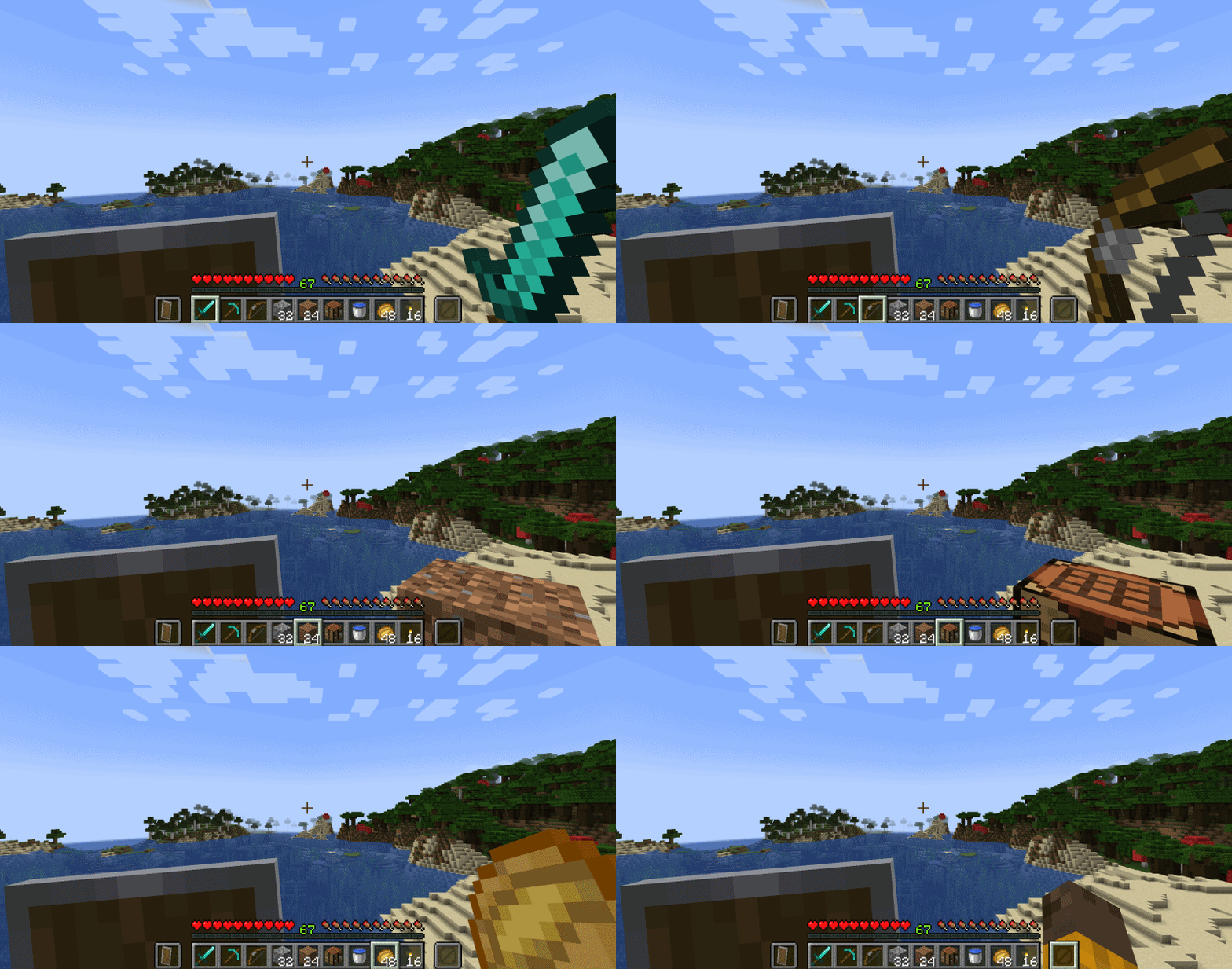
Ever found yourself frantically clearing out a hotbar slot just to free up your hands? Tenth Slot solves that instantly. It adds a permanent, always-empty tenth slot to your hotbar, giving you a dedicated bare-hand position that is always one keypress or scroll away. No more juggling items, no more accidental placements, no more interrupting your flow just to swing an empty fist. It fits seamlessly into the vanilla HUD as if it were always there, and stays completely out of your way until you need it.
FEATURES
| Tenth Hotbar Slot | Adds a permanent tenth slot displayed as an extension of the vanilla hotbar HUD |
| Empty Hand Toggle | The tenth slot is a dedicated empty hand position that always shows a bare hand with no item model |
| Permanently Locked Empty | The tenth slot can never hold an item. Items picked up from the ground, received from containers, or inserted via commands are automatically redirected to other available slots |
HOW TO USE
- Scrolling up slot 1 and down slot 9 goes to the tenth slot.
- Jump directly to the tenth slot by pressing
 .
.
CONFIGURATION
Changing the Keybind:
- Go to Options → Controls → Key Binds
- Scroll to the "Inventory" category
- Click on "Hotbat Slot 10 (Tenth Slot)" and press your desired key
Mod Menu Settings:
| Show Only When Hotbar Is Full | When enabled, the tenth slot is only shown when all 9 hotbar slots are occupied |
| Vanilla Offhand Actions | When disabled, all offhand actions are blocked while the tenth slot is selected (placing blocks, eating, using items, etc.) |
| Vanilla Non-Item Right Click | When disabled, non-item right-click interactions are blocked while the tenth slot is selected (opening doors, mounting, trading, opening block GUIs, etc.) |
| Vanilla Left Click | When disabled, left-click interactions are blocked while the tenth slot is selected (attacking entities, breaking blocks) |
REQUIREMENTS
- Fabric Loader
- Fabric API
- Cloth Config API (1.21.x)
- YetAnotherConfigLib (26.x)
- Mod Menu (recommended for easy in-game configuration)
CLIENT & SERVER
Some functionality exists on both the client and server, requiring the mod to be installed on both sides.
FREE & PUBLIC SOURCE
This is a completely free project. I'm not asking for donations or "buy me a coffee" contributions. If you enjoy the mod, the best way to support it is by:
- Leaving a rating/review
- Sharing it with friends
- Reporting any bugs you find
INCOMPATIBLE MODS
- Smooth Scrolling
- DisableHotbarWrap
These mods conflict with how Tenth Slot handles your hotbar and scrolling. Fixes are being worked on right now and will be included soon.