Compatibility
Minecraft: Java Edition
Platforms
Supported environments


Tags
Creators
Details
Visual HUD
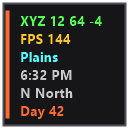
A clean, fully customizable HUD overlay for Minecraft 1.21.11 Fabric. Client-side only — no server-side install needed.
Features
- Coordinates — XYZ position with green highlighting
- FPS Counter — with color-coded bar sparkline graph
- Biome — current biome name (nicely formatted)
- Time — 12-hour clock with AM/PM and day/night icon
- Direction — compass direction with full name
- Light Level — block/sky light levels
- Speed — real-time movement speed in m/s
- Day Counter — current in-game day
- Dimension — shows Overworld / Nether / The End
- Compass Strip — interactive compass bar showing all 8 directions
- FPS Sparkline — real-time bar graph of recent FPS history
Controls
| Key | Action |
|---|---|
| H | Toggle HUD visibility (animated) |
| C | Open configuration screen |
| ALT + Left Click | Drag to reposition anywhere on screen |
All controls are rebindable in Minecraft's Controls settings.
Configuration
Press C in-game to open the config screen where you can:
- Toggle each HUD element on/off individually
- Toggle all elements at once
- Pick from 10 accent colors
- Reset HUD position to default
The HUD fades in/out smoothly when toggled and remembers your settings in config/visualhud.json.
Visual
- Semi-transparent dark panel with accent color strip
- Color-coded text for readability at a glance
- Text shadows for visibility on any background
- Smooth fade animation on toggle
- Draggable anywhere on screen
- Resets on game restart — no persistence unless you save via config
Requirements
- Minecraft 1.21.11
- Fabric Loader >=0.18.2
- Fabric API
- Java >=21
Installation
- Install Fabric Loader for Minecraft 1.21.11
- Download Fabric API and place in
.minecraft/mods - Download Visual HUD and place in
.minecraft/mods - Launch and press H to toggle the HUD, C to configure
License
MIT