
Compatibility
Minecraft: Java Edition
Platforms
Supported environments


Links
Tags
Creators
Details
Licensed ARR
Published last year
Updated last year
🌀 Lag Detector — Find What’s Slowing You Down
See exactly which mods, entities, or blocks cause lag — on both client and server! A lightweight and powerful tool to track performance issues directly in-game.
💻 Client-Side Lag Analysis
Command: /whatsmylag
- Shows FPS, entity count, and top 10 nearby lag sources
- Displays mod name, entity type, distance, and lag impact (%)
- Ideal for spotting laggy builds, farms, or particles
🧠 Note: If the mod is only installed on the client, only this command will be available.

🌐 Server-Side Lag Analysis
Command: /whatsthisserverlag
- Shows server tick usage for the top 10 entities or blocks
- Displays coordinates, mod name, and performance percentage
- Perfect for diagnosing lag farms or overloaded chunks
🧠 Note: If the mod is only installed on the server, only this command will be available.
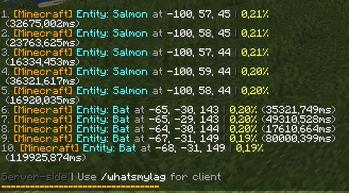
📊 Features
- ✅ Detects lag sources from any mod (Create, Minecraft, etc.)
- ✅ Clear, color-coded in-chat display
- ✅ Works in singleplayer and multiplayer
- ✅ Client and server commands work independently
- ✅ No setup — just install and type the command
🧩 Compatibility
- Supports Fabric / Quilt 1.20+
- Works alongside optimization mods like Sodium, Lithium, and FerriteCore
🧠 Perfect For
- Players who want smooth gameplay
- Server admins hunting lag farms
- Modpack developers testing performance