
Compatibility
Minecraft: Java Edition
Platforms
Supported environments


Tags
Creators
Details





Smooth zoom, a film-style cinematic camera, freecam and keyframed camera paths. Client-side, and configured from one clean settings screen.
Features
Zoom
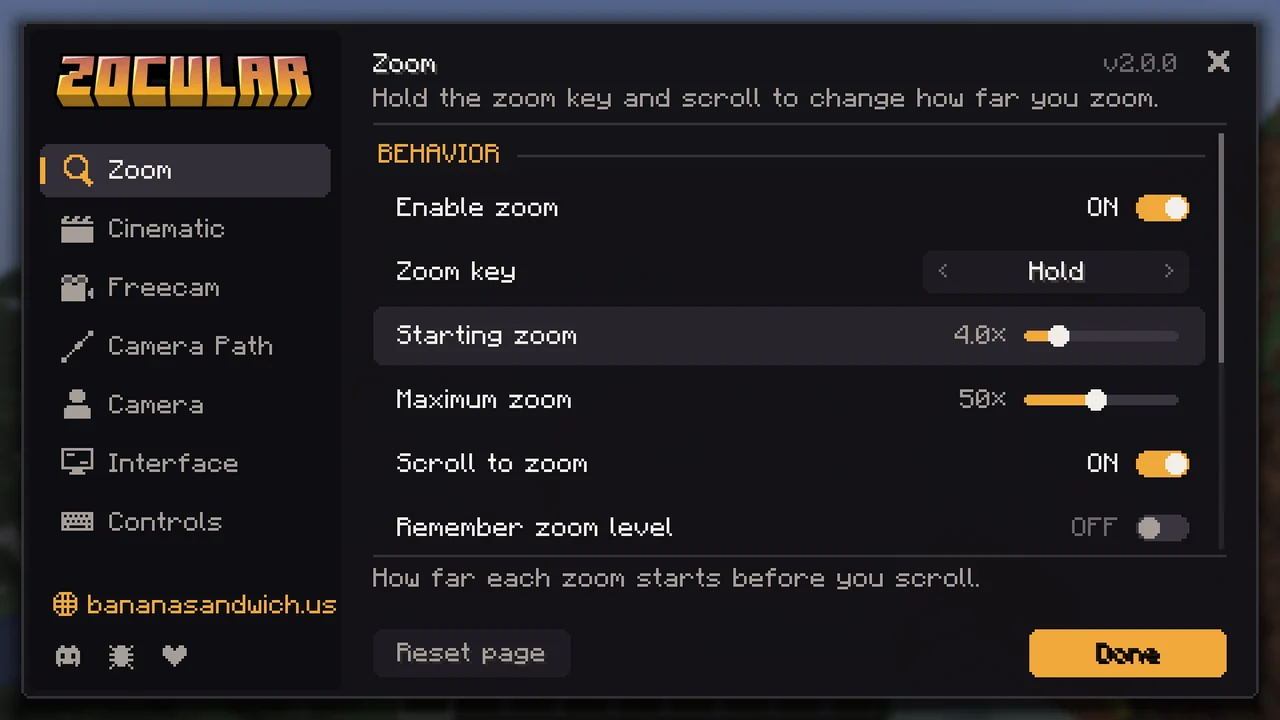
- Hold C to zoom and scroll to go anywhere from 1.1× to 50×.
- Mouse speed follows the zoom, so your aim stays steady at any level.
- The zoom level shows in the top right, out of the way of your potion effects.
- Optional look smoothing, hide-hand, and "remember my last zoom".
Cinematic camera
Press I and the camera flies out and directs the scene like a western film, complete with letterbox bars and a soft vignette.
- Auto works like a camera crew: it tracks alongside you, chases low behind you, leads from the front, sets up roadside cameras you ride past and pulls out for wide shots, cutting between them as you travel.
- Rock-steady footage: your steps and hits don't shake the camera, and it shoots through its own lens.
- Prefer one kind of shot? Pick Tripod, Chase, Side or Orbit instead.
- R cuts to the next shot whenever you want one.
- Can switch Iris shaders on or off for the shot and put them back afterwards.
Freecam
Press F4 to fly the camera anywhere while your character waits where you left it. Blocks stop the camera unless you turn on noclip, and taking damage snaps you straight back. The freecam panel has a Hide button (H) if you want a cleaner screen.
Camera paths
In freecam, left-click to drop keyframes along a route and right-click to play them back as one smooth shot. The camera follows a spline at an even speed with gentle easing, which makes it easy to film build tours and trailers.
Third person
Adjust the third-person distance, switch to an over-the-shoulder view, and roll the horizon for dutch angles in freecam and cinematic shots.
Settings
Everything lives in one settings screen: open it from Mod Menu, type /zocular, or bind a key to it. Every option explains what it does, and anything you've changed can be reset with one click. Every Zocular HUD element can be dragged wherever you like with /zocular hud.
Controls
| Action | Default key |
|---|---|
| Zoom (hold, scroll to adjust) | C |
| Cinematic camera | I |
| Next shot | R |
| Freecam | F4 |
| Freecam panel full / compact | H |
| Roll left / right / level | [ / ] / \ |
| Switch shoulder | not bound |
| Open settings | not bound, or /zocular |
In freecam, Attack adds a keyframe, Use plays or stops the path, Pick Block removes the last keyframe and the scroll wheel sets your flying speed. Every key can be changed in the settings.
Requirements
- Minecraft 26.3 with Fabric Loader 0.19.5+
- Fabric API
- Mod Menu (optional)
Zocular only runs on your client, so it works on any server. Some servers don't allow freecam, so check the rules first.
Play on Banana Sandwich SMP

Zocular is made by Bhored from Banana Sandwich SMP, a mature (18+), Hermitcraft-inspired vanilla server with proximity voice chat, built around genuine collaboration and fun.
Visit bananasandwich.us or join the Discord to hop on.
Found a bug or have an idea? Open an issue on GitHub. If you'd like to support development, you can donate through PayPal.