
Compatibility
Minecraft: Java Edition
Platforms
Supported environments


Creators
Details
Introduction
Preon Pack is a client-side modpack that builds upon Quark Pack, trading a small amount of performance for dramatically enhanced animations. While it maintains the same optimization-focused philosophy, Preon Pack shifts its priority toward delivering smoother, more expressive visual motion throughout the game.
Each mod included in the pack is carefully selected to amplify animation quality—whether in movement, interaction effects, or overall visual fluidity—while still keeping the experience performant enough for everyday play. Although it is not as lightweight as Quark Pack, the improvements in animation are substantial and immediately noticeable.
The pack remains simple, compatible, and easy to customize, allowing players to add additional client-side mods without major concerns about conflicts. With its focused scope and streamlined design, Preon Pack can be quickly updated alongside new Minecraft versions and animation-related advancements, ensuring the experience stays modern and refined.
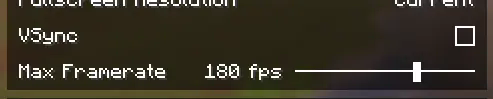
You need to turn off the VSync and on the Max Framerate in the Video Settings.
In your game settings, disable the V-sync option and set a frame rate limit that matches your monitor's refresh rate (e.g., 60fps, 144fps, 240fps). This will help reduce in-game latency to a minimal level. If you rely on V-sync by default, the GPU may become idle and underutilized, resulting in a significantly lower load rate. Consequently, this can cause stuttering and increased latency within the game.
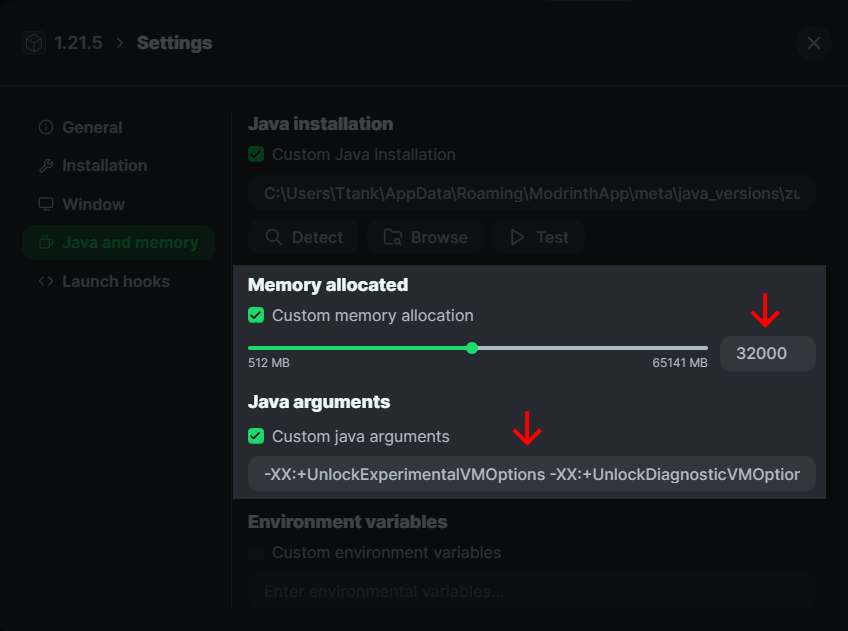
Settings about the memory size and Java arguments
After adjusting the memory size as needed, copy and paste the Java arguments below into the Java arguments field.
-XX:+UnlockExperimentalVMOptions -XX:+UnlockDiagnosticVMOptions -XX:+AlwaysActAsServerClassMachine -XX:+AlwaysPreTouch -XX:+DisableExplicitGC -XX:+UseNUMA -XX:NmethodSweepActivity=1 -XX:ReservedCodeCacheSize=400M -XX:NonNMethodCodeHeapSize=12M -XX:ProfiledCodeHeapSize=194M -XX:NonProfiledCodeHeapSize=194M -XX:-DontCompileHugeMethods -XX:MaxNodeLimit=240000 -XX:NodeLimitFudgeFactor=8000 -XX:+UseVectorCmov -XX:+PerfDisableSharedMem -XX:+UseFastUnorderedTimeStamps -XX:+UseCriticalJavaThreadPriority -XX:ThreadPriorityPolicy=1 -XX:+UseZGC -XX:AllocatePrefetchStyle=1 -XX:-ZProactive
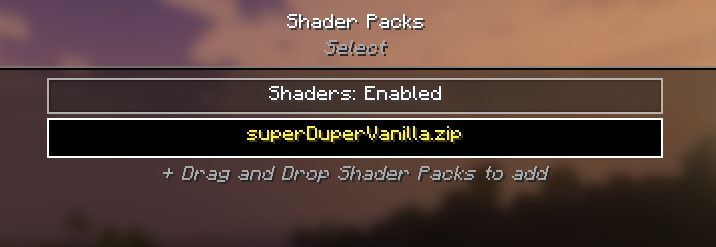
It’s recommended to use the Super Duper Vanilla Shader when you want the shader.
My personal recommendation for a shader is the Super Duper Vanilla Shader, which is included in this mod pack (though optional and requires manual activation). This shader enhances the game’s graphics and atmosphere in an ideal way without compromising the original vanilla look. It also provides stable performance with minimal frame drops or stuttering. Notably, it outperforms BSL, offering both excellent visuals and high performance.
Who should use it?
The modpack includes dependencies like Sodium/Indium for optimization, utilizing a new rendering engine that can deliver performance improvements of up to two to three times over vanilla Minecraft, especially for users with Radeon GPUs.