


Links
Tags
Creators
Details
Licensed CC0-1.0
Published 2 years ago
Updated 11 months ago
All versions
1.10
Ban Mace 1.10last year 22
Compatibility
Minecraft: Java Edition
Platforms
Changes
On versions of Minecraft from 1.21.4 and higher has not been tested
English
Version 1.10
New Features:
- Settings GUI: Introduced a comprehensive settings menu accessible via
/bm-settings. Administrators can now configure all plugin options in-game without editing files. - Radial Menu: Added a radial menu for changing modes. Pressing the ‘F’ (Change Hand) key will bring up the radial menu, a second press when hovering will select the mode.
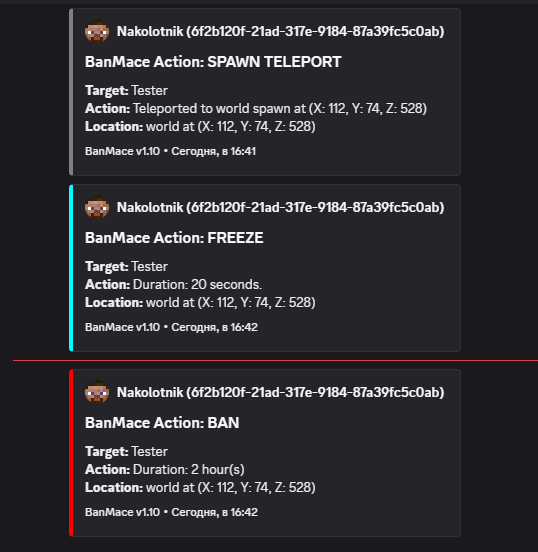
- Discord Webhook Integration: Implemented Discord logging via webhooks. All actions performed with the BanMace can now be sent to a designated Discord channel for moderation tracking.
Improvements:
- Item Customization: The appearance of the Ban Mace can now be changed directly from the new settings GUI. Changes are automatically applied to all existing maces on the server.
Русский
Версия 1.10
Нововведения:
- Меню настроек: Добавлено комплексное меню настроек, доступное по команде
/bm-settings. Администраторы теперь могут настраивать все опции плагина прямо в игре, не редактируя файлы. - Радиальное меню: Добавлено радиальное меню для смены режимов. Нажимая клавишу 'F' (Смена рук), появляется радиальное меню, второе нажатие при наведении выберет режим.
- Интеграция с Discord Webhook: Реализовано логирование действий в Discord через вебхуки. Все действия, совершенные с помощью Булавы Бана, теперь могут отправляться в указанный Discord-канал для отслеживания модерации.
Улучшения:
- Кастомизация предмета: Внешний вид Булавы Бана теперь можно изменять прямо из нового меню настроек. Изменения автоматически применяются ко всем существующим булавам на сервере.