
Compatibility
Minecraft: Java Edition
Platforms


Links
Tags
Creators
Details
BannerForLabyMod
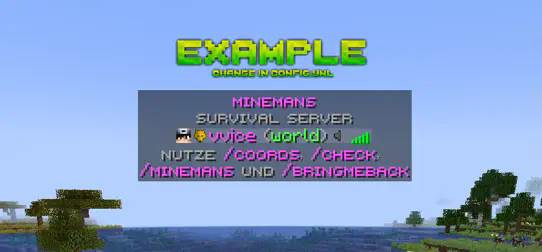
Show a custom image banner above the tab list for LabyMod 4 players - simple, lightweight, for Paper and Purpur 26.x.
ATTENTION
The LabyModServerAPI plugin is required for BannerForLabyMod to work. Download the latest labymod-server-api-bukkit jar here and put it into your plugins folder together with BannerForLabyMod.
BannerForLabyMod runs on Paper and Purpur. It does not work on Velocity or BungeeCord, and not on Folia yet (the LabyModServerAPI plugin does not support Folia).
The aspect ratio of the image must be 5:1, the recommended resolution is 1280x256 pixels. If you use a higher resolution, always keep the ratio 5:1!
Preview
How it works
Every player who uses the LabyMod 4 client sees your banner above the tab list. It's as simple as it sounds. LabyMod is a Minecraft client with millions of users - try it out on LabyMod's website.
Features
- High-resolution banners up to 5K
- Changing banners - show several banners one after another, they change automatically in your interval (in order or random)
- Use any direct image link
/bflm reload- change the banner without a restart, it is sent to all online LabyMod players right away- Invalid links fall back to the default banner instead of breaking
- MiniMessage messages with gradients, classic
&codes still work - English, German, French, Spanish, Polish, Russian, Portuguese, Turkish and Chinese included, add your own language with one file
- No impact on performance
- Update check and optional auto update from Modrinth (off by default) - new config options are added automatically, your values are kept
Changing banners
Want to show more than one banner - e.g. your logo, the next event and your Discord? Turn on rotation in the config.yml and add your banners to the list. Every LabyMod player sees the same banner at the same time, it changes automatically after interval_seconds (at least 5 seconds). With random: true the order is random, but never the same banner twice in a row.
Commands & permissions
/bannerforlabymod reload(alias/bflm reload) - permissionbannerforlabymod.reload(OP by default)- Players need no permission - everyone using LabyMod 4 sees the banner.
Requirements
- Paper or Purpur 26.1 - 26.3, Java 25
- LabyModServerAPI plugin
Bug report & support
If you need help or have a bug please contact me via discord (add hassanbwo). I will guarantee quick help - Thanks for supporting :)
config.yml
Just replace the link with your own banner (make sure it is a direct link to the image).
# ==========================================
# BannerForLabyMod – config.yml
# ==========================================
# Here you can change the url of the banner:
# Make sure you use a direct link, where only the picture is opened!
# ==========================================
# When you create a banner:
# Please note the aspect ratio of the image must be 5:1 and the recommended resolution is 1280x256 pixels!
# ==========================================

banner_url: "https://i.ibb.co/7rBhrfn/example.png"

# ==========================================
# Changing banners: several banners that change automatically in the tab list.
# enabled: true = the banners below are shown one after another, banner_url is not used.
# interval_seconds: how long each banner is shown (at least 5 seconds)
# random: true = random order, false = in the order of the list
# Same rules for every banner: direct link to the picture, 5:1 (1280x256 pixels recommended).
# ==========================================

rotation:
  enabled: false
  interval_seconds: 60
  random: false
  banners:
    - "https://i.ibb.co/7rBhrfn/example.png"
    - "https://i.ibb.co/7rBhrfn/example.png"

# ==========================================
# Language of the command messages: en (English), de (Deutsch), fr (Français), es (Español),
# pl (Polski), ru (Русский), pt (Português), tr (Türkçe) or zh (简体中文)
# The texts are in messages_en.yml / messages_de.yml and support MiniMessage (<red>, <gradient:...>)
# and the classic color codes (&c). You can add your own language, e.g. messages_it.yml -> language: it
# ==========================================

language: en

# Updates from Modrinth: a newer version is always announced in the console.
# enabled: download new versions automatically. Downloads are checked with the SHA-512 checksum from Modrinth
#          and installed on the next server restart (plugins/update folder). Only releases for your
#          Minecraft version and server software (Paper, Purpur, Folia) are downloaded.
# major_versions: also download big updates (e.g. 2.x -> 3.0) automatically, otherwise they are only announced.
auto_update:
  enabled: false
  major_versions: false
More plugins by BetterPlugins
All for Paper, Purpur and Folia 26.x, in English, German, French, Spanish, Polish, Russian, Portuguese, Turkish and Chinese - see the whole BetterPlugins collection:
 |
BetterTimber - Fell whole trees with one hit - protection-plugin safe |
 |
BetterAFK - Stylish AFK holograms, auto-AFK, kick and more |
 |
BetterCarry - Carry and throw players, mobs and chests |
 |
BetterTimberEnchantment - Timber enchantment for BetterTimber - enchanting table, villagers, loot |
 |
BetterRIP - Graves that keep your items in their slots and your experience |
 |
BetterSort - Sort chests with one click, hotbar refill and quick stack |
 |
BetterWaystones - Build, discover and travel between waystones - own 3D model, no resource pack |