
Compatibility
Minecraft: Java Edition
Platforms


Links
Tags
Creators
Details
CatCraftTitle
插件作用
CatCraftTitle 是一个轻量级、支持 GUI 管理、中英双语、功能完善的 Minecraft 头衔与后缀管理插件,支持 MySQL / PostgreSQL / SQLite 三种数据库,帮助服务器轻松实现玩家头衔系统,并支持跨服同步。
内置商店系统(可用内置金币或 Vault 经济)、每日签到、基于 PlaceholderAPI 的自动称号、Tab/头顶显示与 RGB 渐变。
本次更新使用了 DeepSeek V4.1 Flash。
1.6.0 更新详情(24 处修复 + 新功能 + 兼容性说明)
1.6.0 更新内容
〇、本轮安全审计修复(全项目复查,共修复 24 处问题,下表按类别合并为 16 行)
本轮对全部 33 个源文件做了一遍完整复查,修掉以下问题(都经过真实服务端/演练验证):
| # | 问题 | 影响 | 处理 |
|---|---|---|---|
| 1 | Folia 上探测不到区域调度器(1.19.4 没有 RegionizedServer 类) |
Folia 上所有定时任务报错、插件被禁用 | 多标记探测 + 按 API 可用性选路 + 调度失败不再抛出 |
| 2 | player_signin 建表语句多了一个单引号 |
签到表建不起来,签到永远失败 | 修正语句,并加静态检查防复发 |
| 3 | 商品表主键迁移只复制 4 列 | 隐藏/展示状态被重置为可购买、备注丢失 | 保留 state/note + 备份校验 + 失败自动回滚 |
| 4 | 余额首次读取的「建行」不在锁内 | 并发时默认值可能覆盖刚充值的余额 | 建行移入同一把锁 |
| 5 | 签到时先记日期再发奖励 | 发奖失败会白吃掉当天签到 | 奖励为 0 不算失败;发奖失败回滚签到日期 |
| 6 | InternalCurrency 金额强转 int 溢出 |
超大金额会存成负数余额 | 转 int 前做上下限收敛 |
| 7 | 商店价格可为负数 | 负数价格等于免费白拿 | 服务层拒绝负价,购买时也拦截 |
| 8 | 离线玩家发放头衔不查重 | 同 ID 会把已有头衔覆盖成后缀 | 补上与在线路径一致的查重 |
| 9 | 聊天输入回调跑在异步聊天线程 | 异步线程里开 GUI/改记分板(Folia 直接报错) | 统一改到玩家线程执行 |
| 10 | Q 键/数字键也能触发 GUI 操作与购买 |
误按键就购买/切换状态 | 只响应左/右/Shift 点击 |
| 11 | 管理面板「首页/末页」箭头是死的 | 超过一页时无法跳转 | 补上 47/51 槽位处理 |
| 12 | 空列表提示会被背景填充覆盖 | 玩家看不到「没有称号」等提示 | 调整绘制顺序 |
| 13 | 条件右侧解析为空时字符串比较恒为真 | 变量写错会让全服玩家都拿到称号 | 空值一律判定不满足 |
| 14 | => / =< / <> 写法会让整条规则失效 |
按文档写法的规则被静默丢弃 | 词法器支持这三种写法 |
| 15 | matches 是子串匹配、真值判断里 0.00 为真 |
与文档不符,易误判 | 改为整串匹配;纯数字 0 判为假 |
| 16 | 若干文案/解析问题 | 英文签收提示乱码、负数 ID 可发放、超长称号丢颜色、TPS 假值 | 逐一修正 |
这些修复都补了自动化检查:冒烟测试从 76 项增加到 103 项,新增「全新空库安装」演练(31 项) 与「商品表迁移」专项演练(11 项),数据库升级演练保持 16 项全通过。
一、管理员面板重新设计
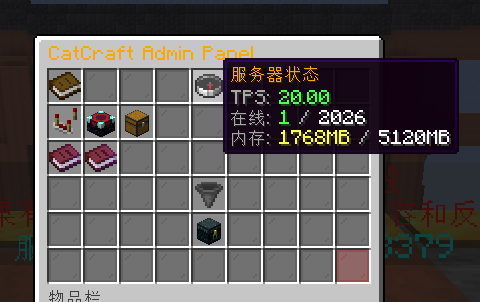
面板按「信息区 / 功能开关区 / 管理入口区 / 底部摘要」重新分区,一眼看清状态,并新增两个子面板:
| 位置 | 内容 |
|---|---|
| 第 1 行 | 插件信息 · 服务器状态(TPS 1m/5m/15m、在线、内存) · 数据库状态 |
| 第 2 行 | 属性支持 / RGB / 商店 / Tab 显示 / 聊天格式 / 更新检测 / 自动称号规则自检 |
| 第 3 行 | 玩家称号管理 · 商店商品管理 · 语言切换 · 重载配置 · 立即检查更新 |
| 第 6 行 | 面板摘要(当前货币、规则条数、最新版本)+ 关闭 |
二、面板内直接管理玩家称号(新功能)
- 玩家称号管理 → 在线玩家列表:头像分页展示所有在线玩家,点头像即可管理
- 搜索玩家:点击「搜索玩家」后在聊天栏输入玩家名或 UUID(支持离线玩家),直接打开该玩家的称号管理
- 玩家管理页可一键完成:查看头衔/后缀列表、发放头衔或后缀、清空全部称号(二次确认)、激活/停用、改名、删除
- 聊天栏输入说明:点击按钮后直接打字发送即可,60 秒内有效,输入
cancel取消
列表内操作方式(每个物品的说明里也写了):
| 操作 | 效果 |
|---|---|
| 左键 | 激活 / 停用该称号 |
| 右键 | 修改显示名(聊天栏输入新名字) |
| Shift + 左键 | 删除该称号 |
| 发放按钮 | 聊天栏输入 ID 显示名 |
三、商店商品管理面板(新功能)
面板内完成商品的全部管理(等价于 /titleadmin shop ...,但更直观):
| 操作 | 效果 |
|---|---|
| 左键 | 循环切换状态:在售 → 展示(不可购买)→ 隐藏 |
| 右键 | 修改价格(聊天栏输入数字) |
| Shift + 右键 | 修改备注(如「活动限定」,输入 clear 清除) |
| Shift + 左键 | 删除商品 |
| 新增商品按钮 | 聊天栏输入 ID 类型 价格 显示名 |
四、玩家面板优化
- 主页头像显示「拥有头衔 X 个 · 后缀 Y 个」
- 头衔/后缀/商店列表页新增 首页 / 末页 按钮(原来是 上一页 / 下一页)
- 列表物品标明来源(自动规则 / 管理员或商店)与状态,操作提示更明确
1.6.0 更新内容 · 更新检测与署名
一、更新检测重做(修复 502 / 检测不生效)
- 多地址回退(共 5 个来源):
api.github.com/.../releases/latest→github.com/.../releases/latest(跟随跳转读 tag)→api.github.com/.../tags→raw.githubusercontent.com上build.gradle里的版本号(master / main 两个分支都试)。某个地址被代理或加速器挡住时会自动换下一个;即使仓库没有发布 Release,也能通过 build.gradle 检测到新版本 - 失败自动重试:5xx、429、超时各重试一次;404(仓库还没有 Release)直接换下一个地址
- 定期复查:默认每 6 小时检查一次(
settings.update-check-interval-hours) - 在聊天栏通知有 op 或
catcraft.admin权限的玩家,并支持玩家上线时补发(settings.update-notify-ops) - 控制台横幅可关闭(
settings.update-notify-console: false) - 手动检查:
/titleadmin updatecheck - 失败时会给出可操作提示:502 通常是代理/加速器造成的,建议把
api.github.com、github.com加入加速器的直连/绕过名单
注意:
releases/latest与tags接口要求仓库存在 Release 或 Tag(例如打v1.6.0标签);如果都没有,会自动回退到读取仓库里build.gradle的版本号,因此不会因为「没发 Release」而完全失效。
二、署名调整
- 控制台横幅、游戏内帮助、管理面板不再输出「DeepSeek V4.1 Flash」
- 相关说明只保留在
config.yml头部注释与 README 中;plugin.yml的authors只保留插件作者本人
三、配置新增(config-version 9)
settings:
  check-update: true
  update-check-interval-hours: 6   # 更新检测间隔(小时)
  update-notify-console: true      # 发现新版本是否在控制台打印横幅
  update-notify-ops: true          # 发现新版本是否在聊天栏通知 op / 管理员
1.6.0 更新内容 · Minecraft 26.3 适配与源码整理
一、适配 Minecraft 26.3
- 编译目标升级到
spigot-api:26.3-R0.1-SNAPSHOT(build.gradle里集中为一个变量spigotApiVersion,以后适配新版本改一行即可) - 继续保留 1.16+ 全兼容:所有可能被新版改动的接口都改成「存在才用」的写法,避免升版本就炸:
- 不再依赖已被标记弃用的
ChatColor,颜色转换由插件自己实现 - 旧聊天事件
AsyncPlayerChatEvent改为运行时探测后再注册:即使未来某个版本移除了它,插件也不会崩,只会停用聊天称号格式并在控制台提示(Tab / 头顶显示不受影响) - 调度器在
Bukkit.getScheduler()不可用时自动改用区域调度器(Folia / 新架构服务端) - 最大血量改从属性 API 读取,同时兼容
MAX_HEALTH新名与GENERIC_MAX_HEALTH旧名,失败回退Player#getMaxHealth()
- 不再依赖已被标记弃用的
- 支持范围更新为 Spigot / Paper / Purpur 1.16.x ~ 26.3
二、顺带修掉 1.16 / 1.17 的兼容问题
之前用到了 1.18 才有的配置注释 API(getComments / setComments),在 1.16/1.17 上会抛 NoSuchMethodError(被捕获所以不崩溃,但有三处功能静默降级)。现在改为反射探测调用:
| 功能 | 1.18+ | 1.16 / 1.17 |
|---|---|---|
| 保存配置保留注释 | 保留 | 不再报错(该版本没有注释 API,所以注释不保留) |
| 升级自动补全新配置项 | 是 | 可补新项 |
| 生成 messages_xx.yml | 是 | 是 |
三、源码整理
- 按要求移除了 Java 源码中的全部注释,只保留
config.yml与build.gradle里的少量配置说明 - 代码逻辑没有任何变化:编译验证与 73 项逻辑测试全部通过
- 带注释的完整源码另有备份,需要对照或恢复随时说
1.6.0 更新内容 · 商品三态与属性条件系统
本次更新来自用户反馈:「能不能加一个支持添加不可售卖的头衔」 与 「能不能兼容一下属性插件」。
一、不可售卖的头衔(商品三态)
商店商品现在有三种状态,用 /titleadmin shop state <ID> <类型> <状态> 切换:
| 状态 | 效果 |
|---|---|
sellable |
正常出售,玩家可购买(默认) |
display |
展示但不可购买:仍在商店列表里,橙色灰显并显示备注(如「活动限定 · 参与活动获得」),玩家点击会收到获取方式提示 |
hidden |
完全隐藏:不出现在玩家的商店界面,只能由管理员指令 / 活动 / 自动规则发放 |
- 备注文本:
/titleadmin shop note <ID> <类型> 活动限定:参与周末活动获得(支持颜色代码,填clear清空) - 商品列表、GUI 悬浮说明都会显示状态与备注;管理面板的商店按钮会统计「在售 / 展示 / 隐藏」数量
- 玩家点击不可购买的商品会提示获取方式,而不是一句笼统的「购买失败」
- 隐藏商品与不存在的商品在购买接口上一视同仁,玩家无法探测到隐藏内容
二、属性插件兼容(条件系统增强)
- 条件表达式:支持
&&(且)、||(或)、!(非)、括号、区间in 10..30/not in 10..30、 字符串equals/contains/startsWith/endsWith/matches(正则)、以及真值判断 - 比较运算符:
>>=<<===!=,也接受 SQL 风格写法=>=<<>(含义相同) - 易踩坑的两点(1.6.0 起行为固定下来):
matches是整串匹配,%world% matches world不会命中world_nether;要模糊匹配请写matches world.*- 比较运算符右侧解析为空(例如变量没装好、写错名字)时一律判定为不满足,不会再出现
「条件恒为真、全服玩家都拿到称号」的情况;真值判断里
0、0.0、0%、-0都算假
- 数值容错:属性插件输出的
1,234、85%、物理攻击 120这类文本都能解析出数字参与比较 (旧版遇到这些会直接判定为「不满足」,这正是很多人觉得「属性插件不兼容」的原因) - 内置变量(不需要 PlaceholderAPI):
{level}{exp}{health}{health_percent}{food}{gamemode}{world}{playtime_minutes}{first_played_days}{kills}{deaths}{mob_kills}{walk_km}{balance}{vault_balance}{currency}{titles}{suffixes}{online_players}{hour}{perm:权限节点}、{has_title:ID}、{has_suffix:ID} - PAPI 变量解析失败不再误判:旧版会把
%ap_attack_2%里的数字2当成数值比较 - 新增排查指令
/titleadmin autotest <玩家>:逐条显示每条规则的变量解析结果与判定结论, 一眼看出是变量没解析出来、还是阈值写错了 - 未安装 PlaceholderAPI 时不再整体关闭自动称号;只用内置变量的规则照常工作,控制台会提示哪些变量需要 PAPI
三、兼容性
- 旧的
%xxx% >= 数字写法完全兼容,老配置可直接沿用 config.yml会自动补充新选项与注释(config-version: 9),不需要删除配置文件- 数据库自动迁移:
shop_items自动增加state、note两列,player_titles的is_auto列同样自动补齐
1.6.0 更新内容 · BUG 修复与新增功能
修复的重要 BUG
| # | 问题 | 说明 |
|---|---|---|
| 1 | 更新检测关闭了全服 SSL 校验 | 旧版调用 setDefaultSSLSocketFactory / setDefaultHostnameVerifier(→true),等于让整个服务端(含其他插件、登录验证)的 HTTPS 都可被中间人劫持。已彻底移除。 |
| 2 | 更新检测从未成功过 | GitHub 返回的是 "tag_name": "1.3.0"(冒号后有空格),旧版按 "tag_name":" 精确匹配,永远解析失败。已改为正则匹配,并把网络请求改为异步(不再卡开服)。 |
| 3 | 聊天打 % 会整条消息丢失 |
旧版把头衔+名字+后缀+消息整串塞进 setFormat(),Bukkit 还会再执行一次 String.format,只要消息里有 % 就抛异常。现在格式里只放 %1$s/%2$s,其余 % 自动转义。 |
| 4 | 数据库抖动会把玩家金币清零 | 旧版 getBalance() 在 SQL 异常时也会执行 setBalance(uuid, 0)。现在异常只返回默认值,绝不写库。 |
| 5 | RGB 模式显示成乱码 | 旧版渐变没有处理 &d 这类传统颜色码,会给每个字符(包括 &、d 本身)加颜色前缀,结果头衔显示为字面量 &d[&d萌新喵]&7。已重写渐变算法。 |
| 6 | 重载会清空 config.yml 的全部注释 | 旧版任何开关/切语言/重载都会 saveConfig(),Bukkit 保存时会丢掉注释。现在保存前会从磁盘读回注释,注释不再丢失。 |
| 7 | Folia 上直接抛异常 | 旧版声明 folia-supported: true 却使用 Bukkit.getScheduler()。现在统一走调度器封装,Folia 下自动使用区域调度器。 |
| 8 | 没装 PAPI 时开属性支持会崩 | 旧版无条件调用 PlaceholderAPI(只是 softdepend),会 NoClassDefFoundError。现在先检测,再安全降级。 |
| 9 | 自动称号收不回来 | 条件不再满足时,旧版调用 removeTitle() 会因“称号正在激活”被拒绝,导致称号永远收不回;clearAllAutoTitles() 还是空实现。现在会先停用再移除,并且只收回自动授予的(不会误删玩家自己买的)。 |
| 10 | 商店商品主键错误 | shop_items 主键只有 id,导致“头衔 ID 5”和“后缀 ID 5”无法共存。启动时自动迁移为 (id, type) 复合主键。 |
| 11 | shop.default-balance 配置无效 |
README 写了“新玩家默认金币”,实际代码从未读取。现已生效。 |
| 12 | MySQL/PG 连不上就没有回退 | README 承诺“自动切换 SQLite”,实际没有实现,导致存档静默失败。现已实现。 |
| 13 | 默认头衔不可配置 | 旧版硬编码 &d[&d萌新喵]&7。现在读取 settings.default-title。 |
| 14 | 管理员面板 TPS 是假的 | 旧版恒为 20.00。现在 Paper 读取真实 TPS,其他服务端用 tick 计时器统计 1m/5m/15m。 |
| 15 | 切语言后面板标题不变 | AdminGUI.TITLE 是 static final,已改为每次打开时读取。 |
| 16 | 控制台 Tab 补全报 ClassCastException | 玩家指令的补全直接 (Player) sender 强转,控制台执行时崩溃。 |
| 17 | GUI 可以让玩家拖入物品 | 旧版只拦了点击事件,未处理 InventoryDragEvent。 |
| 18 | InventoryHolder#getInventory() 返回 null |
容易在 Paper/Folia 上触发 NPE,现在返回真实 Inventory。 |
| 19 | 并发安全隐患 | 聊天事件是异步线程读取玩家称号缓存,旧版用普通 HashMap;现已改为并发容器。 |
| 20 | ID 为 0 的称号永远无法激活 | setActiveTitle 里的条件是 id > 0,已修正。 |
| 21 | 构建产物缺少数据库驱动 | implementation 的 JDBC 驱动不会被打进插件 jar,导致“内置 SQLite”实际连不上。现在 gradlew build 会打出包含驱动的完整 jar。 |
| 22 | 其他 | %catcraft_balance% 未考虑商店关闭、AutoTitleManager 文件目录与包名不一致、属性支持重载后规则不生效、大量硬编码中文提示、英文文案参数顺序错误等。 |
新增功能
- Vault 经济支持:
shop.currency: internal|vault,可在配置文件或/titleadmin shop currency切换,未装 Vault 时自动回退内置金币。 - Tab 列表 + 头顶昵称显示称号/后缀:基于记分板 team 实现,可开关;若玩家已被其他记分板/Rank 插件接管,插件会尊重原有显示。
- 可配置 RGB 渐变:
settings.gradient-colors支持 1 段纯色到多段平滑渐变,支持&#RRGGBB十六进制颜色。 - 可配置聊天格式:
chat.format支持{title} {name} {suffix} {message},可设置是否覆盖其他聊天插件的格式。 - 自定义消息文件:自动生成
messages_zh.yml/messages_en.yml,所有文案服主都能改;升级后新增的键会自动补进现有文件,不会覆盖你的修改。 - 配置自动升级:插件启动/重载时会把新版本新增的配置项补进你现有的
config.yml(保留原有内容与注释),不再需要删掉配置文件重新生成。 - 权限节点可配置:
permissions.admin / use / shop,可对接服务器现有权限体系。 - 真正的 Folia 适配:
folia-supported: true名副其实。 - 新增指令:
/titleadmin reload、/titleadmin shop toggle、/titleadmin shop currency。
功能特点
- 多级头衔体系:每个玩家可拥有多个头衔,按 ID 独立管理,自由切换启用
- 独立后缀系统:头衔与后缀分离设计,玩家可单独控制每个后缀的启用/关闭
- 图形化 GUI 管理:玩家可通过
/catcraft gui打开直观的界面管理所有称号 - 管理员 GUI 控制面板:
/titleadmin panel查看真实 TPS/在线/内存、切换语言、开关功能、重载配置 - 自动称号系统:基于 PlaceholderAPI 占位符,按等级、金币、击杀数等自动授予/收回称号,支持
>= <= == != > < - 实时语言切换:GUI 面板一键中英文切换,消息即时生效
- 独立功能开关:RGB 渐变、商店、属性支持、Tab 显示、聊天格式均独立开关
- 跨服数据同步:支持 MySQL / PostgreSQL,多服务器共享玩家数据
- 本地存储备选:MySQL/PostgreSQL 连接失败自动回退 SQLite,数据不丢失
- 无需重启修改:管理员可直接修改头衔显示名,即时生效
- 玩家自助管理:玩家可通过指令或 GUI 管理自己的头衔和后缀
- 默认头衔系统:无头衔玩家显示可配置的默认头衔
- RGB 渐变色支持:渐变色可自定义,支持十六进制颜色
- 完全国际化:中文/英文一键切换,文案可在消息文件中自由修改
- PlaceholderAPI 支持:提供
%catcraft_title%、%catcraft_suffix%、%catcraft_balance%等变量 - 内置商店与金币系统:支持内置金币或 Vault 经济,每日签到可获得金币
- 不可售卖的头衔:商品支持「可购买 / 展示但不可购买 / 完全隐藏」三态,可写备注(如「活动限定」)
- 强大的自动称号条件:且/或/非、区间、字符串、正则、数值容错,并内置 30+ 变量(不依赖 PlaceholderAPI)
- 启动信息看板:控制台显示版本、作者、数据库、PAPI/Vault、调度器状态
注意事项
- PlaceholderAPI 不是必需的:只有「自动称号」与占位符变量需要它。
- Vault 不是必需的:只有
shop.currency: vault需要它。 - 从旧版本升级时不需要删除
config.yml,插件会自动补全新选项并保留你的注释与设置。 - 离线(非正版)服务器完全支持:面板里按名字搜索离线玩家时,插件会先查自己的
player_names名字缓存;离线服还会按 Minecraft 的「离线 UUID」规则直接匹配玩家名(UUID.nameUUIDFromBytes("OfflinePlayer:名字")),不依赖usercache.json。 - 离线服注意:玩家改名后会得到新的 UUID(这是离线模式的机制),旧称号仍留在原 UUID 名下。
- 本插件需要 Java 8 或更高的服务端运行环境;构建需要 JDK 17+(Gradle wrapper 已升级到 9.3.0,兼容较新的 JDK)。
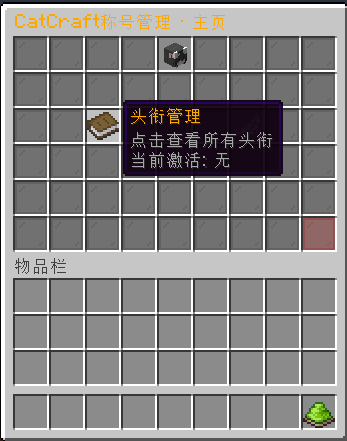
头衔以及后缀统一管理 - GUI 界面
管理员 GUI 控制面板
兼容服务端
- 支持:Paper 1.16.x ~ 26.3、Purpur 1.16.x ~ 26.3、Spigot 1.16.x ~ 26.3
- 支持:Folia 1.19.4 ~ 26.3(Folia 自 1.19.4 起提供)
- 不支持:Bukkit(不推荐)、Sponge / BungeeCord / Velocity
Folia 上的显示说明:Folia 1.19.x 的记分板队伍 API 尚未开放(
registerNewTeam会抛异常), 插件的 Tab/头顶显示会自动降级为「Tab 名字前缀」,并在控制台打印一次提示;聊天称号格式、 GUI、头衔/后缀功能不受影响。服务端版本较新的 Folia 若已支持记分板,则自动使用完整显示。
兼容数据库
- MySQL(驱动已内置)
- PostgreSQL(驱动已内置)
- SQLite(驱动已内置)
必要前置
| 前置插件 | 必需性 | 说明 |
|---|---|---|
| PlaceholderAPI | 可选 | 自动称号条件解析与占位符变量 |
| Vault + 经济插件 | 可选 | 使用 Vault 经济作为货币时必需 |
| MySQL / PostgreSQL | 可选 | 跨服数据库(不使用则用 SQLite) |
玩家指令
| 指令 | 说明 |
|---|---|
/catcraft gui |
打开图形化称号管理界面 |
/catcraft shop |
打开商店首页(头衔/后缀分类购买) |
/catcraft list |
查看自己拥有的所有头衔和后缀及其激活状态 |
/catcraft active <ID> |
激活指定 ID 的头衔(再次执行则停用) |
/catcraft deactive |
停用当前激活的头衔,恢复默认 |
/catcraft suffixactive <ID> |
激活指定 ID 的后缀(再次执行则停用) |
/catcraft suffixdeactive |
停用当前激活的后缀 |
/catcraft remove <ID> |
移除自己拥有的某个称号(不能移除当前激活的/自动授予的) |
管理员指令(需 catcraft.admin 权限)
控制面板与维护
| 指令 | 说明 |
|---|---|
/titleadmin panel |
打开管理员 GUI 控制面板 |
/titleadmin reload |
重载 config.yml、消息文件、聊天格式与自动称号规则 |
/titleadmin autotest [玩家] |
查看自动称号规则的变量解析与判定详情(排查属性插件变量) |
头衔管理
| 指令 | 说明 |
|---|---|
/titleadmin give <玩家> <ID> <显示名> |
为玩家添加一个头衔(ID 必须全局唯一) |
/titleadmin edit <玩家> <ID> <新显示名> |
修改玩家某个头衔的显示名 |
/titleadmin take <玩家> <ID> |
移除玩家的某个头衔(会自动停用) |
/titleadmin list <玩家> |
查看玩家拥有的所有头衔及其激活状态 |
/titleadmin setactive <玩家> <ID> |
激活玩家的某个头衔 |
/titleadmin deactive <玩家> |
停用玩家当前激活的头衔 |
后缀管理
| 指令 | 说明 |
|---|---|
/titleadmin suffixgive <玩家> <ID> <显示名> |
为玩家添加一个后缀 |
/titleadmin suffixedit <玩家> <ID> <新显示名> |
修改玩家某个后缀的显示名 |
/titleadmin suffixtake <玩家> <ID> |
移除玩家的某个后缀 |
/titleadmin suffixlist <玩家> |
查看玩家拥有的所有后缀 |
/titleadmin suffixsetactive <玩家> <ID> |
激活玩家的某个后缀 |
/titleadmin suffixdeactive <玩家> |
停用玩家当前激活的后缀 |
商店管理
| 指令 | 说明 |
|---|---|
/titleadmin shop add <ID> <类型(0/1)> <价格> <显示名> |
添加商品 |
/titleadmin shop remove <ID> <类型> |
移除商品 |
/titleadmin shop setprice <ID> <类型> <新价格> |
修改价格 |
/titleadmin shop list |
列出所有商品与当前货币类型 |
/titleadmin shop givebalance <玩家> <金额> |
增加玩家余额(支持小数) |
/titleadmin shop setbalance <玩家> <金额> |
设置玩家余额 |
/titleadmin shop toggle |
开关商店(并写回配置) |
/titleadmin shop currency <internal|vault> |
切换货币类型(并写回配置) |
/titleadmin shop state <ID> <类型> <sellable|display|hidden> |
设置商品状态(不可售卖的头衔用 display 或 hidden) |
/titleadmin shop note <ID> <类型> <备注|clear> |
设置/清空商品备注(如「活动限定」) |
类型:
0表示头衔,1表示后缀。
权限节点
| 权限 | 默认 | 说明 |
|---|---|---|
catcraft.admin |
op | 管理员指令与管理员面板 |
catcraft.use |
所有人 | 玩家指令与称号 GUI |
catcraft.shop |
所有人 | 商店与每日签到 |
以上权限名都可以在
config.yml的permissions段改成你服务器现有的权限名。
PlaceholderAPI 变量
| 变量 | 说明 |
|---|---|
%catcraft_title% |
当前激活的头衔(含颜色/RGB) |
%catcraft_title_plain% |
当前激活的头衔(纯文本,去颜色) |
%catcraft_suffix% |
当前激活的后缀(含颜色/RGB) |
%catcraft_suffix_plain% |
当前激活的后缀(纯文本,去颜色) |
%catcraft_balance% |
当前余额(按货币类型格式化) |
%catcraft_currency% |
当前货币类型名称 |
%catcraft_active_title_id% / %catcraft_active_suffix_id% |
当前激活的 ID(未激活为 -1) |
%catcraft_title_count% / %catcraft_suffix_count% |
拥有的头衔/后缀数量 |
%catcraft_shop_enabled% |
商店是否开启 |
配置文件(自动生成,示例)
config-version: 9          # 请勿手动修改(插件据此自动补充新选项)
language: zh               # zh / en

database:
  type: sqlite             # mysql / postgresql / sqlite(连接失败自动回退 sqlite)
  mysql:
    host: localhost
    port: 3306
    db: your_db
    user: your_user
    pass: your_pass
  postgresql:
    host: localhost
    port: 5432
    db: your_db
    user: your_user
    pass: your_pass
  sqlite:
    file: catcraft.db

permissions:               # 可改成你服务器现有的权限名
  admin: "catcraft.admin"
  use: "catcraft.use"
  shop: "catcraft.shop"

settings:
  debug: false
  enable-rgb: false
  gradient-colors:         # 1 段纯色或多段平滑渐变
    - "FF0000"
    - "FF00FF"
    - "8000FF"
  default-title: "&d[&d萌新喵]&7"   # 留空则不显示默认头衔
  attribute-support: false
  auto-check-interval: 30  # 自动称号检查间隔(秒)
  check-update: true
  update-check-interval-hours: 6   # 每隔几小时自动检查一次更新
  update-notify-console: true      # 发现新版本时在控制台提示
  update-notify-ops: true          # 发现新版本时在聊天栏通知在线管理员
  messages-file: true

chat:
  enabled: true
  format: "{title}{name}{suffix}: {message}"
  override-format: true    # false = 只在原版格式下接管
  display-name: true       # Tab 列表 + 头顶昵称显示称号

shop:
  enabled: false
  currency: internal       # internal / vault
  default-balance: 0       # 新玩家初始金币
  signin-reward: 30        # 每日签到奖励(0 = 只记录签到、不发金币)
  # 商品的三态与备注不需要写在配置里,用指令或管理面板设置:
  #   状态  /titleadmin shop state <ID> <类型> <sellable|display|hidden>
  #         sellable = 可购买 | display = 展示但不可购买 | hidden = 商店中完全隐藏
  #   备注  /titleadmin shop note <ID> <类型> <文本>(如「活动限定」,填 clear 清空)

# 自动称号规则(仅当 settings.attribute-support 为 true 时生效)
#
# 条件写法(1.6.0):
#   数值比较 : %player_level% >= 30      也支持 <= == != > < 与反向写法 30 <= %player_level%
#              另外接受 SQL 风格写法 => =< <>(含义分别是 >= <= !=)
#   且 / 或  : %a% >= 10 && %b% < 5      || 表示或,! 表示非,可用括号改变优先级
#   区间     : {level} in 10..30          not in 10..30 表示不在区间内
#   字符串   : %job% equals 战士          contains / startsWith / endsWith / matches(正则)
#              matches 为整串匹配:%world% matches world 不会命中 world_nether,模糊匹配请写 world.*
#              比较运算符右侧解析为空时一律判为不满足(避免变量写错导致全服都拿到称号)
#   真值判断 : %some_flag%                非空且不是 false/no/0/off/无/否 即为真(0 / 0.0 / 0% 都算假)
# 变量写法:
#   %xxx% —— PlaceholderAPI 变量(需要装 PlaceholderAPI 与对应插件)
#   {xxx} —— 插件内置变量,不需要 PAPI:{level} {health} {food} {playtime_minutes}
#            {kills} {deaths} {balance} {titles} {online_players} {hour}
#            {perm:权限节点} {has_title:ID} 等
# 数值容错:1,234 / 85% / 物理攻击 120 这类文本都能正确解析
# 排查问题:/titleadmin autotest <玩家>
auto-rules:
  - id: 1
    type: 0                # 0=头衔,1=后缀
    display: "&6[&e老手&6]"
    condition: "%player_level% >= 30"
  - id: 2
    type: 1
    display: " &8[&7大佬&8]"
    condition: "%vault_eco_balance% > 1000"
  - id: 3                  # 只用内置变量,不需要 PlaceholderAPI
    type: 0
    display: "&b[&f冒险者&b]"
    condition: "{level} in 10..30 && {playtime_minutes} > 1440"
  - id: 4                  # 属性插件变量 + 内置变量 + 权限判断混用
    type: 1
    display: " &8[&6VIP&8]"
    condition: "{perm:group.vip} == true || %ap_attack% > 500"
数据库结构
CREATE TABLE player_titles (
    uuid VARCHAR(36) NOT NULL,
    title_id INT NOT NULL,
    title_display VARCHAR(255) NOT NULL,
    type INT DEFAULT 0,       -- 0=头衔, 1=后缀
    is_active BOOLEAN DEFAULT FALSE,
    is_auto BOOLEAN DEFAULT FALSE,  -- 1.4.0 新增:是否由自动规则授予
    PRIMARY KEY (uuid, title_id)
);

CREATE TABLE shop_items (
    id INT NOT NULL,
    type INT NOT NULL,        -- 0=头衔商品, 1=后缀商品
    display VARCHAR(255) NOT NULL,
    price INT NOT NULL,
    state INT NOT NULL DEFAULT 0,        -- 1.5.0 新增:0=可购买, 1=仅展示, 2=隐藏
    note VARCHAR(128) NOT NULL DEFAULT '', -- 1.5.0 新增:备注(如「活动限定」)
    PRIMARY KEY (id, type)    -- 1.4.0:旧表(主键只有 id)会在启动时自动迁移,数据不丢
);

CREATE TABLE player_balances (
    uuid VARCHAR(36) PRIMARY KEY,
    balance INT NOT NULL DEFAULT 0
);

CREATE TABLE player_names (           -- 1.6.0 新增:玩家名缓存(面板搜索/离线服显示用)
    uuid VARCHAR(36) PRIMARY KEY,
    name VARCHAR(32) NOT NULL,
    last_seen BIGINT NOT NULL DEFAULT 0
);

CREATE TABLE player_signin (
    uuid VARCHAR(36) PRIMARY KEY,
    last_signin BIGINT NOT NULL DEFAULT 0
);
所有表在插件首次启动时自动创建;旧版本的表结构会在启动时自动迁移,无需手动操作。
从源码构建
./gradlew build # 产物在 build/libs/CatCraftTitle-x.y.z.jar
适配新的 Minecraft 版本时,只需要修改 build.gradle 里的 spigotApiVersion(例如 26.3-R0.1-SNAPSHOT),然后重新执行上面的命令即可。
- Gradle wrapper 已升级到 9.3.0(旧版 8.10.2 在 JDK 24+ 上会直接构建失败)。
- 构建出的 jar 已包含 MySQL / PostgreSQL / SQLite 驱动,不需要再额外安装驱动。
- 推送
v1.6.0这样的 tag 时,GitHub Actions 会自动构建并发布 Release(工作流见.github/workflows/build.yml)。
常见问题
Q:玩家没有头衔时显示什么?
A:显示 settings.default-title 配置的内容,留空则什么都不显示。
Q:MySQL/PostgreSQL 连接失败怎么办? A:插件会自动回退到 SQLite 并在控制台提示,数据不会丢;修好数据库连接后重载即可。
Q:支持 RGB 颜色吗?
A:支持。开启 settings.enable-rgb 并配置 settings.gradient-colors;也可以在任意显示文本里直接写 &#RRGGBB。
Q:如何切换语言?
A:改 language: zh|en,或在管理员面板点语言按钮;所有文案可在 messages_zh.yml / messages_en.yml 中自定义。
Q:离线(非正版)服务器能用吗?
A:可以。插件不依赖正版验证;面板搜索离线玩家会优先用插件自己的名字缓存(player_names 表),离线服还会按离线 UUID 规则匹配名字。玩家改名的处理见「注意事项」。
Q:升级后需要删掉 config.yml 吗? A:不需要。插件会自动补全新选项并保留你的设置和注释。
Q:Folia 上 Tab/头顶没有显示称号?
A:Folia 1.19.x 尚未开放记分板队伍 API(registerNewTeam 会抛异常)。插件会自动降级为「Tab 名字前缀」并在控制台打印一次提示;聊天格式、GUI、头衔/后缀功能都正常。较新的 Folia 若已支持记分板,会自动使用完整显示。
Q:自动称号收不回来 / 关不掉?
A:条件不满足时会自动收回;关闭 attribute-support 时,插件会清除数据库中由自动规则授予的称号,玩家自己购买的不受影响。
Q:更新检测报 SSL 错误? A:1.4.0 已移除不安全的全局 SSL 绕过,使用正常证书校验;若仍失败请检查服务器的出网访问与系统证书。
Q:聊天里打 % 会让消息发不出去?
A:1.4.0 已修复(旧版会把整条消息弄崩)。
更新日志
1.6.0
本版一次性包含下面全部改动:
界面与管理
- 管理员面板重新分区(信息区 / 功能开关 / 管理入口 / 底部摘要),新增「玩家称号管理」「商店商品管理」子面板
- 面板内可按名称或 UUID 搜索玩家(支持离线玩家)并发放/激活/改名/删除其头衔与后缀,清空带二次确认
- 商店商品管理面板:新增、改价、改状态(在售/展示/隐藏)、改备注、删除全部在面板完成
- 新增聊天栏输入机制(60 秒有效、
cancel取消) - 玩家面板:主页显示称号数量统计,列表页新增「首页/末页」,物品标明来源与操作提示
离线(非正版)服务器
- 新增
player_names名字缓存表(只新增表,不动已有数据),面板搜索离线玩家不再依赖usercache.json - 离线服按 Minecraft 离线 UUID 规则直接匹配玩家名
更新检测
- 5 个来源依次回退(releases/latest → 网页跳转 → tags → 仓库 build.gradle),失败重试、每 6 小时复查
- 发现新版本在聊天栏通知 op / 管理员(含上线补发),
/titleadmin updatecheck手动检查,控制台横幅可关闭
功能与兼容
- 商品三态(在售 / 展示不可购买 / 完全隐藏)+ 商品备注
- 自动称号条件表达式(且/或/非、括号、区间、字符串、正则)+ 30 多个内置变量(无需 PlaceholderAPI)
- Vault 经济、Tab/头顶称号显示、真正的 Folia 适配、配置自动升级、自定义消息文件
- 适配 Minecraft 26.3,同时保留 1.16+ 全兼容
修复
- 修复 22 项 BUG(HTTPS 安全漏洞、聊天
%崩溃、余额被清零、RGB 乱码、配置注释被清空、Folia 崩溃、商品主键错误等,详见上方章节) - 修复 1.16 / 1.17 因缺少配置注释 API 导致的功能降级
- 署名调整:控制台与游戏内不再输出「DeepSeek V4.1 Flash」,仅保留在
config.yml等文件
开源协议
MIT License — 允许自由使用、修改、分发,需保留原作者声明。
作者
QingNiaoQaQ (CatCraft Team) GitHub: https://github.com/qingniaoQwQ 项目地址: https://github.com/qingniaoQwQ/CatCraftTitle
鸣谢
本项目由 QingNiao 开发;本次(1.6.0)更新使用了 DeepSeek V4.1 Flash,协助完成功能设计、代码实现与问题排查修复。 感谢所有使用本插件的玩家与开发者!
CatCraftTitle
About
CatCraftTitle is a lightweight, GUI-driven, bilingual title & suffix plugin for Minecraft servers, supporting MySQL / PostgreSQL / SQLite, so you can run a complete player title system with optional cross-server synchronisation.
It includes a built-in shop (pay with internal coins or Vault economy), daily sign-in rewards, PlaceholderAPI-driven automatic titles, tab / nametag display and RGB gradients.
This update was made with DeepSeek V4.1 Flash.
Everything in 1.6.0 (24 fixes + new features + compatibility notes)
What's new in 1.6.0
1. Update checker reworked (fixes 502 / silent failures)
- Five fallback sources:
api.github.com/.../releases/latest→github.com/.../releases/latest(follows the redirect and reads the tag) →api.github.com/.../tags→ the version inbuild.gradlevia raw.githubusercontent.com (tries both master and main). Even a repository without any Release can still be checked. - Automatic retries for 5xx, 429 and timeouts; a 404 (no release yet) moves on to the next source
- Periodic re-check every 6 hours by default (
settings.update-check-interval-hours) - Chat notification to ops /
catcraft.adminholders when an update exists, including a delayed notice when such a player joins - Console banner can be disabled (
settings.update-notify-console: false) - Manual check:
/titleadmin updatecheck - Clearer failure hints – a 502 usually comes from a proxy/accelerator, so add
api.github.comandgithub.comto its bypass list
Note: the
releases/latestandtagsendpoints need at least one Release or Tag (e.g. tagv1.6.0). If there is none, the checker falls back to the version inside the repositorybuild.gradle, so it never fails just because no release was published.
2. Credits
- The console banner, in-game help and admin panel no longer print "DeepSeek V4.1 Flash"
- The co-creation credit now lives only in the
config.ymlheader (plus README and theplugin.ymlauthors field)
3. New options (config-version 9)
settings:
  check-update: true
  update-check-interval-hours: 6
  update-notify-console: true
  update-notify-ops: true
1.6.0 · Minecraft 26.3 support & source cleanup
1. Minecraft 26.3 support
- Build target upgraded to
spigot-api:26.3-R0.1-SNAPSHOT(kept in a singlespigotApiVersionvariable inbuild.gradle, so a future version bump is a one-line change) - 1.16+ compatibility is still preserved. Everything that a newer API might change is now written as "use it only when it exists":
- No longer depends on the deprecated
ChatColor; colour translation is implemented inside the plugin - The legacy
AsyncPlayerChatEventis now registered only after a runtime check: if a future release removes it, the plugin will not crash – it just disables the chat format and tells you in the console (tab/nametag display keeps working) - The scheduler falls back to region schedulers when
Bukkit.getScheduler()is unavailable - Max health is read through the attribute API, supporting both the new
MAX_HEALTHand the legacyGENERIC_MAX_HEALTHnames, with aPlayer#getMaxHealth()fallback
- No longer depends on the deprecated
- Supported range updated to Spigot / Paper / Purpur 1.16.x – 26.3
2. 1.16 / 1.17 compatibility fixed
The plugin previously used the config-comment API (getComments / setComments) that only exists on 1.18+, which
threw NoSuchMethodError on 1.16/1.17 (caught, so no crash, but three features silently degraded). It now probes
those methods reflectively:
| Feature | 1.18+ | 1.16 / 1.17 |
|---|---|---|
| Preserve comments when saving config | Yes | No error (that API does not exist there) |
| Automatic config upgrade | Yes | New options are added |
| Generate messages_xx.yml | Yes | Yes |
3. Source cleanup
- All comments were removed from the Java sources on request; only a few configuration notes in
config.ymlandbuild.gradleremain - No behavioural change: compilation and all 73 logic tests pass
- A commented copy of the sources is backed up – just ask if you want it back
1.6.0 · item states & condition engine
This release comes straight from user feedback: "can you add titles that are not for sale?" and "can you support attribute plugins?"
1. Titles that are not for sale (three item states)
Shop items now have three states, switchable with /titleadmin shop state <ID> <type> <state>:
| State | Effect |
|---|---|
sellable |
Normal sale, players can buy it (default) |
display |
Visible but not purchasable – stays in the shop, renders greyed out with its note (e.g. "event reward · join the weekend event"); clicking tells the player how to obtain it |
hidden |
Fully hidden – never shown in the player shop; obtainable only via admin commands, events or auto rules |
- Notes:
/titleadmin shop note <ID> <type> event reward(colour codes supported,clearto remove) - Item lists, GUI lore and the admin panel all show the state; the panel counts on-sale / showcase / hidden items
- Hidden items behave exactly like missing items on the purchase API, so players cannot probe for them
2. Attribute plugin support (much stronger conditions)
- Expression engine:
&&,||,!, parentheses, ranges (in 10..30), string operations (equals/contains/startsWith/endsWith/matches) and truthiness checks - Forgiving number parsing: values like
1,234,85%or物理攻击 120are parsed correctly. The old code treated those as "not met" – which is exactly why attribute-plugin conditions seemed broken. - Built-in variables (no PlaceholderAPI needed):
{level}{health}{playtime_minutes}{kills}{balance}{titles}{perm:group.vip}{has_title:1}and 30+ more. - Unresolved placeholders no longer mislead: the old code could treat the
2in%ap_attack_2%as a number. - New debugging command
/titleadmin autotest <player>prints, per rule, the resolved value of every variable plus the final verdict – so you can see instantly whether a variable failed to resolve. - Without PlaceholderAPI the feature is no longer disabled entirely: built-in-variable rules keep working and the console lists which variables would need PAPI.
3. Compatibility
- Old
%xxx% >= numberconditions keep working; existing configs are reused as-is config.ymlis upgraded automatically toconfig-version: 9(comments preserved)- Database migration is automatic:
shop_itemsgainsstateandnotecolumns
1.6.0 · bug fixes & new features
Fixed bugs
| # | Issue | Detail |
|---|---|---|
| 1 | Update checker disabled SSL verification JVM-wide | The old code called setDefaultSSLSocketFactory and setDefaultHostnameVerifier(→true), downgrading every HTTPS connection of the whole server (including other plugins) to MITM-able. Removed entirely. |
| 2 | Update check never succeeded | GitHub returns "tag_name": "1.3.0" (space after the colon), but the old parser matched "tag_name":" exactly. Now parsed with a regex, and the request runs asynchronously (no more startup stall). |
| 3 | A % in chat killed the message |
The old listener pushed title + name + suffix + message into setFormat(), which Bukkit then feeds to String.format again. Now only %1$s / %2$s are used and other % are escaped. |
| 4 | A DB hiccup could wipe a player's balance | getBalance() used to call setBalance(uuid, 0) even on SQL errors. It now only returns the default value and never writes. |
| 5 | RGB mode printed raw &d garbage |
The old gradient never converted legacy colour codes and prefixed every character (including & and d) with a colour code. The gradient engine was rewritten. |
| 6 | Reloading erased all comments in config.yml | Any toggle / language switch / reload called saveConfig(), and Bukkit drops comments on save. Comments are now restored from disk before saving. |
| 7 | Crashes on Folia | The plugin declared folia-supported: true while using Bukkit.getScheduler(). All scheduling now goes through a Folia-aware wrapper. |
| 8 | Crash when PlaceholderAPI was missing | PlaceholderAPI is only a soft-depend but was used unconditionally (NoClassDefFoundError). It is now detected first and degrades safely. |
| 9 | Automatic titles could never be revoked | removeTitle() refuses to delete an active title, so revoking silently failed; clearAllAutoTitles() was an empty stub. Titles are now deactivated first, and only auto-granted ones are removed. |
| 10 | Wrong shop primary key | shop_items had id as its only key, so “title ID 5” and “suffix ID 5” could not coexist. It is migrated to a (id, type) composite key at startup. |
| 11 | shop.default-balance was ignored |
Documented but never read. It works now. |
| 12 | No SQLite fallback | The README promised a fallback that did not exist, so saves failed silently. Implemented. |
| 13 | Default title was hard-coded | Now read from settings.default-title. |
| 14 | Admin panel TPS was fake | It was a constant 20.00. Now real TPS (Paper API or a tick timer) with 1m/5m/15m averages. |
| 15 | Panel title never changed language | AdminGUI.TITLE was static final; it is resolved on every open now. |
| 16 | Console tab-complete threw ClassCastException | The player command cast (Player) sender unconditionally. |
| 17 | Players could drag items into GUIs | Only InventoryClickEvent was handled; InventoryDragEvent is now cancelled too. |
| 18 | InventoryHolder#getInventory() returned null |
A common NPE source on Paper/Folia; it now returns the real inventory. |
| 19 | Thread-safety | Chat is handled on an async thread while player caches were plain HashMaps; they are concurrent now. |
| 20 | Title ID 0 could never be activated | setActiveTitle used id > 0. Fixed. |
| 21 | Build produced a jar without JDBC drivers | Drivers declared as implementation were never packaged, so “built-in SQLite” could not connect. gradlew build now emits a jar that contains them. |
| 22 | Misc | %catcraft_balance% ignored a disabled shop, AutoTitleManager sat in the wrong package folder, auto rules were not reloaded, lots of hard-coded Chinese strings, swapped placeholders in English messages, and more. |
New features
- Vault economy support –
shop.currency: internal|vault, switchable from the config, the panel or/titleadmin shop currency; falls back to internal coins when Vault is absent. - Tab list + nametag display – implemented with scoreboard teams and fully toggleable; if another scoreboard/rank plugin already owns the player entry, it is respected.
- Configurable RGB gradient –
settings.gradient-colorsaccepts one or many colours with smooth interpolation, plus&#RRGGBBhex colours anywhere. - Configurable chat format –
chat.formatwith{title} {name} {suffix} {message}and an option to override other chat plugins. - Custom message files –
messages_zh.yml/messages_en.ymlare generated for you; new keys are merged into your existing file without touching your edits. - Automatic config upgrade – new options are merged into your
config.ymlon startup/reload while keeping your values and comments; no more deleting the config to get new features. - Configurable permission nodes –
permissions.admin / use / shop. - Real Folia support –
folia-supported: truefinally means something. - New commands:
/titleadmin reload,/titleadmin shop toggle,/titleadmin shop currency.
Features
- Multiple titles per player, each managed by its own ID
- Separate suffix system with independent activation
- Full GUI management via
/catcraft gui - Admin GUI panel: real TPS/online/memory, language switch, feature toggles, reload
- Automatic titles from PlaceholderAPI conditions (
>= <= == != > <) - Live language switching (zh/en) with editable message files
- Independent toggles for RGB, shop, auto titles, tab display and chat format
- Cross-server sync via MySQL / PostgreSQL
- Automatic SQLite fallback so data is never silently lost
- Rename titles at runtime, no restart needed
- Editable default title and gradient colours
- PlaceholderAPI placeholders (
%catcraft_title%,%catcraft_suffix%,%catcraft_balance%, …) - Built-in shop with internal coins or Vault economy + daily sign-in
- Titles that are not for sale – items can be sellable / showcase-only / hidden, with custom notes
- Powerful auto-title conditions – and/or/not, ranges, strings, regex, forgiving numbers, 30+ built-in variables
- Startup banner with database, PlaceholderAPI/Vault and scheduler status
Notes
- PlaceholderAPI is optional (only the auto-title system and placeholders need it).
- Vault is optional (only
shop.currency: vaultneeds it). - You do not need to delete
config.ymlwhen upgrading; new options are merged automatically. - Runtime requires Java 8+; building requires JDK 17+ (the wrapper now uses Gradle 9.3.0).
GUI
Admin panel
Supported servers
- Supported: Paper 1.16.x – 26.3, Purpur 1.16.x – 26.3, Spigot 1.16.x – 26.3
- Supported: Folia 1.19.4 – 26.3 (Folia exists since 1.19.4)
- Not supported: Bukkit (not recommended), Sponge / BungeeCord / Velocity
Supported databases
- MySQL (driver bundled)
- PostgreSQL (driver bundled)
- SQLite (driver bundled)
Requirements
| Plugin | Required | Purpose |
|---|---|---|
| PlaceholderAPI | Optional | Auto-title conditions and placeholders |
| Vault + economy plugin | Optional | Required for shop.currency: vault |
| MySQL / PostgreSQL | Optional | Cross-server storage (SQLite otherwise) |
Player commands
| Command | Description |
|---|---|
/catcraft gui |
Open the title GUI |
/catcraft shop |
Open the shop |
/catcraft list |
List your titles and suffixes |
/catcraft active <ID> |
Activate a title (run again to deactivate) |
/catcraft deactive |
Deactivate your title |
/catcraft suffixactive <ID> |
Activate a suffix (run again to deactivate) |
/catcraft suffixdeactive |
Deactivate your suffix |
/catcraft remove <ID> |
Remove one of your titles (not the active/auto one) |
Admin commands (permission catcraft.admin)
| Command | Description |
|---|---|
/titleadmin panel |
Open the admin panel |
/titleadmin reload |
Reload config, messages, chat format and auto rules |
/titleadmin autotest [player] |
Inspect auto-title rule evaluation (debugging attribute placeholders) |
/titleadmin give <player> <ID> <display> |
Give a title |
/titleadmin edit <player> <ID> <display> |
Rename a title |
/titleadmin take <player> <ID> |
Remove a title (auto-deactivates) |
/titleadmin list <player> |
List a player's titles |
/titleadmin setactive <player> <ID> |
Activate a title for a player |
/titleadmin deactive <player> |
Deactivate a player's title |
/titleadmin suffixgive / suffixedit / suffixtake / suffixlist / suffixsetactive / suffixdeactive |
Same operations for suffixes |
/titleadmin shop add <ID> <type> <price> <display> |
Add a shop item |
/titleadmin shop remove <ID> <type> |
Remove a shop item |
/titleadmin shop setprice <ID> <type> <price> |
Change a price |
/titleadmin shop list |
List items and the active currency |
/titleadmin shop givebalance <player> <amount> |
Add balance (decimals supported) |
/titleadmin shop setbalance <player> <amount> |
Set balance |
/titleadmin shop toggle |
Enable/disable the shop (saved to config) |
/titleadmin shop currency <internal|vault> |
Switch currency (saved to config) |
/titleadmin shop state <ID> <type> <sellable|display|hidden> |
Set an item's state (use display/hidden for titles that are not for sale) |
/titleadmin shop note <ID> <type> <note|clear> |
Set/clear an item note (e.g. "event reward") |
type:0= title,1= suffix.
Permissions
| Permission | Default | Description |
|---|---|---|
catcraft.admin |
op | Admin commands and panel |
catcraft.use |
everyone | Player commands and GUI |
catcraft.shop |
everyone | Shop and daily sign-in |
All node names can be remapped in the
permissionssection ofconfig.yml.
PlaceholderAPI placeholders
| Placeholder | Description |
|---|---|
%catcraft_title% / %catcraft_title_plain% |
Active title (with / without colours) |
%catcraft_suffix% / %catcraft_suffix_plain% |
Active suffix (with / without colours) |
%catcraft_balance% |
Balance formatted for the active currency |
%catcraft_currency% |
Active currency name |
%catcraft_active_title_id% / %catcraft_active_suffix_id% |
Active IDs (-1 when none) |
%catcraft_title_count% / %catcraft_suffix_count% |
Owned title / suffix count |
%catcraft_shop_enabled% |
Whether the shop is enabled |
Configuration (auto-generated example)
config-version: 9          # do not edit manually (used for automatic config upgrades)
language: zh               # zh / en

database:
  type: sqlite             # mysql / postgresql / sqlite (auto fallback to sqlite)
  mysql:
    host: localhost
    port: 3306
    db: your_db
    user: your_user
    pass: your_pass
  postgresql:
    host: localhost
    port: 5432
    db: your_db
    user: your_user
    pass: your_pass
  sqlite:
    file: catcraft.db

permissions:
  admin: "catcraft.admin"
  use: "catcraft.use"
  shop: "catcraft.shop"

settings:
  debug: false
  enable-rgb: false
  gradient-colors:
    - "FF0000"
    - "FF00FF"
    - "8000FF"
  default-title: "&d[&d萌新喵]&7"   # leave empty to show nothing
  attribute-support: false
  auto-check-interval: 30
  check-update: true
  update-check-interval-hours: 6   # how often to re-check for updates
  update-notify-console: true      # print new versions to console
  update-notify-ops: true          # message online admins about new versions
  messages-file: true

chat:
  enabled: true
  format: "{title}{name}{suffix}: {message}"
  override-format: true
  display-name: true

shop:
  enabled: false
  currency: internal       # internal / vault
  default-balance: 0       # starting balance for new players
  signin-reward: 30        # daily sign-in reward (0 = record sign-in without paying)
  # Item state and note are not stored in this file - set them in game:
  #   state  /titleadmin shop state <ID> <type> <sellable|display|hidden>
  #   note   /titleadmin shop note <ID> <type> <text>   (use "clear" to wipe)

# Condition syntax (1.6.0):
#   numbers  : %player_level% >= 30     also <= == != > <  and reversed  30 <= %player_level%
#              SQL-style => =< <> are accepted too (>= <= !=)
#   logic    : %a% >= 10 && %b% < 5     || = or, ! = not, parentheses allowed
#   ranges   : {level} in 10..30        not in 10..30
#   strings  : %job% equals 战士        contains / startsWith / endsWith / matches(regex)
#              matches is a full match: %world% matches world will NOT match world_nether
#              an empty/unresolved right-hand side is always false (prevents "everyone passes")
#   truthy   : %some_flag%              true when not empty and not false/no/0/off/无/否
#                                       (0 / 0.0 / 0% count as false)
# Variables:
#   %xxx% = PlaceholderAPI placeholder (needs PlaceholderAPI + the provider plugin)
#   {xxx} = built-in variable, no PAPI needed ({level} {health} {playtime_minutes} {kills}
#           {balance} {titles} {online_players} {hour} {perm:group.vip} {has_title:1} ...)
# Debugging: /titleadmin autotest <player>
auto-rules:
  - id: 1
    type: 0
    display: "&6[&e老手&6]"
    condition: "%player_level% >= 30"
  - id: 2
    type: 1
    display: " &8[&7大佬&8]"
    condition: "%vault_eco_balance% > 1000"
  - id: 3                    # built-in variables only - PlaceholderAPI not required
    type: 0
    display: "&b[&f冒险者&b]"
    condition: "{level} in 10..30 && {playtime_minutes} > 1440"
  - id: 4                    # attribute plugin placeholder + built-in variable + permission
    type: 1
    display: " &8[&6VIP&8]"
    condition: "{perm:group.vip} == true || %ap_attack% > 500"
Database schema
CREATE TABLE player_titles (
    uuid VARCHAR(36) NOT NULL,
    title_id INT NOT NULL,
    title_display VARCHAR(255) NOT NULL,
    type INT DEFAULT 0,             -- 0=title, 1=suffix
    is_active BOOLEAN DEFAULT FALSE,
    is_auto BOOLEAN DEFAULT FALSE,  -- new in 1.4.0
    PRIMARY KEY (uuid, title_id)
);

CREATE TABLE shop_items (
    id INT NOT NULL,
    type INT NOT NULL,
    display VARCHAR(255) NOT NULL,
    price INT NOT NULL,
    state INT NOT NULL DEFAULT 0,           -- new in 1.5.0: 0=sellable, 1=display only, 2=hidden
    note VARCHAR(128) NOT NULL DEFAULT '',  -- new in 1.5.0: free-form note
    PRIMARY KEY (id, type)          -- migrated automatically from the old schema
);

CREATE TABLE player_balances (
    uuid VARCHAR(36) PRIMARY KEY,
    balance INT NOT NULL DEFAULT 0
);

CREATE TABLE player_names (              -- new in 1.6.0: name cache for panel search / offline servers
    uuid VARCHAR(36) PRIMARY KEY,
    name VARCHAR(32) NOT NULL,
    last_seen BIGINT NOT NULL DEFAULT 0
);

CREATE TABLE player_signin (
    uuid VARCHAR(36) PRIMARY KEY,
    last_signin BIGINT NOT NULL DEFAULT 0
);
Building from source
./gradlew build # output: build/libs/CatCraftTitle-x.y.z.jar
To target a new Minecraft version, change spigotApiVersion in build.gradle (for example 26.3-R0.1-SNAPSHOT) and run the same command again.
- The wrapper now uses Gradle 9.3.0 (8.10.2 fails outright on JDK 24+).
- The produced jar already bundles the MySQL / PostgreSQL / SQLite drivers.
- Pushing a tag such as
v1.6.0makes GitHub Actions build and publish a release (see.github/workflows/build.yml).
FAQ
What is shown when a player has no title? The configured settings.default-title (empty = nothing).
MySQL/PostgreSQL unreachable? The plugin falls back to SQLite and tells you in the console; no data is lost.
RGB colours? Enable settings.enable-rgb and configure settings.gradient-colors, or use &#RRGGBB inline.
Switch language? Change language: zh|en, use the panel button, or edit messages_zh.yml / messages_en.yml.
Delete config.yml after upgrading? No longer necessary — new options are merged automatically.
Titles missing from the tab list / nametags on Folia? Folia 1.19.x does not expose the scoreboard team API yet (registerNewTeam throws). The plugin downgrades to a "tab list name prefix" automatically and prints one console notice; chat formatting, GUIs and all title/suffix features keep working. Newer Folia builds that support scoreboards use the full display.
Auto titles not revoked? They are revoked when the condition stops matching; disabling attribute-support clears every auto-granted title while leaving purchased ones untouched.
SSL errors on update check? 1.4.0 removed the insecure global bypass and uses normal certificate validation.
Chat breaks with %? Fixed in 1.4.0.
Changelog
1.6.0
Everything below ships together in this version (the intermediate version numbers were never published):
Interface & management
- Admin panel re-organised into info / toggles / management entries / summary, with new "Player title manager" and "Shop item manager" sub-panels
- Search a player by name or UUID (offline players included) and grant / activate / rename / delete their titles and suffixes, with a confirmation step for clearing
- Shop item manager: add, reprice, restate (sale/showcase/hidden), annotate and delete — all from the GUI
- New chat-input flow for values a GUI cannot type (60 seconds,
cancelto abort) - Player GUI: ownership counts on the home item, first/last page buttons, clearer source and action hints
Offline-mode (non-premium) servers
- New
player_namescache table (an additional table only; existing data untouched) so offline-player search no longer depends onusercache.json - On offline-mode servers, names are also matched through Minecraft's offline UUID rule
Update checker
- Five fallback sources (releases/latest → web redirect → tags → repository build.gradle), retries, re-checks every 6 hours
- Chat notification to ops/admins (including a delayed notice on join),
/titleadmin updatecheck, optional console banner
Features & compatibility
- Three shop item states (sale / showcase-only / hidden) with notes
- Condition expressions (and/or/not, parentheses, ranges, strings, regex) plus 30+ built-in variables (no PlaceholderAPI needed)
- Vault economy, tab/nametag display, real Folia support, automatic config upgrades, editable message files
- Minecraft 26.3 support while keeping full 1.16+ compatibility
Fixes
- 22 bug fixes (HTTPS security hole, chat
%crash, balances being wiped, RGB garbage, config comments lost, Folia crash, wrong shop primary key, and more) - 1.16 / 1.17 degradations caused by the missing config-comment API
- "DeepSeek V4.1 Flash" removed from console and in-game output; that note stays in
config.yml/ the README, andplugin.ymlauthorskeeps only the plugin author
1.3.0 (last published release)
- Vault economy, tab display, Folia scheduler, configurable gradient/default title, chat format config
1.2.5
- Admin GUI panel, PlaceholderAPI-driven automatic titles, live language switching, feature toggles
License
MIT License — free to use, modify and redistribute with the original notice preserved.
Authors
QingNiaoQaQ (CatCraft Team) GitHub: https://github.com/qingniaoQwQ Repository: https://github.com/qingniaoQwQ/CatCraftTitle
Credits
Built by QingNiao; this 1.6.0 update was made with DeepSeek V4.1 Flash (feature design, implementation and the bug hunt). Thanks to every player and developer using this plugin!