Compatibility
Minecraft: Java Edition
Platforms
Tags
Creators
Details
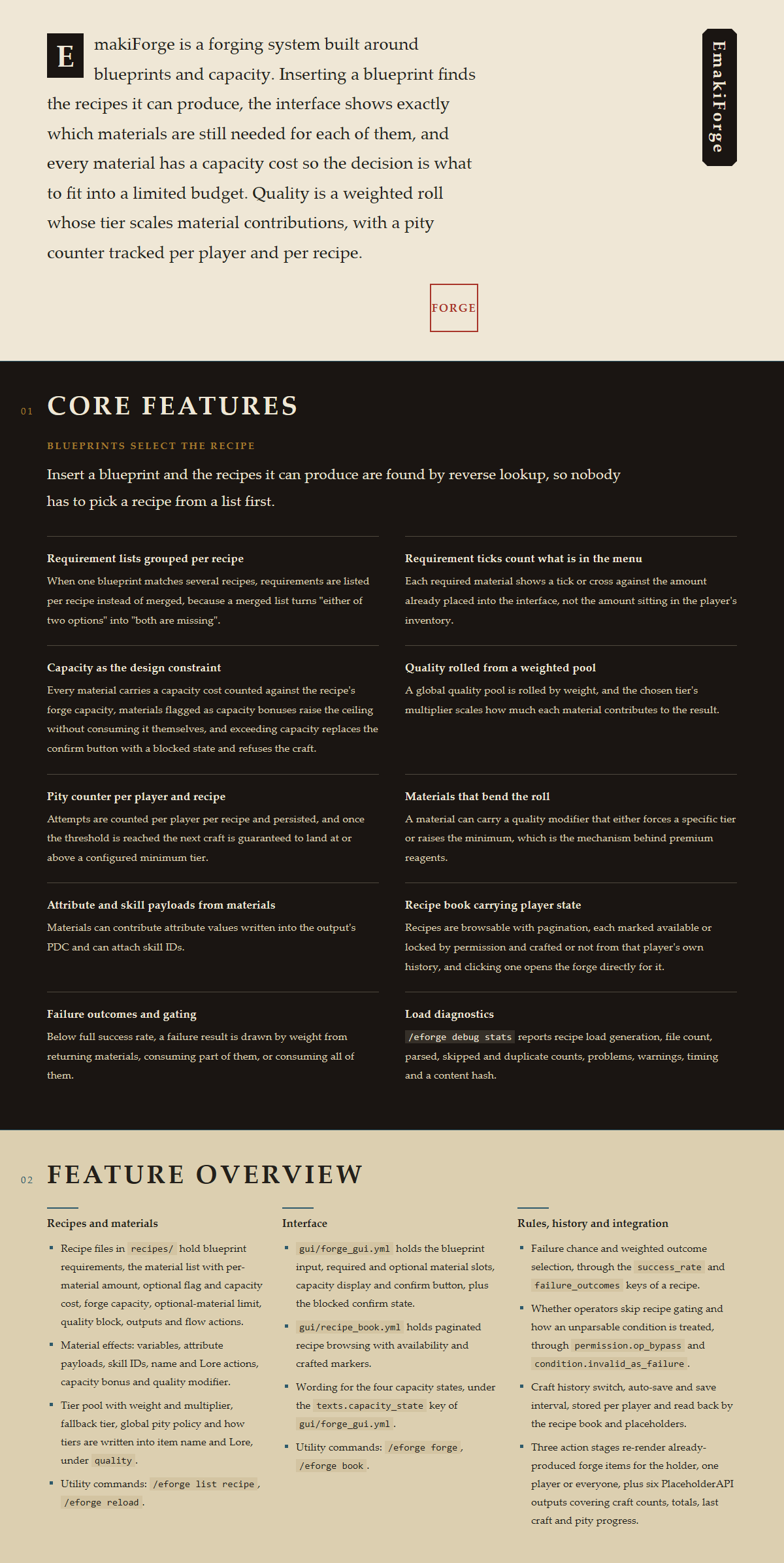
EmakiForge brings deep crafting gameplay to your server. Players learn recipes through blueprints, gather and contribute materials, make trade-offs within capacity limits, and forge equipment of varying quality. The six-tier quality system makes every forge attempt exciting, while the material contribution system turns the forging process itself into meaningful decision-making.
Forging Workflow
A complete forging session follows these steps:
- Blueprint Selection — Players open the forge interface and select an unlocked blueprint recipe. Blueprints can be distributed as items or controlled via permissions.
- Material Input — Place base materials and optional materials into the forge GUI. The system displays real-time capacity usage to help plan material combinations.
- Quality Roll — Upon confirmation, the system performs a weighted random roll based on total material contribution to determine the output quality tier.
- Result Output — The final item is generated with quality multipliers applied to attributes, name/lore modifications executed, audit records written, and the forge is complete.
Core Features
Quality System
EmakiForge provides a six-tier quality system, each with independent weight and attribute multiplier:
| Quality Tier | Default Weight | Multiplier | Description |
|---|---|---|---|
| Flawed | 10 | 0.95x | Slightly below standard output |
| Common | 60 | 1.0x | Most frequent base quality |
| Fine | 30 | 1.05x | Minor improvement |
| Superior | 5 | 1.1x | Noticeably above average |
| Flawless | 2 | 1.15x | Rare quality, triggers server broadcast |
| Perfect | 1 | 1.2x | Extremely rare, triggers server broadcast |
Key quality features:
- Weights determine roll probability; more material contribution shifts odds toward higher tiers
- Attribute multiplier directly scales all base attribute values defined in the recipe
- Each tier can have independent name prefixes (e.g., [Perfect], [Fine])
- Pity system: after a configurable number of consecutive forges, a minimum quality is guaranteed (default: Flawless after 60 attempts)
- Quality pools can be customized globally or per-recipe
Material Contribution System
Forging isn't simple crafting — it's a strategic contribution process:
Base Materials
- Minimum requirements that must be fully met before forging can begin
- Each base material has fixed quantity requirements and capacity cost
Optional Materials
- Extra input to improve quality chances or add special effects
- Each optional material provides different attribute directions (fire damage, movement speed, magic penetration, etc.)
- The number of optional material types per forge is capped by
optional_material_limit
Capacity Limit
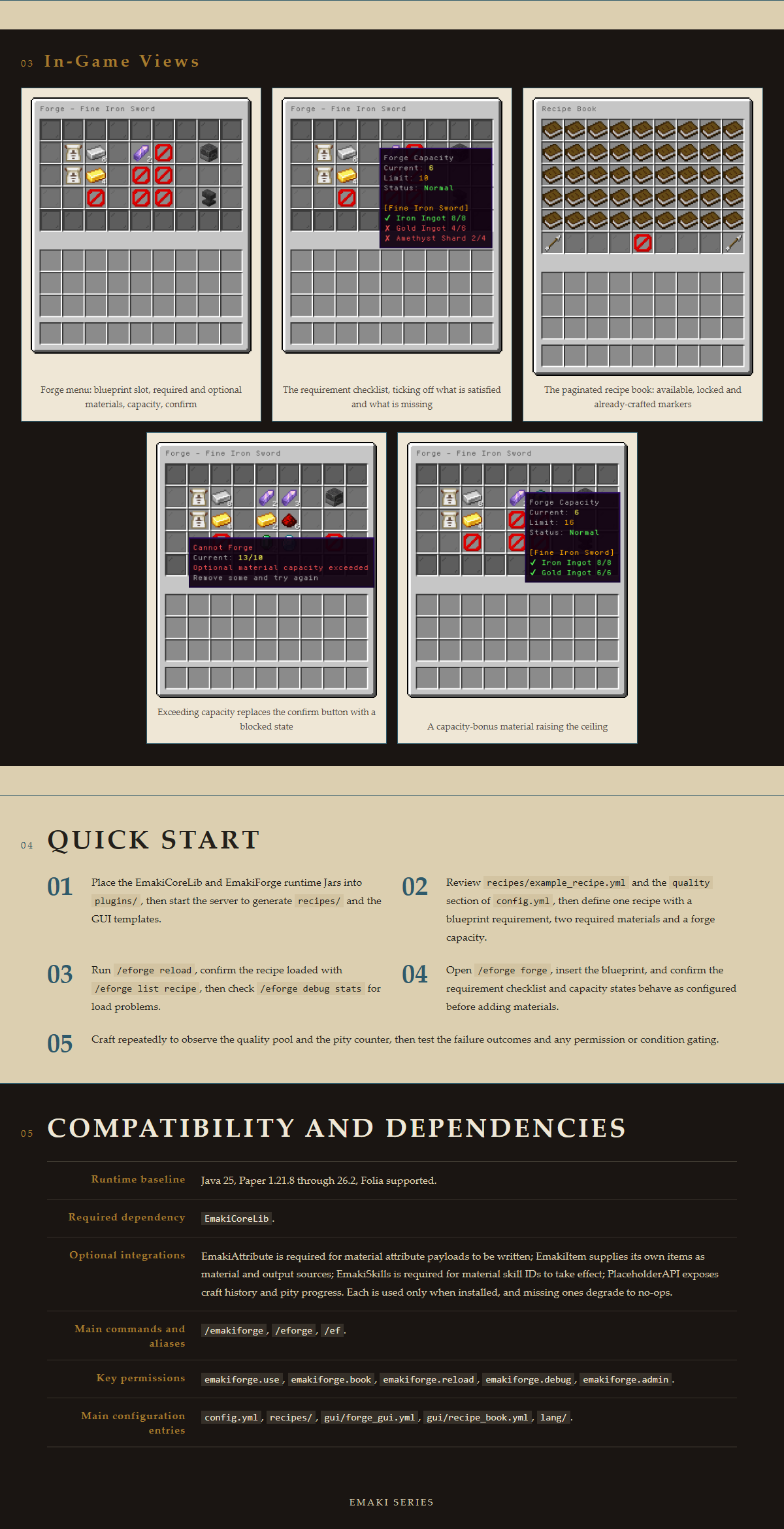
- Total
capacity_costof all materials cannot exceed the recipe'sforge_capacity - Forces players to make trade-offs between multiple optional materials
- Special materials can provide
capacity_bonuseffects to expand the capacity ceiling
Contribution Calculation
- Each material has an independent capacity cost value (
capacity_cost) - Material effects stack additively onto the output item upon successful forge
- Quality multiplier is applied to all material-provided attribute values
Name/Lore Action System
Six action types for modifying output item appearance:
| Action Type | Description | Example Use |
|---|---|---|
append_suffix |
Append text to end of item name | Add [Flame] marker |
prepend_prefix |
Prepend text to beginning of item name | Add quality tag [Perfect] |
prepend |
Insert lines at top of lore | Display quality info |
append |
Append lines at bottom of lore | Add attribute descriptions |
insert_below |
Insert lines below a matched anchor line | Insert values below "Forge Stats:" |
replace_line |
Replace the entire matched anchor line | Update existing attribute values |
All name/lore modifications are built on CoreLib's Ledger system, making them fully reversible and layer-independent. If an item is later modified by another system, the forge layer can be independently reverted without affecting other layers.
Effect System
Each material can provide multiple effect types:
| Effect Type | Description |
|---|---|
variables |
Expression engine variables for lore placeholder rendering and attribute calculation |
ea_attribute |
EmakiAttribute PDC attributes written directly to item data |
es_skill |
EmakiSkills skill binding for active/passive abilities |
name_action |
Item display name modifications |
lore_action |
Item lore description modifications |
capacity_bonus |
Special type that expands the forge capacity ceiling for the current session |
Effects support variable placeholders (e.g., {physical_damage}, {fire_damage}) that are automatically resolved to actual values during lore rendering.
Recipe Codex GUI
Players can browse all available recipes through a codex interface:
- Chest-based GUI displaying all registered forge recipes
- Shows required materials, quantities, and capacity costs
- Displays possible quality ranges and attribute directions
- Pagination support for large recipe collections
- Completed recipes marked with "Crafted" status
Forge Audit Trail
Every forged item stores complete forging information via PDC (PersistentDataContainer):
- Crafter — Player UUID and name who performed the forge
- Blueprint — Recipe ID used
- Materials — Type and quantity of each material contributed
- Quality — Rolled quality tier and multiplier
- Timestamp — Millisecond-precision forge time
Audit data supports post-forge refresh: when recipes are updated, existing items can recalculate attributes from audit records without requiring players to re-forge.
Commands
| Command | Description | Permission |
|---|---|---|
/ef help |
Display help information | emakiforge.use |
/ef forge |
Open the standalone forge interface | emakiforge.use |
/ef book |
Open the recipe codex | emakiforge.book |
/ef reload |
Reload all configuration files | emakiforge.reload |
/ef list recipe |
List all loaded recipes | emakiforge.admin |
Command aliases: /eforge, /ef
Permissions
| Permission Node | Description | Default |
|---|---|---|
emakiforge.use |
Basic forge access | All players |
emakiforge.book |
Recipe codex access | All players |
emakiforge.reload |
Reload configuration | OP |
emakiforge.admin |
Full admin access | OP |
PAPI Placeholders
Prefix: %emakiforge_<placeholder>%
| Placeholder | Description |
|---|---|
recipe_count |
Total number of loaded recipes |
craft_count_<recipe_id> |
Player's forge count for a specific recipe |
has_crafted_<recipe_id> |
Whether the player has completed a specific recipe (true/false) |
total_crafts |
Player's total forge count across all recipes |
last_crafted |
Recipe ID of the player's most recent forge |
guarantee_<recipe_id> |
Player's pity counter for a specific recipe |
Ideal Server Types
EmakiForge is particularly well-suited for:
- RPG/MMORPG servers — Provides deep crafting gameplay as an alternative to simple crafting tables
- Long-term survival servers — Quality system provides ongoing goals for extended play
- Economy servers — Quality variance naturally creates trading markets
- Dungeon servers — Dungeon material drops + forge system creates complete gear loops
Not recommended for pure vanilla survival or small casual servers, as the forge system requires configuration effort and player learning investment.
Requirements
| Item | Requirement |
|---|---|
| Server | Spigot 1.21+ |
| Java | 21+ |
| Hard Dependencies | EmakiCoreLib |
| Soft Dependencies | EmakiAttribute, EmakiSkills, PlaceholderAPI |
View Full Wiki Documentation | Join Discord Community | QQ Group