Compatibility
Minecraft: Java Edition
Platforms
Links
Tags
Creators
Details
Event-PVP-Plugin
A comprehensive Minecraft plugin combining custom event management and PvP wager system with a modern web interface. Build engaging player experiences with customizable events, arenas, equipment sets, and betting mechanics.
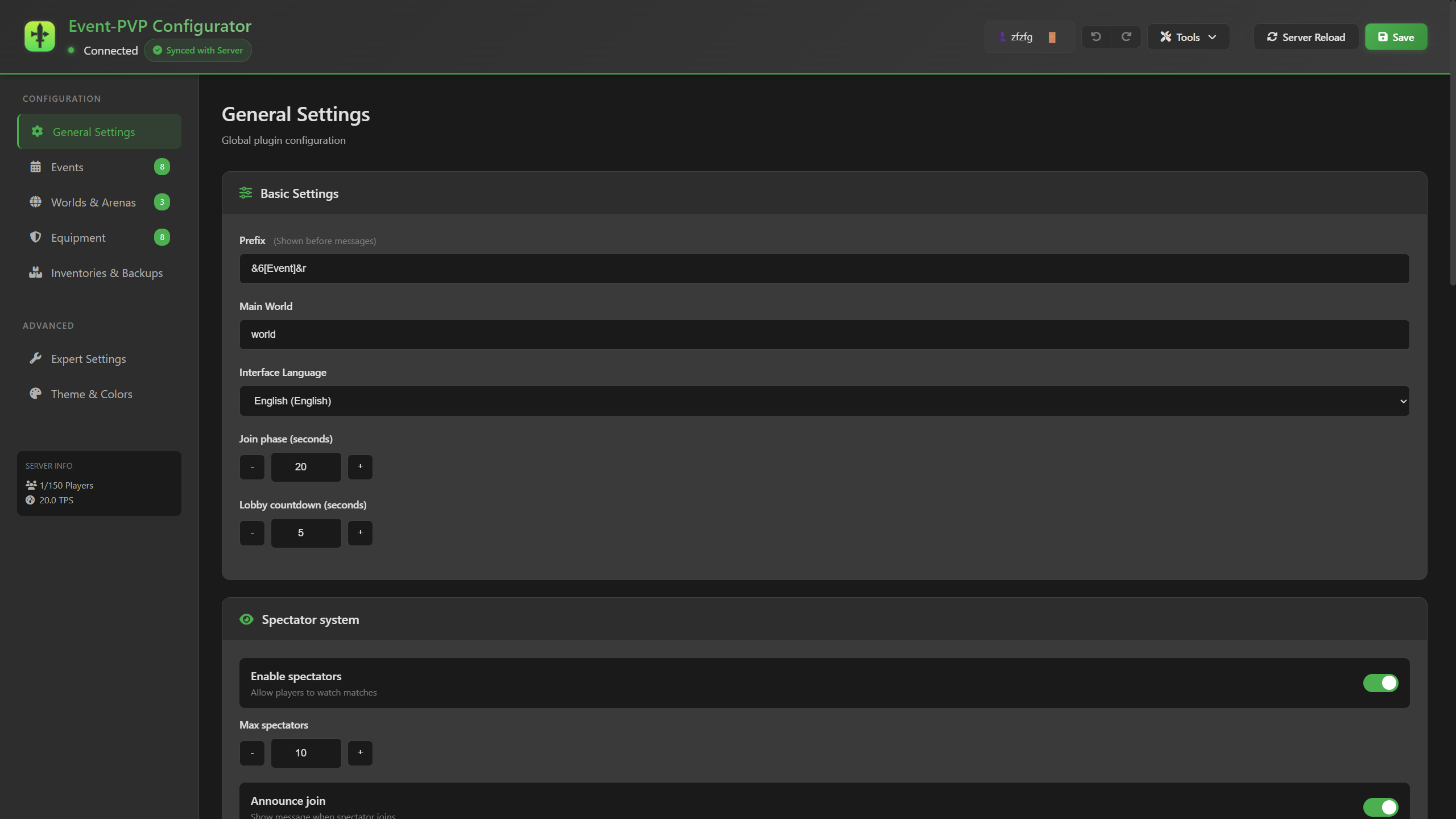
Web Interface
Configure your entire plugin through an intuitive browser-based interface! No need to manually edit YAML files.
🌐 Key Features
- 🎨 Visual Configuration: Edit all plugin settings through a modern, user-friendly web interface
- 🔒 Secure Access: Token-based authentication with configurable expiration times
- 🌍 Multi-language: Full support for 8 languages (EN, DE, FR, ES, RU, PL, JA)
- 📝 Live YAML Editor: Edit config, worlds, equipment, and events with syntax highlighting
- 🖼️ Item Textures: Visual item preview with Minecraft textures for equipment creation
- 💾 Real-time Validation: Instant syntax checking before saving changes
- 🎯 Theme Customization: Customize colors and appearance to match your server
Quick Start
- Enable the web interface in
web-config.yml:web: enabled: true port: 8085 - Generate a secure access token:
/eventpvp webtoken - Open your browser to
http://localhost:8085(or your server IP) - Enter the token and start configuring!
The web interface automatically loads all current configurations and allows you to edit them visually with instant feedback. Changes are validated before being saved to ensure your configuration remains error-free.
Features
🎮 Event System
- Multiple Event Types: Create custom events with unique mechanics and win conditions
- Flexible Spawn Systems: 7 different spawn types including single point, random radius, team spawns, and more
- Team & Solo Modes: Support for solo, 2-team, and 3-team game modes
- Auto-Events: Automated event scheduling with random or sequential selection
- Custom Rewards: Configure item and command rewards for winners and participants
- Statistics Tracking: Track player wins, participations, and leaderboards
⚔️ PvP Wager System
- Wagering: Bet items or money (Vault integration) on PvP matches
- Interactive GUI: Modern inventory-based wager setup interface
- Arena Selection: Multiple arenas with custom spawn configurations
- Equipment Sets: Pre-configured loadouts with customizable enchantments
- Spectator Mode: Allow players to watch ongoing matches
- Match Management: Draw votes, surrender options, and timeout handling
🌍 World Management
- Dynamic Loading: Automatic world loading/unloading with Multiverse-Core integration
- World Cloning: Clone template worlds for events and arenas
- Regeneration: Automatic world reset after events/matches with backup support
- Build Protection: Per-world build permission control
About Multiverse-Core
Multiverse-Core is used for advanced world operations:
- World Loading/Unloading: Automatically loads event and arena worlds when needed and unloads them after use to save resources
- World Cloning: Creates copies of template worlds (e.g.,
PvPArena_original→PvPArena) for each event/match - World Regeneration: Resets worlds to their original state after events/matches, with optional backup creation
- Environment Detection: Automatically detects world type (NORMAL, NETHER, THE_END) for proper loading
The plugin works without Multiverse-Core but with limited functionality (no auto-loading, cloning, or regeneration).
About Multiverse-Inventories (Strongly Recommended)
Multiverse-Inventories is strongly recommended for proper inventory restoration:
- Inventory Groups: Define groups like "event", "pvp", "survival" to keep inventories separate
- Automatic Restoration: When players return to the main world, Multiverse-Inventories automatically restores their original inventory
- World-specific Inventories: Players have different inventories in event/PvP worlds vs. main world
- Reliable: Proven, stable inventory management system
⚠️ Important: The plugin includes a fallback inventory backup/restore system, but it is experimental and may have bugs. For reliable inventory restoration, especially when players switch between worlds, Multiverse-Inventories is essential. Without it, players may experience inventory loss or restoration issues.
Setup Recommendation:
- Install Multiverse-Inventories
- Create world groups:
/mvinv group default,/mvinv group event,/mvinv group pvp - Assign worlds to groups:
/mvinv world <world> <group> - Configure
inventory-snapshots.default-groupinconfig.yml
🎨 Web Interface
- Real-time Configuration: Edit config, worlds, equipment, and events through web browser
- Token Authentication: Secure access with time-limited tokens
- Live Preview: See changes instantly with syntax validation
- Multi-language: Support for 8 languages (EN, DE, FR, ES, RU, PL, JA)
- Item Textures: Visual item selection with Minecraft textures
🔧 Advanced Features
- Inventory Snapshots: Automatic backup and restore of player inventories
- Multi-language Support: Built-in translations for 8 languages
- Performance Optimized: Async operations for backups and world operations
- Command Restriction: Configurable command blocking during events/matches
- Tab Completion: Smart tab completion for all commands
- Update Checking: Automatic update notifications via Modrinth API
- Checks for newer versions on server startup
- Notifies admins with
eventpvp.admin.updatenotifypermission on join - Manual check with
/eventpvp versioncommand - Configurable via
settings.update-checkin config.yml
Requirements
- Server: Paper/Spigot 1.19+ compatible
- Required:
- Vault: Economy integration for money wagers
- Multiverse-Core: Essential for world management (loading, unloading, cloning, regeneration)
- Strongly Recommended:
- Multiverse-Inventories: Handles automatic inventory restoration when players switch between worlds. The plugin has a fallback inventory system, but it's experimental and may be buggy. For reliable inventory restoration, Multiverse-Inventories is essential.
Installation
-
Install Required Dependencies:
- Download and install Vault
- Download and install Multiverse-Core
- Download and install Multiverse-Inventories (strongly recommended)
-
Install the Plugin:
- Download the plugin JAR file
- Place it in your server's
plugins/folder
-
Start the Server:
- Start the server to generate configuration files
- The plugin will detect Multiverse-Core and Multiverse-Inventories
-
Configure Multiverse-Inventories:
/mvinv group default /mvinv group event /mvinv group pvp /mvinv world <your_main_world> default /mvinv world <event_world> event /mvinv world <pvp_arena> pvp -
Configure the Plugin:
- Edit configuration files (see Configuration section)
- Or use the web interface:
/eventpvp webtoken
-
Reload and Test:
/eventpvp reload /event list
Updating
When updating to a new version of the plugin:
-
Language Files: Language files (
messages_*.yml) are NOT automatically replaced when updating. If you have customized language files, you need to delete them from the plugin data folder and restart the server to let the plugin regenerate them with the new message keys, then manually reapply your customizations. -
Configuration Files: Other configuration files (
config.yml,worlds.yml,equipment.yml,web-config.yml) are preserved during updates. The plugin will not overwrite existing files. If new configuration options are added in a new version, they will use default values until you manually add them to your config files.
Configuration Files
The plugin uses centralized configuration files in the plugin folder:
| File | Purpose |
|---|---|
config.yml |
General settings, event definitions, auto-events |
worlds.yml |
World definitions with spawn points and flags |
equipment.yml |
Shared equipment sets for events and PvP |
messages.yml |
Multilingual message configurations |
web-config.yml |
Web interface settings and theming |
config.yml Structure
settings:
language: "en" # en, de, fr, es, ru, pl, ja
prefix: "&6[Event]&r"
main-world: "world"
save-player-location: true
join-phase-duration: 30
lobby-countdown: 10
world-loading: "both" # none, event, arena, both
command-restriction: "both"
# Inventory backup system
inventory-snapshots:
enabled: true
default-group: "default"
retain-days: 30
# World regeneration settings
arena-regeneration:
backups: true # Create backups before regeneration
backup-async: true # Async backups (recommended)
# Auto-event scheduler
auto-events:
enabled: false
interval-min: 1800 # 30 minutes
interval-max: 3600 # 60 minutes
random-selection: true
selected-events:
- "pvparena"
- "ctf"
# PvP settings
match:
countdown-time: 10
max-duration: 600 # 10 minutes
draw-vote-time: 30
allow-no-wager: true
spectators:
enabled: true
max-spectators: 10
announce-join: true
events:
pvparena:
enabled: true
command: "pvparena"
display-name: "&c&lPvP Arena"
description: "&7Fight to the last man standing!"
min-players: 2
max-players: 16
countdown-time: 45
worlds:
lobby-world: "EventLobby"
lobby-spawn: { x: 0.5, y: 65, z: 0.5, yaw: 0, pitch: 0 }
event-world: "PvPArena"
clone-source-event-world: "PvPArena_original"
build-allowed: false
regenerate-event-world: true
spawn-settings:
spawn-type: "SINGLE_POINT" # See Spawn Types section
single-spawn: { x: 0.5, y: 65, z: 0.5, yaw: 0, pitch: 0 }
equipment-group: "pvp_starter"
give-equipment-in-lobby: true
mechanics:
game-mode: "SOLO" # SOLO, TEAM_2, TEAM_3
pvp-enabled: true
hunger-enabled: true
win-condition:
type: "LAST_ALIVE"
death-handling:
eliminate-on-death: true
spectator-mode: true
allow-rejoin: false
rewards:
winner:
items:
enabled: false
items: []
commands:
enabled: true
commands:
- "say Congratulations {player}!"
participation:
items:
enabled: false
commands:
enabled: false
messages:
start: "&c&lPVP ARENA STARTS!"
winner: "&6&l{player} IS THE CHAMPION!"
eliminated: "&7{player} was eliminated!"
objective: "&7Goal: &cBe the last survivor!"
worlds.yml Structure
worlds:
PvPArena:
display-name: "&cPvP Arena"
pvpwager-world-enable: true # Enable for PvP wagers
build-allowed: false
regenerate-world: true
clone-source-world: "PvPArena_original"
pvpwager-spawn:
spawn-type: FIXED_SPAWNS
spawns:
spectator: { x: 0, y: 80, z: 0, yaw: 0, pitch: 0 }
player1: { x: 10, y: 64, z: 0, yaw: 90, pitch: 0 }
player2: { x: -10, y: 64, z: 0, yaw: -90, pitch: 0 }
EventLobby:
display-name: "&aEvent Lobby"
pvpwager-world-enable: false
build-allowed: false
equipment.yml Structure
equipment-sets:
pvp_starter:
enabled: true
allowed-pvpwager-worlds: "all" # all, none, or world list
display-name: "&aStarter PvP"
description: "&7Basic starting equipment"
gui-item:
material: STONE_SWORD
slot: 10
name: "&a&lSTARTER"
lore:
- "&7Basic equipment for quick matches"
armor:
helmet: LEATHER_HELMET
chestplate: LEATHER_CHESTPLATE
leggings: LEATHER_LEGGINGS
boots: LEATHER_BOOTS
inventory:
- slot: 0
item: STONE_SWORD
amount: 1
- slot: 1
item: BOW
amount: 1
enchantments:
- "POWER:2"
- "KNOCKBACK:1"
- slot: 8
item: ARROW
amount: 32
- slot: 2
item: GOLDEN_APPLE
amount: 2
diamond_pvp:
enabled: true
allowed-pvpwager-worlds: "all"
display-name: "&b&lDiamond PvP Set"
armor:
helmet: DIAMOND_HELMET
helmet-enchantments:
- "PROTECTION:4"
- "UNBREAKING:3"
- "RESPIRATION:3"
chestplate: DIAMOND_CHESTPLATE
chestplate-enchantments:
- "PROTECTION:4"
- "UNBREAKING:3"
# ... more armor pieces
inventory:
- slot: 0
item: DIAMOND_SWORD
amount: 1
enchantments:
- "SHARPNESS:5"
- "UNBREAKING:3"
name: "&b&lDiamond Slayer"
Spawn Types
Event Spawn Types
Configure in events.<id>.spawn-settings:
-
SINGLE_POINT: All players spawn at one location
spawn-type: SINGLE_POINT single-spawn: { x: 0, y: 65, z: 0, yaw: 0, pitch: 0 } -
RANDOM_RADIUS: Random spawn within a circular radius
spawn-type: RANDOM_RADIUS random-radius: center-x: 0 center-z: 0 radius: 50 min-distance: 10 -
RANDOM_AREA: Random spawn in 2D area (X/Z)
spawn-type: RANDOM_AREA random-area: point1: { x: -50, z: -50 } point2: { x: 50, z: 50 } min-distance: 10 -
RANDOM_CUBE: Random spawn in 3D volume
spawn-type: RANDOM_CUBE random-cube: point1: { x: -50, y: 60, z: -50 } point2: { x: 50, y: 100, z: 50 } min-distance: 10 -
MULTIPLE_SPAWNS: Predefined spawn points
spawn-type: MULTIPLE_SPAWNS multiple-spawns: spawns: spawn1: { x: 10, y: 64, z: 0, yaw: 0, pitch: 0 } spawn2: { x: -10, y: 64, z: 0, yaw: 180, pitch: 0 } -
TEAM_SPAWNS: Team-specific spawn points
spawn-type: TEAM_SPAWNS team-spawns: RED: spawn1: { x: 50, y: 64, z: 0, yaw: -90, pitch: 0 } BLUE: spawn1: { x: -50, y: 64, z: 0, yaw: 90, pitch: 0 } -
COMMAND: Execute command for spawning
spawn-type: COMMAND spawn-command: "tp {player} 0 65 0"
PvP Arena Spawn Types
Configure in worlds.<world>.pvpwager-spawn:
-
FIXED_SPAWNS: Dedicated player/spectator spawns
spawn-type: FIXED_SPAWNS spawns: spectator: { x: 0, y: 80, z: 0, yaw: 0, pitch: 0 } player1: { x: 10, y: 64, z: 0, yaw: 90, pitch: 0 } player2: { x: -10, y: 64, z: 0, yaw: -90, pitch: 0 } -
RANDOM_RADIUS, RANDOM_AREA, RANDOM_CUBE, MULTIPLE_SPAWNS: Same as event spawn types
-
COMMAND: Command-based spawning with placeholders
Commands
Event Commands
| Command | Description | Permission |
|---|---|---|
/event <name> join |
Join an event | eventplugin.join |
/event <name> leave |
Leave an event | eventplugin.join |
/event <name> start |
Start an event (admin) | eventplugin.admin |
/event <name> stop |
Stop an event (admin) | eventplugin.admin |
/event <name> forcestart |
Force start without min players | eventplugin.admin |
/event list |
List available events | eventplugin.join |
/eventstats me |
View your statistics | - |
/eventstats top [N] |
View leaderboard | - |
PvP Wager Commands
| Command | Description | Permission |
|---|---|---|
/pvpask <player> |
Send PvP request (opens GUI) | pvpwager.use |
/pvpaccept [player] |
Accept request and open GUI | pvpwager.use |
/pvpdeny [player] |
Deny a request | pvpwager.use |
/pvpa <player> <wager> <amount> <arena> <equipment> |
Full request command | pvpwager.use |
/pvpanswer <wager> <amount> [arena] [equipment] |
Counter-offer | pvpwager.use |
/pvpyes |
Confirm counter-offer | pvpwager.use |
/pvpno |
Decline counter-offer | pvpwager.use |
/surrender |
Surrender current match | pvpwager.use |
/draw |
Vote for a draw | pvpwager.use |
/pvp spectate <player> |
Spectate a match | pvpwager.spectate |
/pvp leave |
Leave match/spectator mode | pvpwager.use |
/pvpainfo |
Show PvP command help | - |
/pvpstats me |
View your PvP stats | - |
/pvpstats top [N] |
View PvP leaderboard | - |
/pvpadmin reload |
Reload PvP config | pvpwager.admin |
/pvpadmin stopall |
Stop all matches | pvpwager.admin |
/pvpadmin info |
Show system info | pvpwager.admin |
Unified Commands
| Command | Description | Permission |
|---|---|---|
/eventpvp reload |
Reload all configurations | eventpvp.admin |
/eventpvp version |
Check plugin version and update status | eventpvp.admin |
/eventpvp webtoken |
Generate web interface token | eventpvp.admin.web |
/inventoryrestore <player> <ID> |
Restore player inventory | eventpvp.inventory.restore |
Command Examples
PvP Wager with Items:
/pvpa Steve DIAMOND_SWORD 1 PvPArena diamond_pvp
PvP Wager with Money (requires Vault):
/pvpa Alex MONEY 100 desert standard
No-Wager Match:
/pvpa Mike SKIP 0 forest pvp_starter
Counter-Offer:
/pvpanswer MONEY 150 PvPArena diamond_pvp
/pvpyes
Permissions
Core Permissions
eventpvp.admin- Access to unified reload and version commandseventpvp.admin.web- Access to web interfaceeventpvp.admin.updatenotify- Receive update notifications on joineventpvp.inventory.restore- Restore player inventories
Event Permissions
eventplugin.admin- Event administrationeventplugin.join- Join eventseventplugin.stats.reset- Reset player statistics
PvP Permissions
pvpwager.admin- PvP administrationpvpwager.use- Use PvP wager systempvpwager.spectate- Spectate matchespvpwager.spectate.all- Spectate any matchpvpwager.command- Use command-based requestspvpwager.bypass.betlimit- Bypass betting limitspvpwager.nowager- Create no-wager matches
Web Interface
Access the Web Interface
-
Enable in
web-config.yml:web: enabled: true port: 8085 public-url: "http://localhost:8085" -
Generate an access token:
/eventpvp webtoken -
Open the URL and enter the token
-
Configure your plugin through the web interface!
Features
- Live Config Editor: Edit all YAML files with syntax highlighting
- Visual Equipment Builder: Create equipment sets with item preview
- World Manager: Configure worlds and spawn points
- Event Creator: Design events with visual spawn configuration
- Multi-language: Switch between 8 supported languages
- Theme Customization: Adjust colors and appearance
- Token Security: Time-limited access tokens (configurable)
Security Settings
security:
auth-enabled: true # Enable token authentication
token-validity-minutes: 10 # Token expiration time
session-validity-minutes: 60 # Session duration
required-permission: "eventpvp.admin.web"
allowed-ips: [] # IP whitelist (empty = all)
Workflows
Creating a New Event
-
Define the event in
config.ymlunderevents:events: my_event: enabled: true command: "myevent" display-name: "&aMy Event" min-players: 2 max-players: 10 worlds: lobby-world: "EventLobby" event-world: "MyEventWorld" spawn-settings: spawn-type: "SINGLE_POINT" single-spawn: { x: 0, y: 65, z: 0 } equipment-group: "default" mechanics: game-mode: "SOLO" pvp-enabled: true rewards: winner: commands: enabled: true commands: - "say {player} won!" participation: items: enabled: false -
Reload the configuration:
/eventpvp reload -
Start the event:
/event myevent start -
Players join:
/event myevent join
Setting up PvP Arena
-
Create the world (copy template if needed)
-
Define in
worlds.yml:worlds: MyArena: display-name: "&cMy Arena" pvpwager-world-enable: true build-allowed: false regenerate-world: true clone-source-world: "MyArena_template" pvpwager-spawn: spawn-type: FIXED_SPAWNS spawns: spectator: { x: 0, y: 100, z: 0 } player1: { x: 20, y: 64, z: 0, yaw: 90 } player2: { x: -20, y: 64, z: 0, yaw: -90 } -
Create equipment set in
equipment.yml:equipment-sets: my_pvp_set: enabled: true allowed-pvpwager-worlds: "MyArena" # ... define armor and inventory -
Reload configuration:
/eventpvp reload -
Challenge someone:
/pvpa Steve DIAMOND_SWORD 1 MyArena my_pvp_set
Setting up Auto-Events
-
Configure in
config.yml:settings: auto-events: enabled: true interval-min: 1800 # 30 min interval-max: 3600 # 60 min random-selection: true check-online-players: true selected-events: - "pvparena" - "ctf" - "ffa" -
Reload:
/eventpvp reload
Auto-events will now start automatically based on the configured interval!
Troubleshooting
World Not Loading
- Ensure world folder exists in server directory
- Check
settings.world-loadingis set tobothor appropriate value - Install Multiverse-Core for advanced world management
- Use
clone-source-worldto automatically clone template worlds
Equipment Not Showing in Tab Completion
- Check
enabled: truein equipment set - Verify
allowed-pvpwager-worldsmatches your arena - Use
allto allow in all arenas - Reload config with
/eventpvp reload
Match Not Starting
- Check minimum player count
- Verify both players have inventory space
- Ensure arena world is loaded
- Check console for error messages
- Verify spawn points are configured
Web Interface Not Accessible
- Check
web.enabled: trueinweb-config.yml - Verify port is not in use:
netstat -an | grep 8085 - Check firewall allows the port
- Generate a new token:
/eventpvp webtoken - Check
security.auth-enabledsetting
Inventory Not Restored
- Check
inventory-snapshots.enabled: true - Verify player has permission
eventpvp.inventory.restore - Use
/inventoryrestore <player> <ID>with correct 4-digit ID - Check retention period:
inventory-snapshots.retain-days
Performance Issues
- Enable async backups:
arena-regeneration.backup-async: true - Reduce auto-event frequency
- Limit max players in events
- Use
world-loading: arenato only load when needed
Advanced Features
Inventory Snapshot System
⚠️ Experimental Feature - Use Multiverse-Inventories Instead
The plugin includes a basic inventory backup/restore system, but it is experimental and may be buggy:
settings:
inventory-snapshots:
enabled: true
default-group: "default"
retain-days: 30
ids:
inventory-id-digits: 4
eventmatch-id-digits: 5
Known Issues:
- May not restore inventories correctly in all cases
- Can cause inventory loss if not used with Multiverse-Inventories
- Manual restoration required with
/inventoryrestore <player> <ID>
Recommended: Install Multiverse-Inventories for automatic, reliable inventory restoration. The plugin's inventory system works best as a fallback alongside Multiverse-Inventories.
World Regeneration with Backups
settings:
arena-regeneration:
backups: true # Create ZIP backup before regeneration
backup-async: true # Non-blocking backups (recommended)
Backups are stored in plugins/Event-PVP-Plugin/backups/
Multi-language Support
Set language in config.yml:
settings:
language: "en" # en, de, fr, es, ru, pl, ja
Supported languages:
- English (en)
- German (de)
- French (fr)
- Spanish (es)
- Russian (ru)
- Polish (pl)
- Japanese (ja)
Each language has its own messages_<lang>.yml file.
Statistics System
Track player performance:
- Event wins and participations
- PvP match wins/losses
- Leaderboards with
/eventstats topand/pvpstats top - Admin commands to reset or modify stats
Command Restrictions
Control command access during events/matches:
settings:
command-restriction: "both" # none, event, pvp, both
Prevents teleportation and other exploits during gameplay.
Performance Tips
- Enable async backups for large worlds
- Use world cloning instead of full regeneration when possible
- Set retention period for inventory snapshots to avoid database bloat
- Limit spectators per match to reduce entity processing
- Use fixed spawns instead of random when possible (faster)
- Configure auto-events with reasonable intervals
- Enable world-loading: arena to only load worlds when needed
Support & Development
Plugin Version
Check version: /pvpadmin info or see plugin.yml
Reporting Issues
When reporting issues, provide:
- Server version (Paper/Spigot)
- Plugin version
- Error logs from console
- Configuration files
- Steps to reproduce
Performance Monitoring
Plugin logs startup/shutdown times:
[Event-PVP-Plugin] Plugin enabled in 123 ms
Use this to track performance changes after configuration updates.
License & Credits
Author: zfzfg
Version: See plugin.yml
API: 1.19+
Dependencies: Vault, Multiverse-Core (soft)
For questions, feature requests, or custom arena configurations, contact the plugin author.