
Compatibility
Minecraft: Java Edition
Platforms


Links
Tags
Creators
Details
Exploration Journal
Exploration Journal is an advanced Minecraft server plugin that turns world exploration into an exciting adventure. Players can record discovered biomes, found structures, and unique discoveries, level up their journal, and unlock new features along the way.

✨ Main Features
🧭 Journal Tier System (I–IV): Unlock new features as you progress.
🏰 Structure Exploration: The plugin tracks time spent inside a structure before it counts as discovered.
🌍 BlueMap Integration: Display player discoveries on your server’s 3D map.
💬 DiscordSRV: Log major discoveries directly to your Discord channel.
📜 Book Export: Create a physical in-game book containing a list of all your achievements.
📊 PlaceholderAPI: Show player stats in scoreboards or menus.
🚀 Folia Support: Full compatibility with multithreaded server cores.
🛠 Journal Crafting
Journals are crafted in a crafting table. Each next tier requires the previous one.
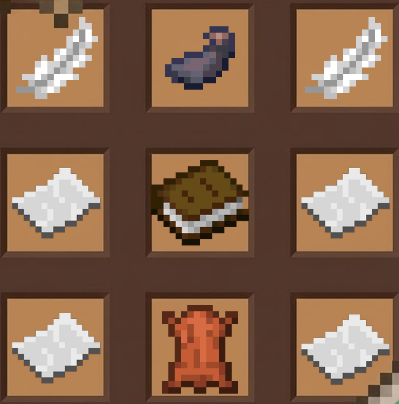
[Tier I] Traveler’s Journal
Basic tracking of biomes and structures.
[ Feather ] [ Ink Sac ] [ Feather ] [ Paper ] [ Book ] [ Paper ] [ Paper ] [ Leather ] [ Paper ]
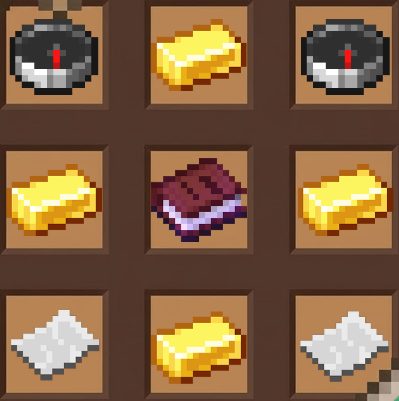
[Tier II] Cartographer’s Journal
Adds the /journal map command to view the coordinates of discovered biomes.
[ Compass ] [ Gold Ingot ] [ Compass ] [ Gold Ingot ] [ Journal I ] [ Gold Ingot ] [ Paper ] [ Gold Ingot ] [ Paper ]
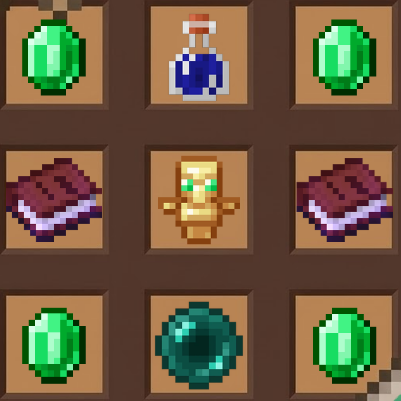
[Tier III] Explorer’s Journal
Adds the /journal export command to create a book containing your discoveries.
[ Emerald ] [ Night Vision Potion ] [ Emerald ] [ Journal II ] [ Totem of Undying ] [ Journal II ] [ Emerald ] [ Ender Pearl ] [ Emerald ]
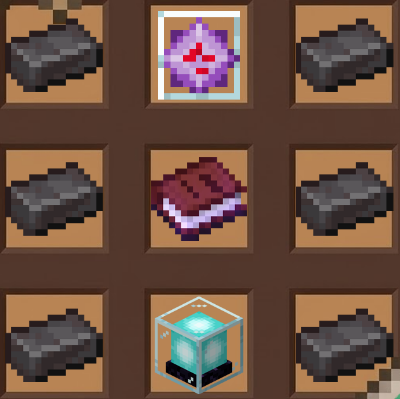
[Tier IV] Legend’s Journal
Adds the server leaderboard command /journal top and visual effects when discovering something new.
[ Netherite Ingot ] [ End Crystal ] [ Netherite Ingot ] [ Netherite Ingot ] [ Journal III ] [ Netherite Ingot ] [ Netherite Ingot ] [ Beacon ] [ Netherite Ingot ]
🎮 Commands and Permissions Player Commands (/journal or /ej) Command Description Required Tier Permission /journal Open the journal (book interface) I explorationjournal.use /journal biomes List discovered biomes I explorationjournal.use /journal structures List discovered structures I explorationjournal.use /journal discoveries List unique discoveries I explorationjournal.use /journal stats [player] View statistics I explorationjournal.use /journal map View coordinates of your discovered biomes II explorationjournal.use /journal export Create a report book III explorationjournal.export /journal top [cat] Top players (biomes / structures / disc) IV explorationjournal.top /journal give <player> Give a copy of your journal I explorationjournal.give Admin Commands (/journaladmin or /eja)
All admin commands require the permission explorationjournal.admin.
/journaladmin reset <player> — Fully reset a player’s data.
/journaladmin give <player> <1-4> — Give a journal of a specific tier.
/journaladmin reload — Reload the plugin configuration files.
🧩 Integrations PlaceholderAPI
%explorationjournal_level% — Player journal tier
%explorationjournal_biomes_found% — Number of discovered biomes
%explorationjournal_structures_found% — Number of discovered structures
BlueMap
Automatically creates markers at locations where players make unique discoveries.
DiscordSRV
Sends messages to a configured Discord channel when a biome or structure is discovered for the first time on the server.
Developed with ❤️ by Erotoro