
Compatibility
Minecraft: Java Edition
Platforms


Tags
Creators
Details
 Let players control nearby natural mob spawning with a clean GUI and permission-based overrides.
FoMobToggle gives players three simple toggles: all mobs, monsters, and passive mobs. Server owners can let players manage the settings themselves, or lock the final behavior through permission nodes for ranks, perks, or protected areas.
Features
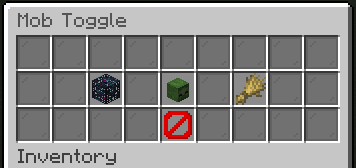
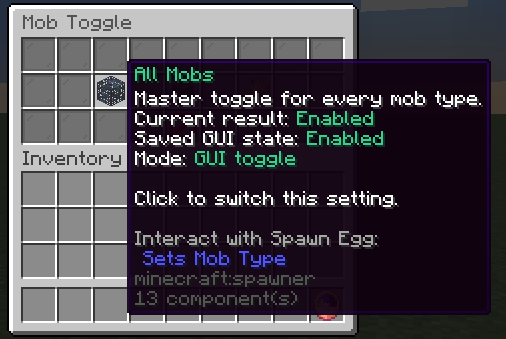
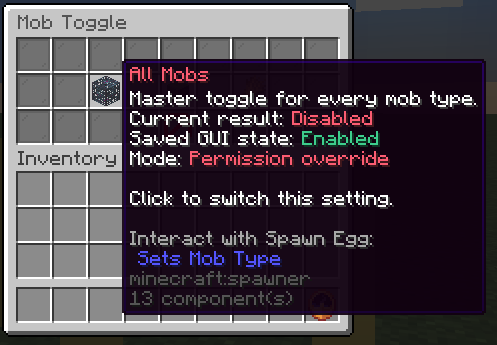
- Give players a compact GUI for all mobs, hostile mobs, and passive mobs.
- Block natural and chunk-generation spawns around players based on their effective settings.
- Use permission nodes as final overrides when a setting should be rank-controlled.
- Save per-player GUI choices in SQLite-backed player data.
- Disable the GUI while keeping permission-based spawn blocking active.
- Tune the nearby-player spawn check radius from config or the admin editor.
- Configure and save plugin settings through an admin editor.
Dependencies
FoMobToggle has no required external plugin dependencies.
Commands
/fomobtoggle- Open the mob toggle menu.- Aliases:
/mobtoggle,/togglemob,/togglemobs /fomobtoggleadmin editor- Open the admin settings editor./fomobtoggleadmin reload- Reload config, messages, and GUI settings./fomobtoggleadmin version- Show the plugin version and update status.- Admin alias:
/mobtoggleadmin
Permissions
fomobtoggle.use- Open the FoMobToggle GUI.fomobtoggle.admin- Use admin commands and the settings editor.fomobtoggle.spawn.mob- Final override for all mob spawning around the player.fomobtoggle.spawn.monster- Final override for monster spawning around the player.fomobtoggle.spawn.passive- Final override for passive mob spawning around the player.
Developer API
Compile against the matching jar (provided in Maven, compileOnly in Gradle); install it locally if needed. Declare FoMobToggle in your plugin metadata (softdepend for an optional integration).
<dependency>
  <groupId>me.foesio</groupId>
  <artifactId>FoMobToggle</artifactId>
  <version>1.8</version>
  <scope>provided</scope>
</dependency>
import me.foesio.foMobToggle.api.FoMobToggleApi;
import me.foesio.foMobToggle.model.ToggleCategory;
import me.foesio.foMobToggle.api.event.MobTogglePreferenceChangedEvent;

FoMobToggleApi api = Bukkit.getServicesManager().load(FoMobToggleApi.class);
if (api != null) api.getState(player, ToggleCategory.MONSTERS);

@EventHandler
public void onMobTogglePreferenceChangedEvent(MobTogglePreferenceChangedEvent event) {
    Bukkit.getLogger().info(event.getClass().getSimpleName());
}
API methods (overloads grouped):
FoMobToggleApi:getState,setPreference,evaluateSpawn.
Other API types: SetPreferenceResult, SpawnDecision, ToggleState.
Events: MobTogglePreferenceChangedEvent.
Browse API and event source for signatures and event details.