
Compatibility
Minecraft: Java Edition
Platforms


Tags
Creators
Details
🎮 Gamemodes
Stop waiting time with the regular gamemode command and get this plugin instead, you won't regret it.
🌟 Main Commands
-
/gmc
- Switches your gamemode to creative! (Or optionally supply a different player! Requires
gamemodes.changeotherperm!) - Permission:
gamemodes.gmc
- Switches your gamemode to creative! (Or optionally supply a different player! Requires
-
/gms
- Switches your gamemode to survival! (Or optionally supply a different player! Requires
gamemodes.changeotherperm!) - Permission:
gamemodes.gms
- Switches your gamemode to survival! (Or optionally supply a different player! Requires
-
/gma
- Switches your gamemode to adventure! (Or optionally supply a different player! Requires
gamemodes.changeotherperm!) - Permission:
gamemodes.gma
- Switches your gamemode to adventure! (Or optionally supply a different player! Requires
-
/gmsp
- Switches your gamemode to spectator! (Or optionally supply a different player! Requires
gamemodes.changeotherperm!) - Permission:
gamemodes.gmsp
- Switches your gamemode to spectator! (Or optionally supply a different player! Requires
Alternatively, you can just use the permission gamemodes.all to give access to all the commands above
-
/gmlock <player> <gamemode>
- Locks the specified player to the specified gamemode until unlocked
- Permission:
gamemodes.gmlock
-
/gmunlock <player>
- Unlocks the specified player's gamemode
- Permission:
gamemodes.gmunlock
-
/gmreload
- Reloads the plugin's config
- Permission:
gamemodes.reload
❌ Gamemode Blocking Permissions
-
gamemodes.blockaccess.creative
- Prevents whoever has the permission from swapping to gamemode creative
-
gamemodes.blockaccess.survival
- Prevents whoever has the permission from swapping to gamemode survival
-
gamemodes.blockaccess.adventure
- Prevents whoever has the permission from swapping to gamemode adventure
-
gamemodes.blockaccess.spectator
- Prevents whoever has the permission from swapping to gamemode spectator
👍 Other Permissions
-
gamemodes.changeothers
- Players with this permission will be able to change the gamemode of other players as well as themself
-
gamemodes.notifyupdate
- Players with this permission will be notified in chat when an update becomes available (checked when joining the server)
🪶 Features
-
Quickly swap between gamemodes
- No more typing out long commands such as
/gamemode creative, just use/gmcinstead!
- No more typing out long commands such as
-
Lock the gamemode of players
-
Great for preventing plugins from changing your gamemode while testing things
-
Useful when you have a player that keeps finding bugs to escape survival mode
-
Prevent staff from changing your gamemode without permission, simply lock your gamemode and don't give them the permisson to unlock it
-
-
Prevent swapping to specific gamemodes using permissions
-
Allows world specific gamemode blocking
-
Prevents players from getting into gamemodes they shouldn't be in
-
Simple setup, works with plugins you already use like Luckperms
-
Checks players gamemodes when they join the server to ensure they're allowed to be in their current gamemode
-
-
Whenever you change gamemodes a nice sound effect is played!
- This can be disabled in the config if you don't like it! Simply set
do-sound-effects: false!
- This can be disabled in the config if you don't like it! Simply set
-
Players get a notification when their gamemode is changed!
- This can also be disabled in the config by simply setting
send-target-message: false!
- This can also be disabled in the config by simply setting
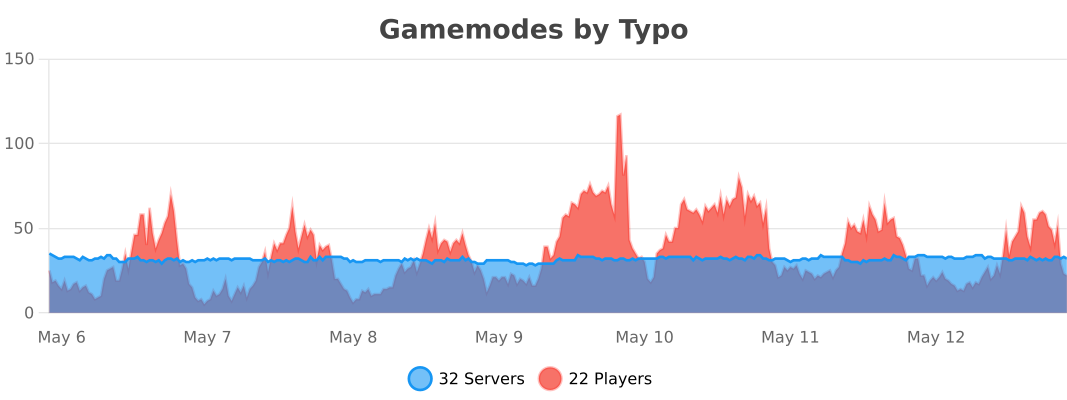
Statistics
Default Config:
# Made with love by Typo from TypoCreates (https://typocreates.com/#)
# Report bugs to me on Github <3.#


# Do you want to play a sound whenever you receive a message such as when you switch someone's gamemode?
# The sound effect will be played to anyone who receives a message. This is enabled by default.
# Options: true, false
do-sound-effects: true

# When changing another players gamemode, should the target player be notified when their gamemode is changed? This is enabled by default.
# Options: true, false
send-target-message: true

# Do you want to enable update checking? This is enabled by default.
# Options: true, false
update-checker: true

# All messages that are sent to the player, configurable here!
# {gamemode} will be replaced with the gamemode! (Only on applicable messages!)
# {player} will be replaced with the player! (Only on applicable messages!)
messages:
  target-gamemode-change: "Your gamemode has been set to {gamemode}."
  executor-confirmation: "{player}'s gamemode has been set to {gamemode}."
  executor-not-player: "You have to be a player or target a player to use this command."
  target-not-found: "That player could not be found, maybe they went offline?"
  too-many-args: "You can only have a maximum of 1 argument for this command."
  gamemode-locked: "Unable to change that users gamemode! Their gamemode is currently locked!"
  gamemode-blocked: "That user isn't allowed in {gamemode}!"
  not-enough-perms: "You don't have the required permissions to do that!"

# Config version:
version: 1.0.4