Compatibility
Minecraft: Java Edition
Platforms


Tags
Creators
Details

JakubSasinkaCore









The JakubSasinkaCore plugin is the core for minigames such as Fishing +, SpeedRun, Archery and future more.
You need the PlaceholderAPI if you want placeholders and DecentHolograms if you want to generate a hologram template on your server
💎 Key Features
- ✨ Tab Completer - Tab completion works for all commands.
- A custom permissions system has been added; see below for more details.
👤 Player Management
/manage [player]Data management for the Fishing, SpeedRun, and Archery mini-games includes clearing all mini-game data (Gallery:[Manage Home Page]), clearing a single player's data (Gallery:[Manage Player Home Page]), and viewing a player's overall statistics—such as which items they caught and how many.playeris used to specify which user to open. (Gallery:[Manage Player Statistics]). It also features a dynamic Players page where you can see all players who have earned at least 1 point in the mini-games, with automatic pagination and sorting by mini-game or alphabetically. (Gallery:[Manage Players])
🛡️ Admin Commands
/jscThis opens the plugin interface, where you can view all the plugins currently installed on the server and their versions. (e.g., if you have JakubSasinkaCore and one other plugin, only two will be listed there.) (Gallery:[Plugins Menu Main])/jsc <command>Currently, you can create a hologram template, test whether the text works correctly in a given language, and reset the API./jsc apior/jscapiRe-registers the placeholder in PAPI./jsc holo <create|delete> <minigame> [name]Thenameattribute is used for a custom placeholder name. Hologram template (Gallery:[Hologram Template Main])/jsc language <name>Just enter thenamefrom the lang.yml file, and either the text or an error message will appear. (e.g.,/jsc language no_permission)/jsc placeholdersor/jscpList of placeholders/jsc reload <command>or/jscreload <command>Reload the entire plugin or part of it, depending on the 'command' argument
🔖 Language System
Currently, only the cs_CZ.yml and en_US.yml files are available. However, if you want to change the language, simply set settings.Language to your preferred language in the config.yml file. If you are using multiple plugins, they share a single centralized language system in the Core plugin. Therefore, language files are not included in individual plugins.
However, the other lang files are currently on GitHub.
⚙️ Configuration
-
The coordinates for the mini-games are set in the configuration file in Core. To apply the changes, you need to run '/jsc reload <command>' in the "config.yml" file.
Click to view config.yml
# *   Config version 1.0.0
# *   Minecraft versions:
# *     Build: 1.21.11
# *     Tested: 26.1.2, 1.21.11-1.21.1

# ?     JakubSasinkaCore

settings:
  name: "X"
  version: "1.0.0"
  supported: "1.21.x"
  created: "1.21.x"
  build: "B100"
  Language: "cs_CZ"

Database:
  # Database type: none (Minecraft scoreboard), SQLite
  type: "SQLite"
  host: "localhost" # It's not working right now...
  port: 3306 # It's not working right now...
  database: "database" # It's not working right now...
  username: "root" # It's not working right now...
  password: "password" # It's not working right now...

Admin:
  Permissions:
#   If the value is "true", the permission settings from the permissions.yml file are used instead of the default permissions.
    custom-permissions: false
  manage:
#   Enable or disable the "specific only" mode for the /manage command
    restriction: false
#    You can add specific users who have permissions to use /manage the system. (They must have either the "OP" or "jakubsasinkacore.admin" permission.)
#    players:
#      - "Admin"
#      - "Mod"

Minigames:
  Lobby:
    world: spawn
    loc: "0,250,0"
  Fishing:
    prefix: "§e[§b?§e] "
    Locations:
      Location1:
        pirate: "39,222,-37"
        world: spawn
        pos1: "23,230,-9"
        pos2: "83,218,-65"
      Loc2:
        pirate: "39,222,-37"
        world: spawn
        pos1: "23,230,-9"
        pos2: "83,218,-65"
  SpeedRun:
    Locations:
      Location1:
        world: spawn
        pos1: "23,223,-50"
        pos2: "-23,227,-23"
  Archery:
    Locations:
      Location1:
        world: spawn
        pos1: "-48,222,16"
        pos2: "-26,226,17"
🔑 Permissions
Compatible with - LuckPerms, compatibility with other permission management plugins is not guaranteed.
-
This library also offers its own custom permissions system, which consists of groups of commands to which you can assign existing permissions from the plugin. However, for this to work, it must be enabled in the config: 'Admin.Permissions.custom-permissions: true'
-
In addition, this library offers player restrictions for the '/manage' command. Based on the admin names specified in the config, only those users will have access to '/manage', but they must still have the appropriate permissions. In the config, this is set to 'Admin.Permissions.manage.restriction: true', and then you simply need to add the relevant permissions to 'Admin. Permissions.manage.players'. A clear example is provided directly in config.yml
Click to view permissions.yml
# *   Config version 1.0.0
# *   Minecraft versions:
# *     Build: 1.21.11
# *     Tested: 26.2, 26.1.2, 1.21.11-1.21.1

# ?     JakubSasinkaCore - Custom Permissions

# List of variable permissions:
# jakubsasinkacore.admin, jakubsasinkacore.jsc, jakubsasinkacore.api, jakubsasinkacore.reload, jakubsasinkacore.holograms,
# jakubsasinkacore.placeholders, jakubsasinkacore.connection, jakubsasinkacore.manage, jakubsasinkacore.user

# Example:
JakubSasinkaCore:
  Commands_Reload:
    - "jakubsasinkacore.admin"
    - "jakubsasinkacore.reload"

  Commands_API:
    - "jakubsasinkacore.admin"
    - "jakubsasinkacore.api"

  Commands_Holograms:
    - "jakubsasinkacore.admin"
    - "jakubsasinkacore.holograms"

  Commands_Placeholders:
    - "jakubsasinkacore.admin"
    - "jakubsasinkacore.placeholders"

  Connection:
    - "jakubsasinkacore.admin"
    - "jakubsasinkacore.connection"

  Manage_All:
    - "jakubsasinkacore.admin"
    - "jakubsasinkacore.manage"

  JSC_Plugins:
    - "jakubsasinkacore.admin"
    - "jakubsasinkacore.jsc"
jakubsasinkacore.admin – Access to all commands (default: OP) jakubsasinkacore.jsc - Access to '/jsc' jakubsasinkacore.api - Access to '/jsc api' or '/jscapi' jakubsasinkacore.reload - Access to '/jsc api' or '/jscreload' or '/jscr' jakubsasinkacore.area - Access to '/jsc' or '/jscarea' jakubsasinkacore.holograms - Access to '/jsc' jakubsasinkacore.placeholders - Access to '/jsc' or '/jscp' jakubsasinkacore.connection - Access to '/connection' jakubsasinkacore.manage - Access to '/jsc' jakubsasinkacore.user - Access to user common commands```
📌 PAPI Placeholders
You need to have PlaceholderAPI on your server.
Click to view all Placeholders
  %JSC%  // Returns the text "Registered"; otherwise, there is an error somewhere.
  %JSC_time%  // Last updated
  %JSC_Fishing_me%
  %JSC_Fishing_me_Points_score%
  %JSC_Fishing_me_Coins_score%
  %JSC_Fishing_me_CaughtFish_score%
  %JSC_Fishing_me_Luck_score%
  %JSC_Fishing_me_Lure_score%
  %JSC_Fishing_me_TIME_score%
  %JSC_Fishing_me_AFK_score%
  %JSC_Fishing_me_Rank_score%
  %JSC_Fishing_me_RankP_score%
  %JSC_Fishing_me_RankZ_score%
  %JSC_Fishing_<number 1-10>_name%
  %JSC_Fishing_<number 1-10>_Points_score%
  %JSC_Fishing_<number 1-10>_Coins_score%
  %JSC_Fishing_<number 1-10>_CaughtFish_score%
  %JSC_Fishing_<number 1-10>_Lure_score%
  %JSC_Fishing_<number 1-10>_Luck_score%
  %JSC_Fishing_<number 1-10>_TIME_score%
  %JSC_Fishing_<number 1-10>_AFK_score%
  %JSC_Fishing_<number 1-10>_Rank_score%
  %JSC_Fishing_<number 1-10>_RankP_score%
  %JSC_Fishing_<number 1-10>_RankZ_score%
  %JSC_Fishing_<Player Name>%
  %JSC_Fishing_<Player Name>_Points_score%
  %JSC_Fishing_<Player Name>_Coins_score%
  %JSC_Fishing_<Player Name>_CaughtFish_score%
  %JSC_Fishing_<Player Name>_Lure_score%
  %JSC_Fishing_<Player Name>_Luck_score%
  %JSC_Fishing_<Player Name>_TIME_score%
  %JSC_Fishing_<Player Name>_AFK_score%
  %JSC_Fishing_<Player Name>_Rank_score%
  %JSC_Fishing_<Player Name>_RankP_score%
  %JSC_Fishing_<Player Name>_RankZ_score%

  %JSC_SpeedRun_me%
  %JSC_SpeedRun_me_TotalMeters_score%
  %JSC_SpeedRun_me_m_score%
  %JSC_SpeedRun_me_km_score%
  %JSC_SpeedRun_<number 1-10>_name%
  %JSC_SpeedRun_<number 1-10>_score%
  %JSC_SpeedRun_<number 1-10>_m_score%
  %JSC_SpeedRun_<number 1-10>_km_score%
  %JSC_SpeedRun_<Player Name>%
  %JSC_SpeedRun_<Player Name>_TotalMeters_score%
  %JSC_SpeedRun_<Player Name>_m_score%
  %JSC_SpeedRun_<Player Name>_km_score%

  %JSC_Archery_me%
  %JSC_SpeedRun_me_Coins_score%
  %JSC_SpeedRun_me_Hit_score%
  %JSC_Archery_<number 1-10>_name%
  %JSC_Archery_<number 1-10>_Coins_score%
  %JSC_Archery_<number 1-10>_Hit_score%
  %JSC_Archery_<Player Name>%
  %JSC_Archery_<Player Name>_Coins_score%
  %JSC_Archery_<Player Name>_Hit_score%
If you also want extra placeholders for residences and the economy, you'll need Residence and Vault.
Click to view extra Placeholders
  %JSC-Residence%
  %JSC-Residence_time%
  %JSC-Residence_top<1-10>%
  %JSC-Residence_top<1-10>_name%
  %JSC-Residence_top<1-10>_price%
  %JSC-Residence_top<1-10>_SellPrice%
  %JSC-Residence_top<1-10>_SellPriceMult%
  %JSC-Residence_top<1-10>_size%
  %JSC-Residence_top<1-10>_TPLoc%
  %JSC-Residence_top<1-10>_main%

  %JSC-Economy%
  %JSC-Economy_time%
  %JSC-Economy_total%
  %JSC-Economy_top<1-10>%
  %JSC-Economy_top<1-10>_total%
  %JSC-Economy_top<1-10>_money%
🔧 Compatibility
Version: Minecraft 26.2, 26.1.x, 1.21.11-1.21.1
Major Version: Minecraft 1.21.11
Server: Paper, Spigot, Purpur, Bukkit
📩 Contact
- If you have any problems with plugin. Thanks for downloading! Discord: .vir.3665
- https://discord.gg/nwVTHexjJc
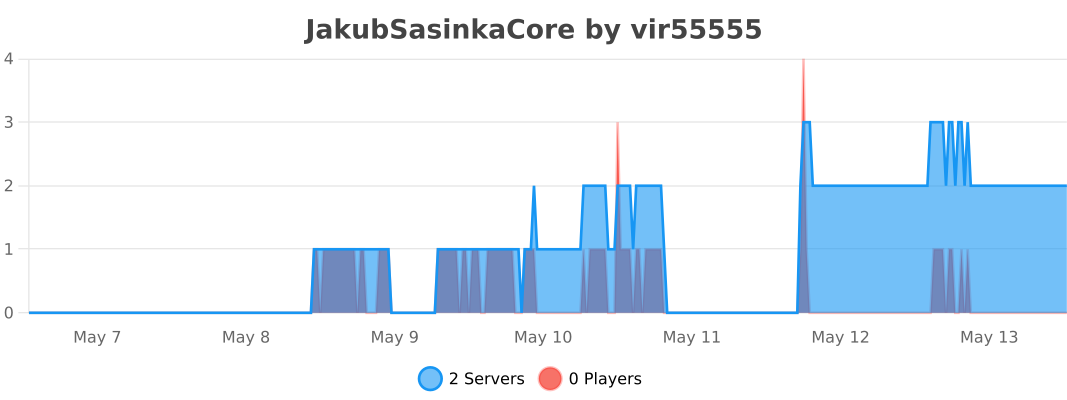
📈 Metrics - BStats