
Compatibility
Minecraft: Java Edition
Platforms


Tags
Creators
Details
Kilacraft-AI
The first plugin that gives every server an AI agent that understands you better the more you use it — powered by LLM intent recognition and skill execution framework





Version Compatibility
Minimum Requirements: Minecraft 1.16.5 + Java 17
| Minecraft Version | Java Requirement | Supported Servers |
|---|---|---|
| 1.16.5 | Java 17+ | Paper / Purpur / Leaf / Folia |
| 1.17 - 1.19 | Java 17+ | All |
| 1.20 - 1.21+ | Java 21+ | All |
One JAR compatible with all versions. Developed on Spigot 1.16.5 API, fully supports Folia regional thread scheduling.
Optional Dependencies
| Plugin | Version | Features |
|---|---|---|
| CMI | 9.8.6.4+ | Teleport, homes, warps, enhanced player info, TPA |
| GlobalMarketPlus | 1.3.8.0+ | Market queries, balance, prices, listings |
| MythicMobs | 5.12.0+ | NPC placeholders (display AI responses) |
| Vault | Latest | Multi-currency support |
| Spark | Latest | Server performance sampling & analysis (Paper 1.21+ etc. have it built-in) |
Features auto-disable when plugins are missing. Core chat remains unaffected.
Quick Start
1. Install
Download the latest Kilacraft-AI.jar, place it in your server's plugins/ directory, and start the server.
2. Configure API
Edit plugins/Kilacraft-AI/llm.yml with your LLM API credentials:
llm:
  api_url: "https://api.deepseek.com/v1/chat/completions"
  api_key: "your-api-key"
  model: "deepseek-chat"
Supports all OpenAI-compatible providers (DeepSeek, Zhipu AI, Moonshot, OpenAI, Groq, SiliconFlow, Gemini, OpenRouter, etc.). Just change api_url and model to switch.
3. Test
/kila hello
If you see an AI response, you're all set.
Reload config with
/kilacraft reload, knowledge base with/kilacraft knowledge reload, personalities with/kilacraft personalities reload.
Core Features
AI Smart Chat




Three Interaction Modes:
# Command mode
/kila How do I get diamonds?

# Continuous chat mode
/kilacraft chat
> I want to build a farm
> AI: Great idea! What crop do you want to plant?

# Keyword trigger (public chat)
@ai How do I craft this?
Command aliases: /kilacraft, /kila, /ai, /zm
Streaming Output & Carriers:
AI responses display character by character in real-time, eliminating wait. Supports 5 output carriers, configurable per scenario:
| Carrier | Effect | Best For |
|---|---|---|
| SIDEBAR | Right sidebar, no FOV obstruction | Long responses (recommended) |
| BOSS_BAR | Top bar | Medium-length text |
| ACTION_BAR | Above hotbar | Short notifications |
| CHAT | Chat box | Default |
| TITLE | Screen center | Short highlights |
AI Response Sound:
Plays a sound when AI starts responding, only the triggering player hears it. Configured in output.yml:
output:
  sound:
    enabled: true
    sound_name: "ENTITY_PLAYER_LEVELUP"
    volume: 0.5
    pitch: 1.2
Knowledge Base Enhancement
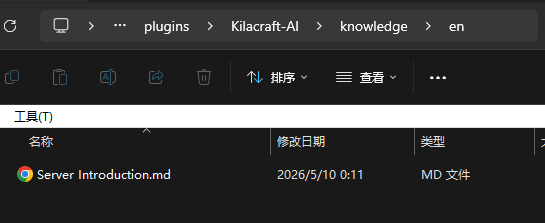
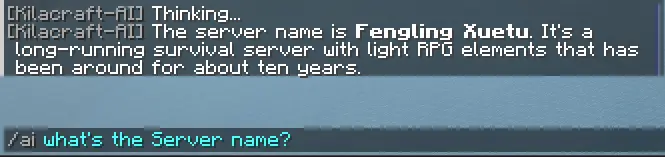
Let AI understand your server rules, gameplay, and FAQ. Just place Markdown or TXT files in plugins/Kilacraft-AI/knowledge/:
# server_rules.md

## How to claim land?
Use the /claim command to define your territory. Costs at least 10 coins.
Run /kilacraft knowledge reload to load. AI automatically retrieves and cites relevant content when players ask questions. Supports custom dictionaries for server-specific terminology to improve search accuracy.

Advanced Features
Player Profile & Social Relations
Player Profile: AI automatically analyzes player conversation history and builds an eight-dimension behavioral profile for each player, dynamically injecting profile summaries as reference context in subsequent conversations. AI gets smarter about your players over time.

| Dimension | Description | Example |
|---|---|---|
| Playstyle | Gameplay preferences | Combat-oriented, Explorer, Builder |
| Personality | Behavioral patterns | Friendly, Humorous, Direct |
| Interests | Liked areas and activities | Economy & trading, Redstone, Building |
| Boundaries | Disliked content or behaviors | Don't use my name, Don't rush me |
| Communication | Preferred AI response style | Brief & direct, No emojis |
| Spatial Memory | Mentioned locations, base positions | Main base at desert (1200,64,-800) |
| Known Facts | Explicitly stated facts by the player | Steve is a friend, Home near desert temple |
| Special Observations | AI freeform observations | "This player has recently shown interest in enchanting" |
Automatically triggers analysis on player login/logout (triple gate mechanism to prevent wasting API calls). Configured in llm.yml:
agent:
  profile:
    enabled: true
    min_interval_minutes: 30    # Minimum analysis interval
    min_message_delta: 20       # Minimum new message count
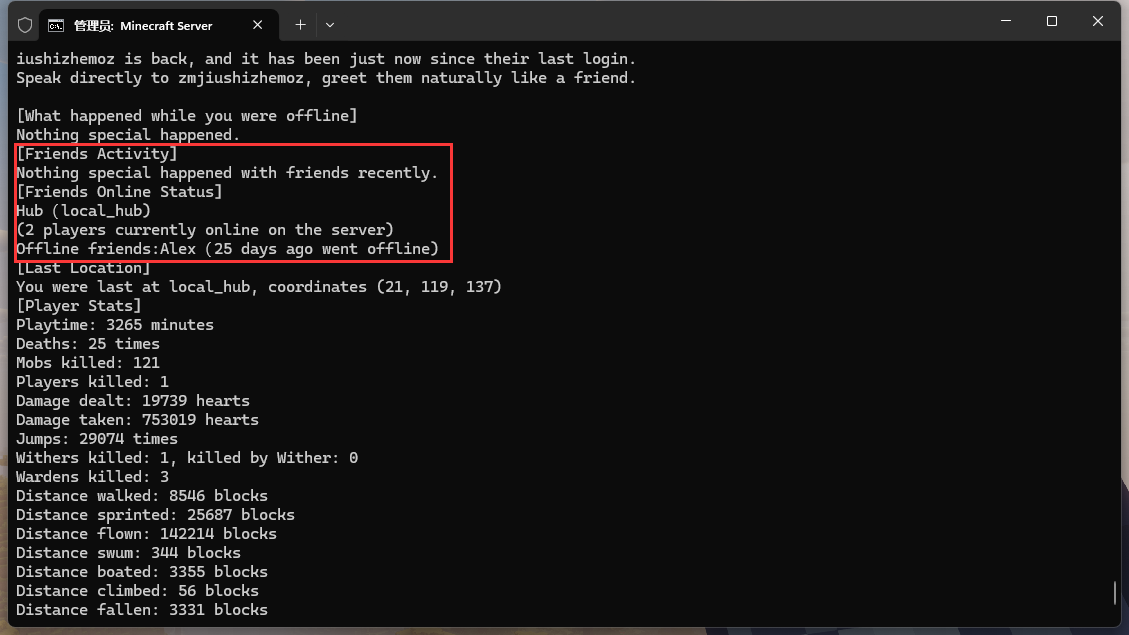
Social Relations: Automatically tracks interactions between players (private messages, TPA, skill interactions), building a social relationship graph. Relationship strength uses diminishing incremental algorithm — inactive relationships naturally decay over time.
- Friends' milestone events (boss kills, raid completions, pet deaths, etc.) appear in each other's login greetings
- AI can sense "who's friends with whom" and naturally mention friend dynamics in conversations

Login Greeting
AI automatically sends personalized greetings when players log in. Based on player profiles, offline events, and friend dynamics, every greeting is unique.
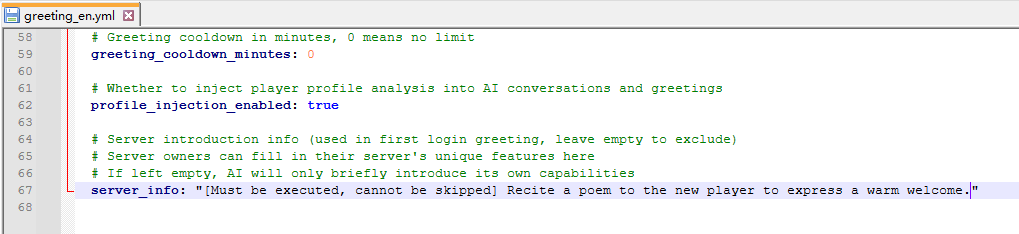
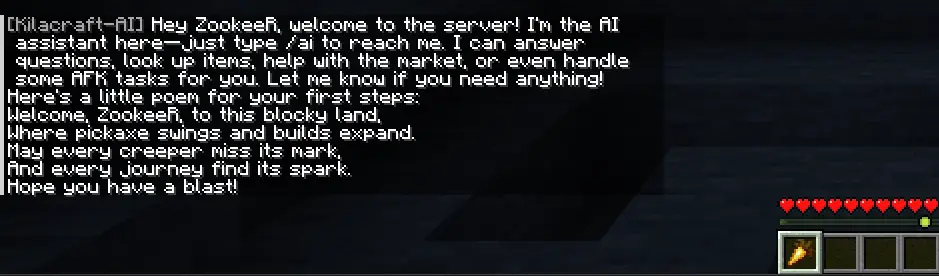
First Login: Welcomes new players with an introduction to AI assistant features. Supports custom server info (configured via server_info in greeting.yml).
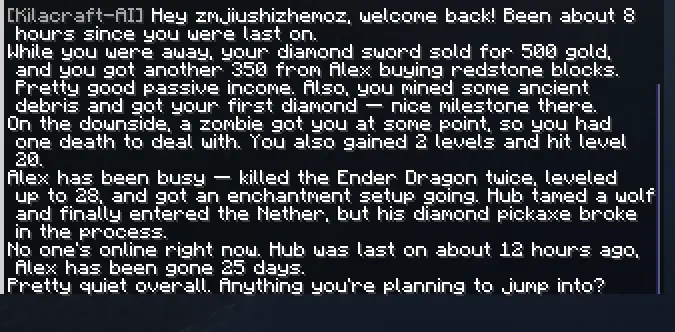
Returning Login (Three-Category Data Aggregation):
| Category | Data Source | Example |
|---|---|---|
| Own Events | Events that happened while player was offline | Items sold, payments received |
| Friend Dynamics | Friends' milestones during offline period | Friend killed the Ender Dragon |
| Session Highlights | Important events since last greeting | Pet killed, totem triggered, Warden defeated |
Personality System & NPC Dialogue
Define different AI personality styles in personalities.yml, and with MythicMobs, NPCs can have independent personalities and dialogue capabilities:
common_prompt: "You are an NPC on a Minecraft server, talking to player {player}."

Fox: |
  You are a clever fox NPC who speaks playfully and cutely.
  Likes to end sentences with "~", often uses emojis.
NPC Dialogue Methods:
Method 1 (Callback Command, recommended):
fox_npc_skill:
  Skills:
  - cmd{c="kilacraft plugins Fox What are the server rules <caster.uuid> myplugin handle_ai {response} <caster.name>"} @self
Method 2 (MythicMobs Placeholder):
fox_npc_skill:
  Skills:
  - cmd{c="kilacraft plugins Fox What are the server rules <caster.uuid>"} @self
  - message{msg="<caster.ai.answer{type=Fox}>"} @trigger
Plugin commands are console-only. Each
UUID_personalitycombination has independent history.
AFK Task System
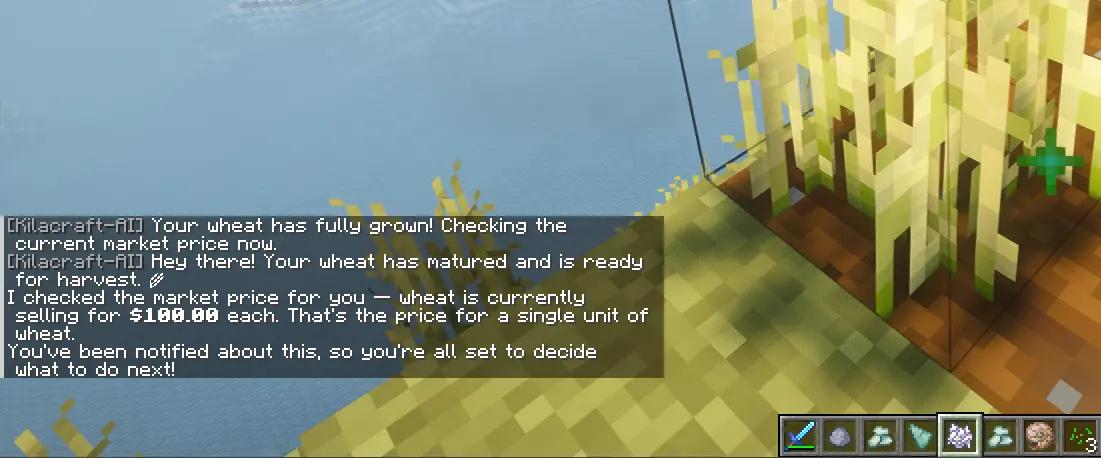
Create background monitoring tasks via natural language. Automatically notifies or executes actions when conditions are met.



Player: Watch for Steve to come online
AI: Got it! I'll notify you as soon as Steve logs in.

[30 minutes later...]
🔔 Steve has joined the server!
Player: Watch for Steve to come online, then check what he's holding
AI: Will do! I'll automatically check Steve's item when he logs in.

[After Steve joins...]
🔔 Steve is online! He's holding a Diamond Sword x1 in main hand.
Supports 20 monitoring types (19 event listeners + custom polling):
| Monitor Type | Description |
|---|---|
| Player Join/Quit | Monitor specific player online status |
| Player Death/Respawn | Monitor death events and respawns |
| Player Teleport/World Change | Monitor position changes |
| Level Change | Monitor player level ups/downs |
| Weather Change | Monitor world weather |
| Sleep/Item Break | Enter/leave bed, item breakage |
| Fishing | Notify or trigger actions on catch |
| Chat | Trigger automation via keywords |
| Block Break | Trigger actions when specific blocks mined |
| Entity Death | Boss kill detection |
| Entity Spawn | Mob farm efficiency monitoring |
| Entity Explosion | Anti-grief warning |
| Furnace Smelt | Notify when smelting completes |
| Crop Growth | Notify when crops mature |
Custom Condition Polling — Monitor any numeric condition returned by Skills:
Player: Tell me when my health drops below 10
Player: Remind me when my balance goes below 1000
Player: Check diamond price when I reach level 30
Management: /kilacraft afk to view, /kilacraft afk cancel to cancel. One task per player at a time.
Server Health Monitoring
Real-time server performance monitoring and AI-powered diagnostics based on Spark. A daemon thread runs 24/7 in the background with automatic anomaly detection and alerting.
Automatic Monitoring: The daemon thread polls TPS/MSPT/CPU metrics every 10 seconds. When thresholds are exceeded, it automatically launches Spark Profiler sampling, then calls the reasoning model to generate a diagnostic report upon completion.
Manual Profiling: Use for proactive troubleshooting:
/kilacraft profile start [30-120]    # Start profiling (seconds)
/kilacraft profile status            # View status
/kilacraft profile stop              # Abort and discard
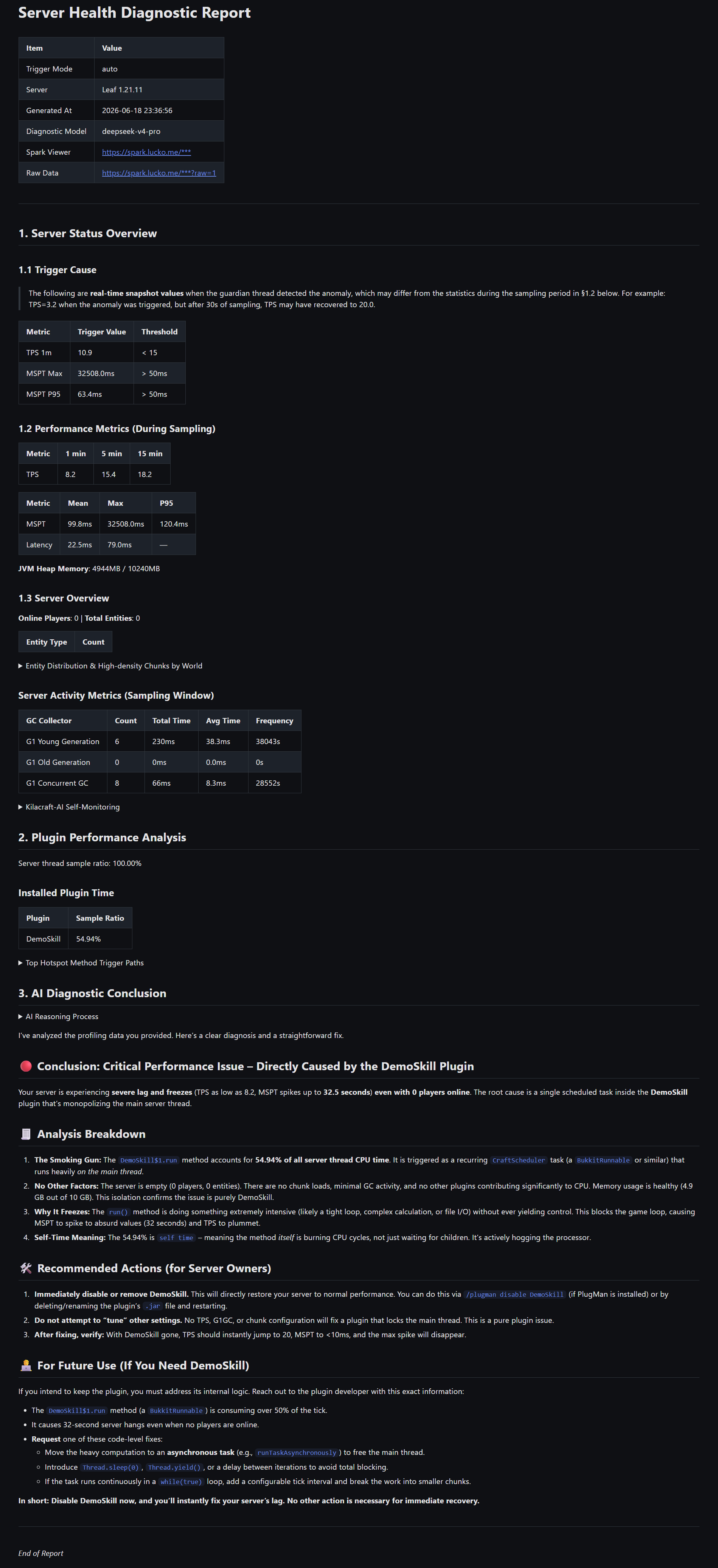
Diagnostic Reports: Includes server status overview, plugin timing and hot method trigger paths (self time), AI diagnostic conclusions and optimization recommendations. Reports are saved in plugins/Kilacraft-AI/reports/ permanently.
Alert Notifications: Supports in-game notifications + Discord Webhook / DingTalk bot external push (automatic mode only). Use /kilacraft notify test to test notification channels.
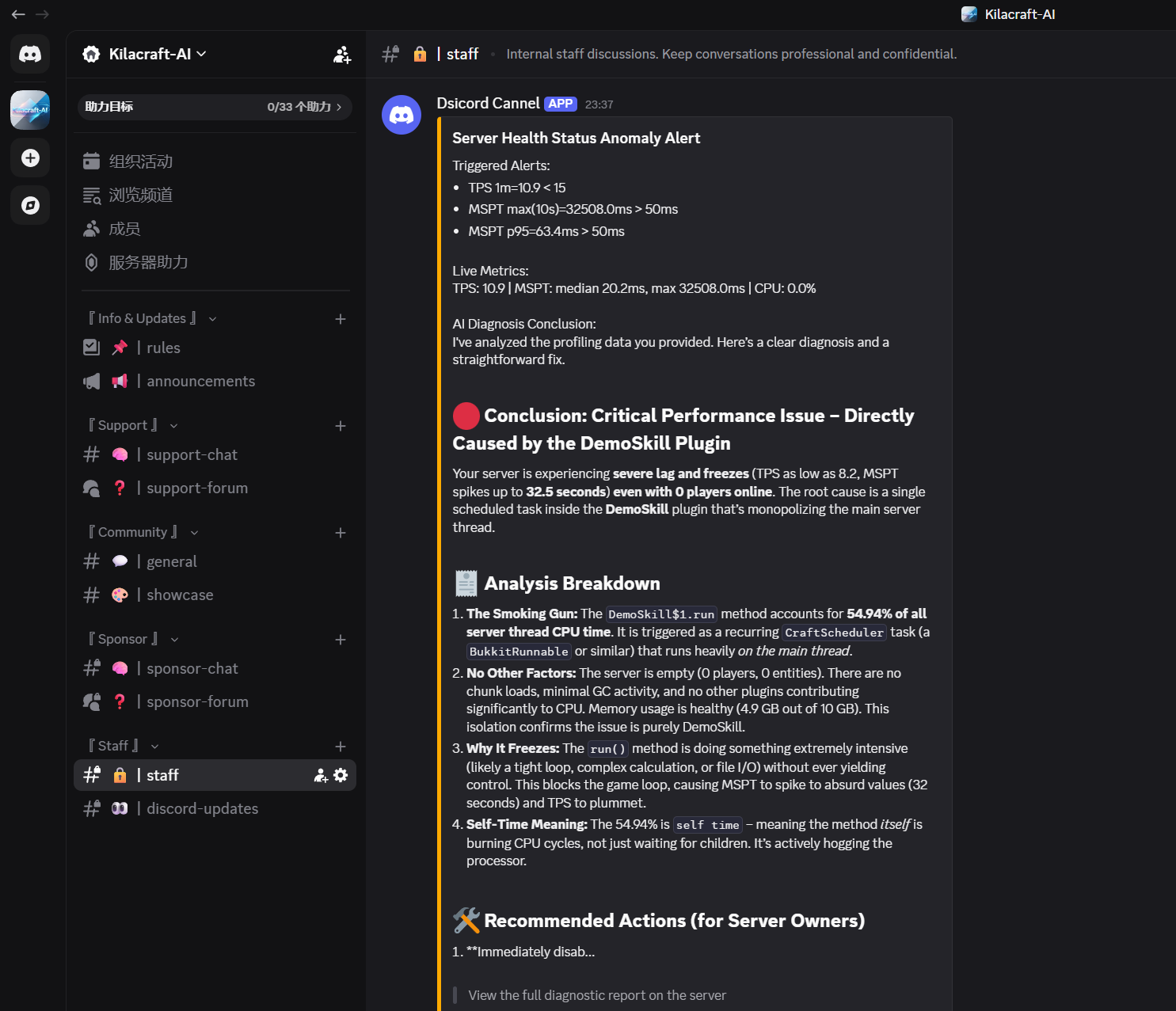
Historical Queries: Query historical alerts and reports via natural language:
- "What alerts have there been in the past day?"
- "List recent diagnostic reports"
- "I upgraded MythicMobs yesterday, check if performance has improved"
Full configuration guide in
admin.yml. Requires Spark plugin + reasoning model API key. Paper 1.21+/Folia/Purpur/Leaf/Pufferfish have Spark built-in.
Player Behavior Analysis
Query your server's player ecosystem via natural language. Permission: kilacraft.admin.player.
- Online Trends: "What's the player online trend this week?" — Login/logout time distribution
- Activity Rankings: "Show the most active players leaderboard" — Login count, playtime, last login
- New Player Influx: "How many new players joined this week?" — Count and time distribution
- Profile Coverage: "How many players have AI profile analysis?" — Analyzed/pending count
- Social Insights: "Show player social network analysis" — Total relations, average strength, isolated players
- Specific Player Social Relations: "Check Steve's social relations" — Detailed social relations, strength, interaction frequency for a specific player
Audit Log Query
Query AI skill usage via natural language. Permission: kilacraft.admin.audit.
- Execution Records: "Query what skills player Steve has used" — Skill name, parameters, results
- Usage Statistics: "Show skill usage statistics leaderboard" — Usage count, success/failure, avg duration
- Error Tracking: "Show failed skill execution records" — Failure records, error messages, time distribution
AI Skill System
AI interacts with the server through Skills, each corresponding to a category of operations. All Skills are read-only queries (except explicitly marked write operations), with fine-grained permission control.
Capabilities Overview
| Category | Capabilities | Dependency | Permission Node |
|---|---|---|---|
| Bukkit API | 72 built-in read-only interfaces: player inventory/status/info, world info, server info, environment awareness | None | kilacraft.api.* |
| Vanilla Stats | 80+ vanilla cumulative stat queries, knowledge base BM25 retrieval, auto unit conversion | None | kilacraft.bukkit_stats |
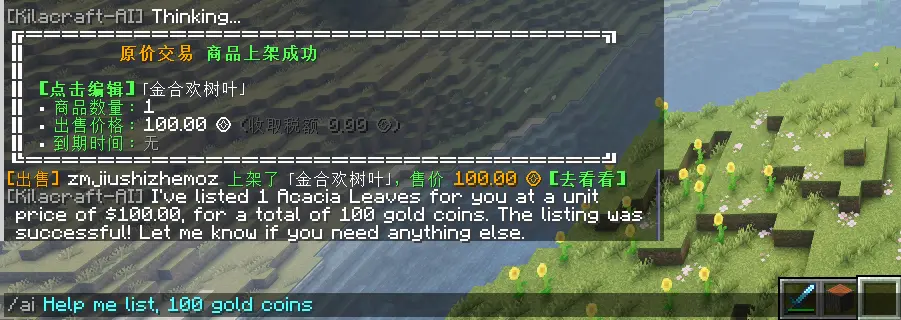
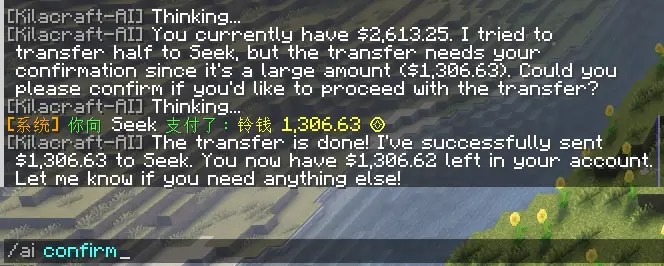
| Global Market | Search/list/collect/buy-order/delist/transfer/auction/bulk-sell/bulk-buy (9 operations) | GlobalMarketPlus | kilacraft.market.* |
| CMI Integration | 5 queries (home/warp/player info/online/AFK) + 3 teleports | CMI | kilacraft.cmi.* |
| AFK Tasks | 19 event listeners + custom polling, natural language creation, notification/callback dual mode | None | kilacraft.afk |
| Utility | Timed delay, proactive notification, server-wide broadcast | None | — |
| Command Execution | Execute commands as player, inherits permission system (disabled by default) | None | kilacraft.command.execute |
| Sound & Particles | AI-triggered sounds/particles, only caller perceives, YAML-driven config | None | kilacraft.bukkit_fx |
| Server Admin | Health monitoring, player analysis, audit logs (see Advanced Features above) | Spark (optional) | kilacraft.admin.* |
Wildcards
kilacraft.api.*andkilacraft.cmi.*include all sub-permissions respectively.

Data & Security
Data Persistence
Supports both H2 embedded database (default, zero-config) and MySQL. Data persists across restarts. MySQL recommended for multi-server data sharing. Hot-switch with /kilacraft reload, auto-fallback on failure.
| Data | Description |
|---|---|
| Conversation History | All player-AI conversations, batch flushed every 30 seconds |
| Player Profiles | Eight-dimension behavioral analysis results |
| Social Relations | Interaction strength and type between players |
| Server Events | Milestone events like deaths, achievements, trades |
| Skill Audit | All Skill execution logs |
| Profile Snapshots | Profile historical versions |
Data retention days configurable in
database.yml. Expired data is automatically cleaned up. Group server data isolation.
Security
- Player Data Isolation: Built-in non-cooperative security filter scans all Skill parameter values — non-self, non-whitelisted player names are automatically replaced (sanitization)
- Third-Party Skill Protection: Even if a third-party Skill attempts to operate on other players, the security filter automatically sanitizes inputs
- Skill Global Registry: Usage statistics and security review status of all registered third-party Skills at Skill Global Registry. Reviewed Skills marked as Verified
Open SPI Interface
Third-party plugin developers can expose their features to AI via the Skill SPI interface:
- API JAR only 5 KB (compileOnly dependency)
- Implement
SkillProviderinterface to register custom Skills - Built-in error isolation — third-party Skill exceptions don't affect core functionality
See Skill SPI Integration Guide.
Commands & Permissions
Command List
| Command | Permission | Description |
|---|---|---|
/kilacraft <message> |
None | Chat with AI |
/kila /ai /zm |
None | Aliases |
/kilacraft chat |
None | Toggle continuous chat mode |
/kilacraft clear |
kilacraft.clear.self |
Clear own chat history |
/kilacraft clear <player> |
kilacraft.clear.other |
Clear specified player's history |
/kilacraft reload |
kilacraft.reload |
Reload config |
/kilacraft knowledge reload |
kilacraft.knowledge |
Reload knowledge base |
/kilacraft personalities reload |
kilacraft.personalities |
Reload personality config |
/kilacraft afk |
kilacraft.afk |
View AFK tasks |
/kilacraft afk cancel |
kilacraft.afk |
Cancel AFK task |
/kilacraft tasks |
kilacraft.tasks |
View scheduled task status (default OP) |
/kilacraft profile start [seconds] |
kilacraft.admin.health |
Start manual profiling |
/kilacraft profile status |
kilacraft.admin.health |
View profiling status |
/kilacraft profile stop |
kilacraft.admin.health |
Abort profiling and discard |
/kilacraft notify test |
kilacraft.admin.health |
Test external notification channels |
/kilacraft plugins ... |
Console only | Third-party plugin integration |
Skill Permissions
| Permission Node | Default | Description |
|---|---|---|
kilacraft.api.player.inventory |
true | Query player inventory |
kilacraft.api.player.status |
true | Query player status |
kilacraft.api.player.info |
true | Query player info |
kilacraft.api.world.info |
true | Query world info |
kilacraft.api.server.info |
true | Query server info |
kilacraft.cmi.query |
true | CMI info queries |
kilacraft.cmi.teleport |
true | CMI teleportation |
kilacraft.bukkit_fx |
true | Sound & particle effects |
kilacraft.bukkit_stats |
true | Vanilla stats queries |
kilacraft.command.execute |
op | Command execution (OP only by default) |
kilacraft.tasks |
op | View scheduled task status (OP by default) |
kilacraft.admin.health |
op | Server health monitoring |
kilacraft.admin.player |
op | Player behavior analysis |
kilacraft.admin.audit |
op | Audit log query |
kilacraft.admin.* |
op | All admin features |
Wildcards
kilacraft.api.*andkilacraft.cmi.*include all sub-permissions respectively.
FAQ
Q: Is the API expensive?
With DeepSeek as an example, a single conversation costs approximately ¥0.001-0.002. Setting cooldown time (default 5 seconds) effectively controls costs.
Q: Which LLMs are supported?
All OpenAI-compatible providers. Regular conversations do not support thinking/reasoning models (like deepseek-reasoner, o1), but the admin features' AI diagnostics support configuring a reasoning model (in admin.yml).
Q: Will it lag the server?
No. All API requests are async. Memory usage 8-50 MB, HTTP connection pool reuse, supports streaming to reduce latency.
Q: How to update?
Back up plugins/Kilacraft-AI/ to preserve configs, replace the JAR, restart the server.
Community & Resources
|
Source Code |
Community |
|
Documentation
|
Contributing
|






MIT License — If you find this useful, a ⭐ Star would be appreciated!