
Compatibility
Minecraft: Java Edition
Platforms


Creators
Details

LiteSignInBedrock
Provides Bedrock Edition sign-in forms for LiteSignIn






English · 简体中文
Download · Report an Issue · bStats
LiteSignInBedrock is a Bukkit addon for LiteSignIn. It allows Bedrock Edition players connecting through Geyser and Floodgate to sign in, perform retroactive sign-ins, and view sign-in records through native Bedrock forms. Rewards and data storage are still handled by LiteSignIn. This README also serves as the installation, configuration, and administration manual.
Demo
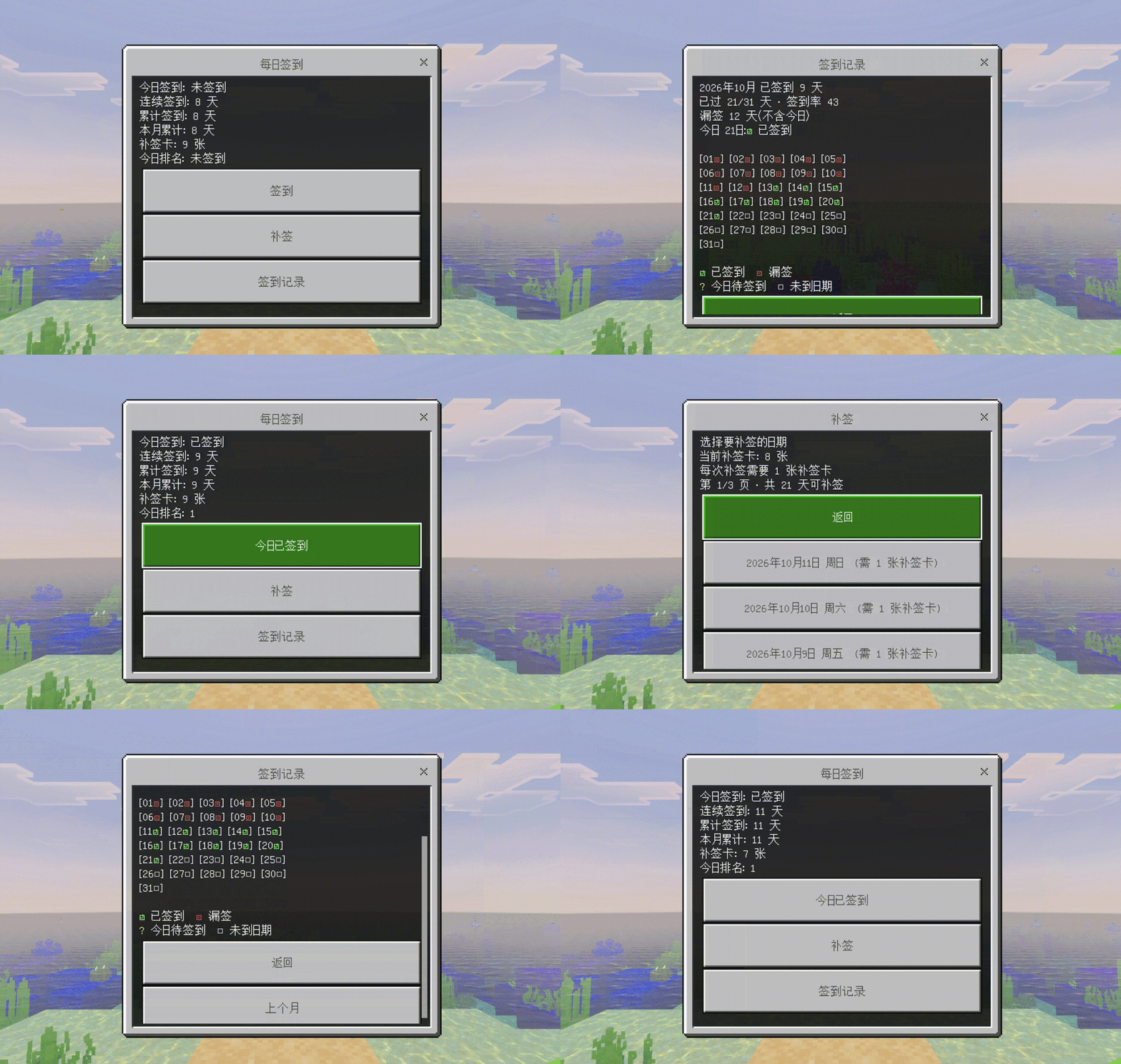
Features
- Three form pages: a main sign-in and information page, a monthly sign-in records page, and a retroactive sign-in page.
- The main page displays today's sign-in status, consecutive sign-in streak, total sign-in days, sign-ins this month, available retroactive sign-in cards, and today's ranking.
- One-click sign-in, with checks for LiteSignIn permissions, disabled worlds, online time requirements, and duplicate sign-ins.
Compatibility and Dependencies
| Component | Requirements and Compatibility |
|---|---|
| Server software | 1.16+: Spigot, Paper, Purpur, Folia, and other compatible server implementations. |
| LiteSignIn | Required. This addon is built against the LiteSignIn 1.9.0 API. |
| Floodgate | Required. Must be installed on the backend Bukkit server. Requires a 2.x version that supports modern Cumulus forms (build baseline: 2.2.2). |
| Geyser | Required as part of the Bedrock connection setup. It can be deployed on the backend server or proxy. This plugin does not directly depend on the Geyser plugin. |
| PlaceholderAPI | Required. Used for placeholders such as %litesignin_...% in form text and sign-in chat messages. |
This addon must be installed on the backend server, not on the proxy.
Installation and Upgrading
- Install compatible versions of LiteSignIn and Floodgate on the backend server, and configure the Geyser connection. For proxy-based setups, enable Floodgate data forwarding and configure Floodgate on the backend according to the Floodgate documentation.
- Download the appropriate
LiteSignInBedrock-<version>.jarfrom GitHub Releases. - Place the JAR in the server's
plugins/directory, remove duplicate older versions of this addon, and restart the server. - Edit
plugins/LiteSignInBedrock/config.ymland the selected file underlang/, then run/litesigninbedrock reload. - Bedrock Edition players can join the server and run
/besigninto open the forms.
When upgrading, keep your existing configuration and language files. On startup or reload, missing configuration keys and messages are added while existing values are preserved. Invalid YAML files will not be overwritten. Invalid language files fall back to the built-in messages, while an invalid configuration retains the last known working settings. If no valid configuration is available on the first startup, the plugin will fail to enable.
Adding missing keys may reformat existing YAML files and remove comments.
Commands and Permissions
The command alias is /besignin, which supports the same arguments as the main command.
| Command or Permission | Description | Default |
|---|---|---|
/litesigninbedrock |
Opens the main form. Players only; Bedrock Edition players only. | litesigninbedrock.use |
/litesigninbedrock reload |
Reloads the configuration. Can also be executed from the console. | litesigninbedrock.admin |
litesigninbedrock.use |
Allows access to the forms. Permissions are checked again when an action is processed. | All players |
litesigninbedrock.admin |
Allows configuration reloading and receiving update notifications. | OP |
Sign-in actions also check the permission configuration key used by LiteSignIn itself, rather than a permission node declared by this addon. Refer to the LiteSignIn configuration to find or set the relevant permission node.
The addon's own usage permission does not bypass any restrictions imposed by LiteSignIn.
Configuration
# LiteSignInBedrock
# Auto-detect the server JVM Locale, or use a language file, e.g. zh_cn.yml.
# Supported: en_US, zh_CN, ja_JP, ko_KR, zh_TW, de_DE, fr_FR, es_ES, ru_RU.
language: auto

# Check for updates 5 seconds after startup and every 6 hours.
# Notifications only; updates are never installed automatically.
check-for-updates: true

# bStats metrics
bstats:
  enabled: true

# Automatically open the sign-in form when a player joins
auto-open-on-join: false

# Delay in seconds, 0–86400
auto-open-delay: 1

# Number of days to look back for retroactive sign-ins, 0–3660.
# 10 dates are displayed per page.
retroactive-days: 30

# Number of viewable months, including the current month.
# The earliest available month is January 1970.
records-months: 12
auto uses the server JVM's default locale and falls back to English (en_US) when unsupported. Manual language values are case-insensitive and may include or omit .yml.
Retroactive sign-in cards, reward groups, disabled worlds, and other sign-in rules are configured in LiteSignIn.
Frequently Asked Questions and Limitations
| Issue | What to Check |
|---|---|
| "Bedrock Edition only" message or forms do not appear | Check whether Floodgate is installed on the backend, proxy forwarding and keys are configured correctly, and the player is recognized as a Floodgate player. Installing Geyser alone is not sufficient. |
| Permission denied | Check both this addon's permissions and the permission mapping configured in LiteSignIn. |
| Retroactive sign-in list is empty | Check retroactive-days, existing sign-in history, and LiteSignIn's earliest allowed retroactive sign-in date. |
| Retroactive sign-in fails | Check LiteSignIn's retroactive sign-in settings, world restrictions, retroactive sign-in card item and quantity, cooldowns, and permissions. |
| Update checks fail | Ensure the server can access api.github.com over HTTPS, and check for GitHub anonymous API rate limits. A GitHub Release must be published before an update can be detected. |
Java Edition players will continue to use LiteSignIn's existing sign-in methods and cannot open these Bedrock forms.
The forms do not reproduce reward item icons from chest GUIs, reward previews, multi-group reward layouts, or the full historical leaderboard. Only the daily ranking provided by LiteSignIn is displayed.
This addon does not provide an independent reward system, database, or resource pack.
Sponsorship and Support
If this project helps you, you can support development through Ko-fi or Afdian. Sponsors can request plugin installation, configuration, and troubleshooting.

