
Compatibility
Minecraft: Java Edition
Platforms


Links
Tags
Creators
Details

Server-side control over mace limits, enchantments, combat rules, and owner visibility.



| Feature | What it does | Control |
|---|---|---|
| Craft limits | Caps the number of tracked maces that can be crafted server-wide | Config or GUI |
| Enchantment rules | Allows selected enchantments and enforces a maximum level for each | Config, GUI, or commands |
| Combat balance | Adds an optional custom mace attack cooldown | Config, GUI, or command |
| Owner visibility | Colors owner glow, dropped maces, and tab-list names | Config, GUI, or commands |
| Position reveals | Announces mace wielder locations at a configurable interval | Config, GUI, or commands |
| Milestone alerts | Announces mace crafts and when the server-wide limit is reached | Config or GUI |
See it in action
Configure mace rules from one menu
Run /maceconfig gui to manage limits, combat rules, owner visuals, announcements, tracking, and reloads.

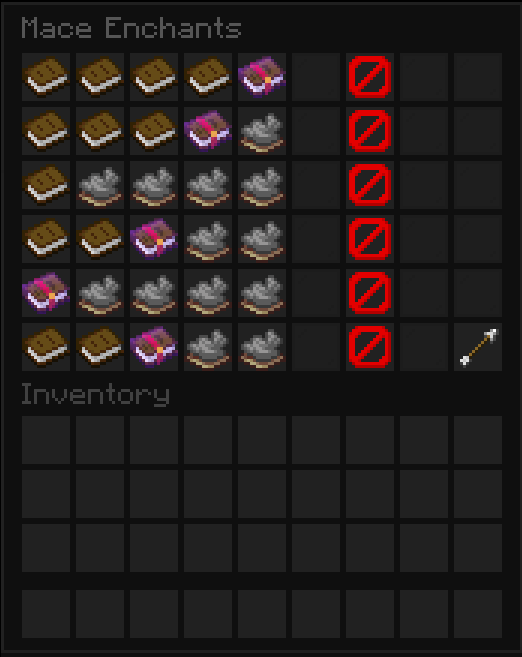
Set enchantment limits visually
Open the enchantment editor to allow or block each mace enchantment and select its maximum level.
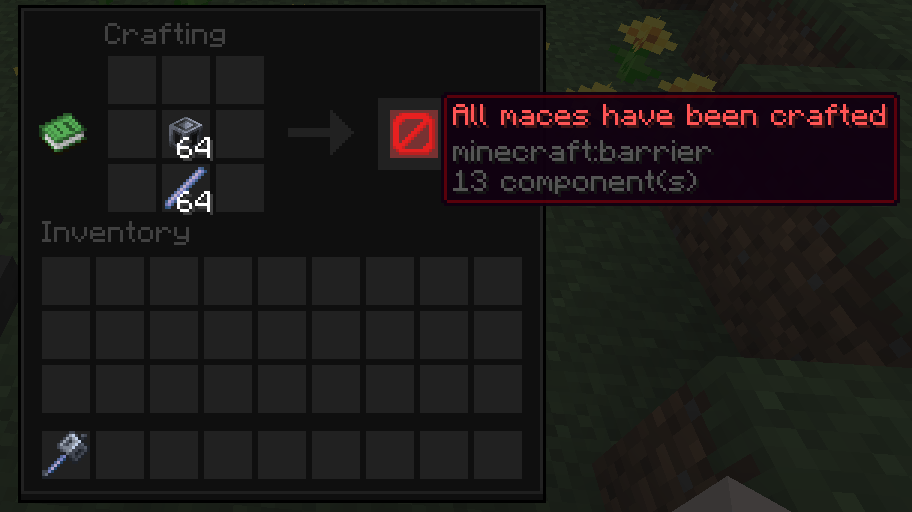
Recognize blocked crafts immediately
When the mace limit is reached, the crafting result becomes an uncraftable barrier indicator.
Install
- Install a supported Bukkit-based server for Minecraft 26.1 or 26.2.
- Download the Mace Config
.jarfrom Modrinth. - Place the
.jarin the server'spluginsdirectory. - Restart the server, then confirm that Mace Config appears in
/plugins.
Mace Config has no hard plugin dependencies.
Compatibility
Mace Config supports Minecraft 26.1–26.2 on:
Folia and other region-threaded server software are not currently supported. Mace Config is server-side only; players do not need to install anything.
Use
- Join with the
maceconfig.adminpermission; server operators receive it by default. - Run
/maceconfig guito open the main settings menu. - Select a category to configure mace limits, enchantments, cooldowns, owner visuals, reveals, or announcements.
- Run
/maceconfig refreshafter changing or restoring player storage to recount tracked maces held by online players. - Use
/maceconfig reloadafter editingplugins/MaceConfig/config.ymldirectly.
Tip: A refresh scans online player inventories, ender chests, and nested shulker boxes. It does not scan offline players or arbitrary world containers.
Commands
Aliases: /macecfg, /mcconfig
Permission: maceconfig.admin
| Command | Purpose |
|---|---|
/maceconfig gui |
Open the interactive settings menu |
/maceconfig reload |
Reload config.yml and restart configuration-dependent tasks |
/maceconfig refresh |
Recount tracked maces in online player storage |
/maceconfig set limit <amount> |
Set the crafting limit; 0 is unlimited |
/maceconfig set cooldown <seconds> |
Set the custom attack cooldown; 0 disables it |
/maceconfig set revealinterval <seconds> |
Set the position reveal interval; minimum 5 seconds |
/maceconfig set color <color> |
Set the shared owner, tab-list, and dropped-mace color |
/maceconfig toggle <setting> |
Toggle enchantable, glow, tab, reveal, craftedchat, fullchat, or fulltitle |
/maceconfig enchantlevel <enchantment> <max-level> |
Set an allowed enchantment's maximum level |
/maceconfig whitelist add <enchantment> |
Allow an enchantment on maces |
/maceconfig whitelist remove <enchantment> |
Block an enchantment on maces |
/maceconfig whitelist list |
Show allowed mace enchantments |
Build from source
JDK 25 is required. From the repository root, build the single API target that covers the full supported Minecraft range:
gradle clean build
The distributable jar is written to build/libs/MaceConfig-<version>.jar. The same jar supports Minecraft 26.1–26.2.
GPL-3.0-only · 2026 · NullKeeper-dev