
Compatibility
Minecraft: Java Edition
Platforms


Links
Tags
Creators
Details
MineVerify
Lightweight PaperMC plugin allowing apps to verify Minecraft players through generated in-game codes.
📋 Overview
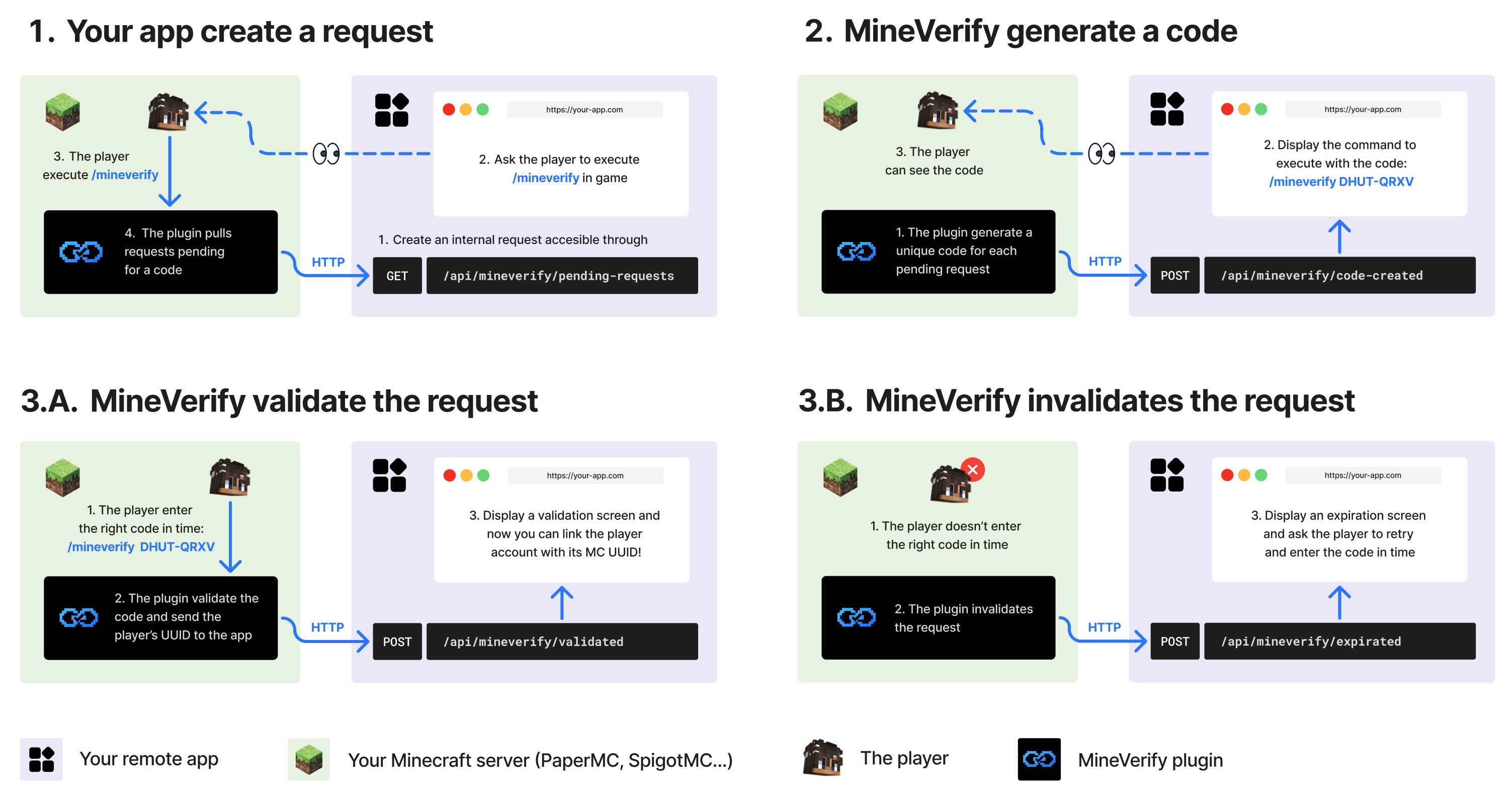
MineVerify lets external apps verify that a Minecraft account is controlled by a real player on your server.
The app creates an internal verification request and asks the player to run /mineverify.
The plugin then polls configured apps, generates a temporary code, validates /mineverify <code>
in game, and reports the verified Minecraft UUID and username back to the app.
MineVerify only makes outbound requests to configured apps. It does not expose a public HTTP API on the Minecraft server.
✨ Features
- Verifies that a real connected Minecraft player owns a generated code
- Lets several external apps use the same Minecraft server for verification
- Keeps the Minecraft server private by using outbound app calls only
- Sends the app the verified Minecraft UUID and username after validation
- Expires unused codes automatically
- Expires pending verifications during graceful server shutdowns
- Provides admin status commands to inspect current verification activity
- Supports localized in-game messages
🚀 Installation
- Install a PaperMC server with Java 25+
- Download the latest
MineVerify-x.x.x+mcx.x.x.jarfrom the releases page - Drop the jar into your server's
plugins/folder - Restart the server or run
/reload confirm - Configure your apps in
plugins/MineVerify/config.yml
🕹 Command Usage
| Command | Permission | Description |
|---|---|---|
/mineverify |
mineverify.use |
Starts checking configured apps for pending verification requests. |
/mineverify <code> |
mineverify.use |
Validates a generated code for the connected player. |
/mineverify status |
mineverify.admin |
Shows polling state, configured apps, stored requests, and last app responses. |
/mineverify status requests |
mineverify.admin |
Shows admin status with stored request details. |
/mineverify and /mineverify <code> must be run by a real player. Admin status commands can be
run by admins or from the console.
⚙️ Configuration
config.yml defines the language, remote apps, and code validity.
language: "en_us"

apps:
  my-app:
    name: "Your App"
    base-url: "https://your-app.com"
    token: "generated-token-from-your-app"
    poll-interval-seconds: 3

linking:
  code-ttl-seconds: 60
| Key | Default | Description |
|---|---|---|
language |
en_us |
In-game message language. Available values are listed in config.yml. |
apps.<id>.name |
<id> |
Player-facing app name. |
apps.<id>.base-url |
Required | Full app backend URL, starting with http:// or https://. |
apps.<id>.token |
Required | Bearer token used by MineVerify when calling this app. |
apps.<id>.poll-interval-seconds |
3 |
Poll interval used only during an active player-triggered polling session. |
linking.code-ttl-seconds |
60 |
Generated code validity duration. |
🔁 Verification Flow
- The app creates an internal request for its own user.
- The app asks the player to join the Minecraft server and run
/mineverify. - MineVerify starts a temporary polling session.
- MineVerify calls each configured app for pending requests.
- MineVerify generates a code for each new pending request and sends it to the owning app.
- The app shows
/mineverify <code>to the user. - The player runs
/mineverify <code>in game. - MineVerify validates the code and reads the connected player's UUID and username.
- MineVerify reports either validation or expiration to the app.
🔌 App Endpoints
It's always MineVerify that contacts the app, never the opposite.
In this way, each app configured in config.yml must implement these endpoints on its own backend.
| Endpoint | Method | Description |
|---|---|---|
/api/mineverify/pending-requests |
GET |
Returns app requests waiting for a generated code. |
/api/mineverify/code-created |
POST |
Receives the generated code and expiration time. |
/api/mineverify/validated |
POST |
Receives the verified Minecraft UUID and username. |
/api/mineverify/expired |
POST |
Receives an expiration event for an unused code or a graceful server shutdown. |
Every request sent by MineVerify includes:
Authorization: Bearer <app-token>
[!IMPORTANT] To fully integrate MineVerify into your app, follow
docs/APP_INTEGRATION.md.