
Compatibility
Minecraft: Java Edition
Platforms


Links
Tags
Creators
Details
🛡️ ModerationGUI — The All-in-One Staff Management Plugin






The next-generation, high-performance moderation and server administration suite built for Paper, Purpur, and Folia 1.21+ servers. Eliminate command fatigue with a unified 54-slot visual staff menu, automated reason-based ban presets, real-time redstone lag detector, screenshare freeze, and live inventory inspection.
📸 In-Game Staff Control Center
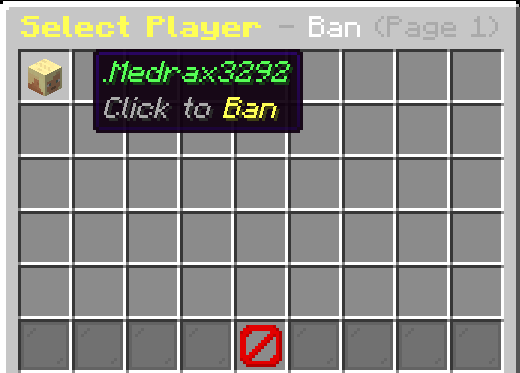
Open instantly in-game using /mod or /moderation
┌─────────────────────────────────────────────────────────────────────────────────┐
│                           54-SLOT MODERATION MATRIX                             │
├──────────────────┬──────────────────┬──────────────────┬────────────────────────┤
│ 📖 Slot 4: History│ 🟥 Slot 11: Ban   │ 🟪 Slot 13: Kick │ 🟧 Slot 15: Mute       │
│ 🧊 Slot 20: Freeze│ 🟦 Slot 22: Warn  │ ✍️ Slot 24: Chat │ 🟩 Slot 29: Unban      │
│ 🩵 Slot 31: Warned│ 🟨 Slot 33: Unmute│ 📦 Slot 38: InvSee│ 📑 Slot 40: Reports    │
│ 📝 Slot 42: Notes │ 🚨 Slot 47: Maint │ 👁️ Slot 49: Vanish│ 🏷️ Slot 51: Tickets    │
└──────────────────┴──────────────────┴──────────────────┴────────────────────────┘
🌟 What Makes ModerationGUI 3.0 Special?
Traditional server moderation is fragmented across multiple slow plugins. ModerationGUI 3.0 consolidates every administrative workflow into an ultra-fast, zero-lag ecosystem.
💎 Core Architectural Highlights:
- ⚡ Zero Main-Thread Lag: Asynchronous audit logging, file saving, and cache indexing keep tick rates at a steady 20.0 TPS.
- 🔒 Visual RBAC Security: If a staff member lacks permission for any button, it dynamically renders as a locked Barrier icon.
- 💬 Interactive Chat Input: No clunky anvil inputs; durations and reasons are typed directly in chat with automatic timeout protection.
- 🌐 True Ghost Vanish: Complete silence, vanished player list status, hidden join/leave messages, and silent container opening.
✨ Feature Breakdown
⚡ 1. Reason-Based Auto-Duration Punishments
Never remember ban durations again. Simply type the player and the cheat name:
- Example:
/mod ban Steve killaura- Instantly resolves
killaura(or aliasesaura,ka,forcefield). - Automatically applies the configured duration: 14 Days.
- Formats display reason:
KillAura / Unfair Combat.
- Instantly resolves
- Append Custom Notes:
/mod ban Steve killaura with fast hits-> applies 14d ban with formatted reason and suffix notes. - Manual Override:
/mod ban Steve 3d killaura-> manual duration overrides preset duration while keeping clean reason styling. - Preset Mutes:
/mod mute Steve spam(30m),/mod mute Steve toxicity(2h),/mod mute Steve advertising(7d).
🪤 2. Researched 25+ Hack Categories
Preset configurations researched from premier anticheats (Vulcan, GrimAC, Matrix, Polar):
- Combat:
killaura(14d),reach(14d),hitbox(14d),velocity(14d),autoclicker(7d),criticals(7d). - Movement:
fly(14d),speed(14d),jesus(7d),nofall(7d),timer(14d),step(7d). - World & Exploits:
xray(30d),lagmachine(30d),scaffold(14d),nuker(14d),fastbreak(7d),baritone(14d),dupe(permanent). - Chat Violations:
spam(30m),toxicity(2h),advertising(7d),hate(14d).
🎯 3. In-Game Cheat & Lag Testing Suite
- 🪤
/test aura <player>: Spawns an invisible bait entity behind the suspect to detect automated rotation locks and KillAura hacks. - 🛡️
/test totem <player>: Audits offhand totem equip frequency in milliseconds to detect automated AutoTotem swap macros. - 🚨
/test lag//test lagmachine: Real-time redstone clock monitor. Audits TPS, counts redstone ticks and piston loops per chunk, and flags entity clumping clusters.
🧊 4. Freeze & Screenshare (SS) System
- Total Suspect Lockdown (
/freeze <player>//ss <player>):- Applies blindness and locks player location, jumps, attacks, and block interactions.
- Broadcasts persistent screen titles and chat instructions.
- Combat Logout Guard: If a frozen suspect disconnects, they are automatically banned for 14 days for screenshare evasion.
📦 5. Live Inventory & Ender Chest Inspector
/invsee <player>: Live-view target armor, offhand item, and full inventory contents in real time./enderchest <player>//ec <player>: Open and view any online player's Ender Chest on demand.
💬 6. Complete Chat Management & Staff Channel
/chat clear: Instantly wipe chat history to clear slurs or advertisement links./chat mute: Silence global chat during server events or announcements./chat slow <seconds>: Enforce cooldowns between player messages./staffchat <message>//sc: Dedicated private staff channel with persistent chat toggle.
🚨 7. Server Maintenance Mode
/maintenance [on|off|toggle|status]//maint:- Locks server access exclusively to operators and staff with
moderation.maintenance.bypass. - Non-staff players receive a custom kick screen and title explaining the ongoing maintenance.
- Locks server access exclusively to operators and staff with
👥 8. Alt Account Tracker & Staff Notes
/alts <player>: Tracks IP addresses across joins and alerts staff if a connecting player shares an IP with banned accounts./notes <player> add|remove|list: Permanent private notebook attached to each player profile for staff communication.
🎮 Master Command Reference
| Command | Aliases | Description | Permission Node |
|---|---|---|---|
/mod |
/moderation |
Open the 54-slot interactive moderation GUI | moderation.use |
/mod ban <player> [dur] <reason> |
— | Ban player (supports preset auto-durations) | moderation.ban |
/mod unban <player> |
— | Unban a player via command or GUI | moderation.unban |
/mod mute <player> [dur] <reason> |
— | Mute player (supports preset auto-durations) | moderation.mute |
/mod unmute <player> |
— | Unmute a player via command or GUI | moderation.unmute |
/mod kick <player> <reason> |
— | Kick a player from the server | moderation.kick |
/mod warn <player> <reason> |
— | Warn a player (triggers automated punishment ladder) | moderation.warn |
/mod unwarn <player> |
— | Remove a player's warning | moderation.unwarn |
/freeze <player> |
/ss |
Freeze suspect for screenshare inspection | moderation.freeze |
/invsee <player> |
— | Live inspect player inventory and armor | moderation.invsee |
/enderchest <player> |
/ec |
Open and inspect player Ender Chest | moderation.enderchest |
/chat <clear|mute|slow> |
— | Manage global chat channel | moderation.chat.manage |
/alts <player> |
— | Audit linked alternate accounts and shared IPs | moderation.alts |
/notes <player> <add|remove|list> |
— | Manage persistent player staff notes | moderation.notes |
/test <aura|totem|lag> |
— | Cheat bait and redstone lag diagnostics | moderation.test |
/maintenance [on|off|toggle] |
/maint |
Toggle server maintenance lockdown | moderation.maintenance |
/vanish |
/v |
Toggle silent ghost vanish | moderation.vanish |
/staffchat <message> |
/sc |
Private staff communication channel | moderation.staffchat |
/report <player> <reason> |
— | Submit player report to staff ticket desk | None (All players) |
Supported Duration Formats: 30s 15m 2h 1d 7d 14d 30d permanent
🔑 Permissions & LuckPerms Matrix
| Permission Node | Description | Default Role |
|---|---|---|
moderation.use |
Open the /mod GUI menu |
OP |
moderation.ban |
Ban players via GUI or command | OP |
moderation.unban |
Unban players | OP |
moderation.mute |
Mute players via GUI or command | OP |
moderation.unmute |
Unmute players | OP |
moderation.kick |
Kick players | OP |
moderation.warn |
Issue warnings with automated ladder | OP |
moderation.unwarn |
Remove player warnings | OP |
moderation.freeze |
Freeze suspects for screenshare | OP |
moderation.freeze.bypass |
Immunity to freeze | OP |
moderation.invsee |
Live inspect player inventories | OP |
moderation.enderchest |
Open player Ender Chests | OP |
moderation.chat.manage |
Clear, mute, or slow chat | OP |
moderation.chat.bypass |
Bypass chat mute and slowmode | OP |
moderation.alts |
Audit player alt accounts | OP |
moderation.alts.notify |
Receive alt account join alerts | OP |
moderation.notes |
View and manage staff notes | OP |
moderation.test |
Run cheat and lag diagnostics | OP |
moderation.maintenance |
Toggle maintenance lockdown | OP |
moderation.maintenance.bypass |
Join server during maintenance | OP |
moderation.vanish |
Enter silent ghost vanish mode | OP |
moderation.staffchat |
Access staff communication channel | OP |
moderation.alerts.lag |
Receive real-time redstone lag alerts | OP |
moderation.* |
Full administrative root access | OP |
📋 Ready-to-Paste LuckPerms Setup
# 1. Moderator Role Setup
/lp group mod permission set moderation.use true
/lp group mod permission set moderation.kick true
/lp group mod permission set moderation.mute true
/lp group mod permission set moderation.unmute true
/lp group mod permission set moderation.warn true
/lp group mod permission set moderation.freeze true
/lp group mod permission set moderation.invsee true
/lp group mod permission set moderation.enderchest true
/lp group mod permission set moderation.notes true
/lp group mod permission set moderation.staffchat true

# 2. Administrator Role Setup
/lp group admin permission set moderation.* true
💡 Smart Dynamic Locking: Players with any permission (e.g.
moderation.kick) can open/mod. Any actions they lack permissions for will be visually locked with a Barrier item.
📝 Configuration Preview (config.yml)
# Moderation Plugin Settings
prefix: "&c&lModeration &8» &7"

# Punishment presets
presets:
  default-ban-duration: "30d"
  default-mute-duration: "1d"
  killaura:
    duration: "14d"
    reason: "KillAura / Unfair Combat"
    aliases:
      - "aura"
      - "ka"
      - "forcefield"
  fly:
    duration: "14d"
    reason: "Flight / Movement Cheat"
    aliases:
      - "flight"
  xray:
    duration: "30d"
    reason: "X-Ray / Illegal Mining"
  spam:
    type: "mute"
    duration: "30m"
    reason: "Spam / Chat Flood"

# Lag machine detector
lag-detector:
  enabled: true
  redstone-threshold: 250
  piston-threshold: 60
  entity-threshold: 80
  alert-cooldown-seconds: 10

# Maintenance mode
maintenance:
  enabled: false
  kick-message: "&cServer is currently under maintenance!\n&ePlease check back later."
⚙️ Requirements & Installation
| Requirement | Supported Version |
|---|---|
| Server Platform | Paper, Purpur, or Folia |
| Minecraft Version | 1.21.x (1.21 to 1.21.11) |
| Java Version | Java 21+ |
| Permissions Plugin | LuckPerms (Recommended) |
Installation Steps:
- Download
ModerationGUI-3.0.jar. - Drop the jar file into your server's
plugins/folder. - Restart your server (never use
/reload). - Configure roles and permissions with LuckPerms.
- Type
/modin-game and enjoy effortless server management!
💬 Support & Community
Have a bug to report or a feature to request? Join our Discord community:

Direct Invite Link: https://discord.gg/DmAaWeSnK8
Crafted with ❤️ by MDR Studios