
Compatibility
Minecraft: Java Edition
Platforms


Links
Tags
Creators
Details

Plugin Info

A Minecraft plugin that adds three special mace variants with unique abilities and crafting recipes.
Mace Variants
WARDEN MACE 🟣
A powerful mace imbued with the essence of the Warden, capable of unleashing devastating sonic attacks and sculk-based abilities.
Primary Ability: Sculk Resonance
- Activation: Right-click (place button)
- Description: Massive sculk shockwave affecting all entities in range
- Effects:
- Slowness III (8 seconds)
- Darkness (8 seconds)
- Mining Fatigue III (8 seconds)
- Nausea (8 seconds)
- Range: 15 blocks radius
- Cooldown: 5 minutes (300 seconds)
- Visual: Expanding sculk particles with soul fire effects and dark energy waves
- Sound: Warden sonic boom + enderman scream + deep cave ambience
Secondary Ability: Sonic Beam
- Activation: Double shift click
- Description: Targeted sonic beam at entities in line of sight
- Effects:
- Slowness III (6 seconds)
- Weakness II (6 seconds)
- Range: 30 blocks with line-of-sight targeting
- Cooldown: 4 minutes (240 seconds)
- Visual: Sculk soul beam with shockwave particles and impact effects
- Sound: Warden sonic boom + warden roar
General Properties:
- Appearance: Warden-like texture with dark colors
- Effect on Hit: Warden shockwave effect with entity pushback
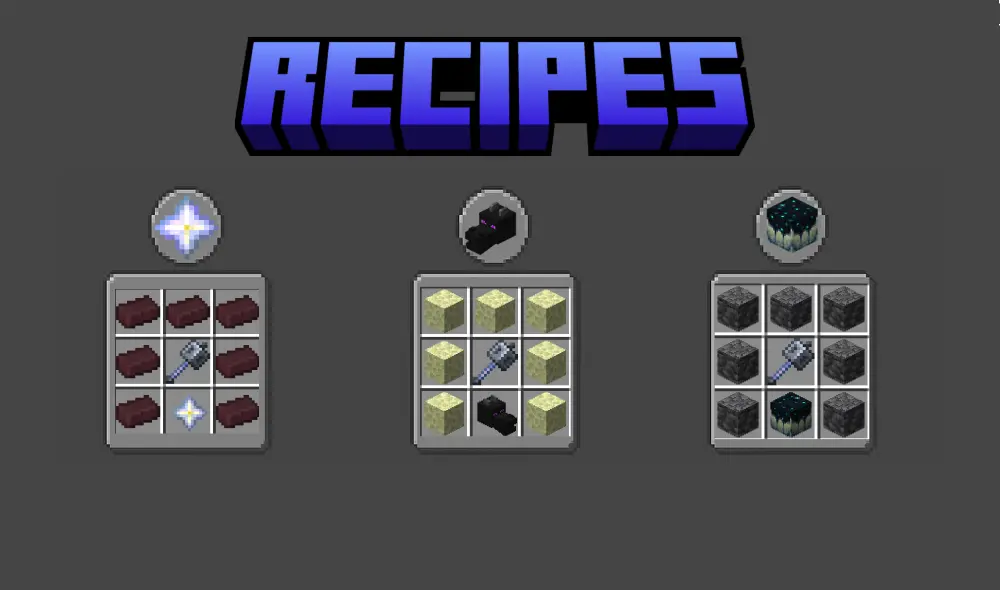
- Crafting Recipe: Deepslate + Mace + Sculk Sensor
NETHER MACE 🔴
A mace forged in the depths of the Nether, harnessing the infernal power of fire and destruction.
Primary Ability: Infernal Wrath
- Activation: Right-click (place button)
- Description: Devastating meteor shower from the nether
- Effects:
- Fire Damage (continuous)
- High knockback impact
- Temporary lava pools
- Range: 20 blocks radius
- Cooldown: 4 minutes (240 seconds)
- Visual: Fire particles, smoke, and falling meteor effects with explosions
- Sound: Ghast scream + explosion sounds + lava bubbling
Secondary Ability: Fire Tornado
- Activation: Double shift click
- Description: Spinning fire tornado that follows the player
- Effects:
- Continuous fire damage (15 seconds)
- Area control with mobile tornado
- Range: 8 blocks radius, 10 blocks height
- Cooldown: 6 minutes (360 seconds)
- Visual: Spinning fire particles and smoke in tornado formation
- Sound: Lava pop + ghast scream + fire crackling
General Properties:
- Appearance: Nether-like texture with red/orange colors
- Effect on Hit: Automatic Fire Aspect 4 + extra fire damage
- Crafting Recipe: Nether Brick + Mace + Nether Star
END MACE 🟣
A mace infused with the power of the End dimension, capable of manipulating void energy and controlling the forces of the End.
Primary Ability: Void Rift
- Activation: Right-click (place button)
- Description: Creates a void rift that damages enemies
- Effects:
- Slow Falling (applied to all affected entities)
- Blindness (2 seconds)
- Void damage (6 hearts)
- Range: 30 blocks radius
- Cooldown: 5 minutes (300 seconds)
- Visual: Swirling portal particles with end rod effects and void energy
- Sound: Enderman teleport + End portal spawn
Secondary Ability: Ender Storm
- Activation: Double shift click
- Description: Summons falling end crystals that explode
- Effects:
- 4 hearts damage per crystal explosion
- Continuous void damage
- Blindness (2 seconds)
- Range: 25 blocks radius
- Cooldown: 5 minutes (300 seconds)
- Visual: Falling crystals with end rod trails and massive explosions
- Sound: Ender Dragon growl + Crystal explosions + Portal sounds
General Properties:
- Appearance: End-like texture with purple colors
- Effect on Hit: Slow falling effect with void energy explosion (Players & Mobs)
- Crafting Recipe: End Stone + Mace + Ender Dragon Head
Passive Abilities:
- Void Walker: Reduces fall damage by 80% with void particles
- Ender Sight: See players through walls within 20 blocks
Crafting Recipes
Mechanics
Crafting System
- Shaped Recipes: Each mace has a unique shaped recipe
- One-time Crafting: Only one of each mace type can be crafted in total
- Status Tracking: The system tracks which maces have already been crafted
Durability
- Unbreakable: Maces cannot break from normal damage
- Void Damage: Only void damage can destroy maces
- Protection: Lava and cactus damage is blocked
- Recovery: If a mace is destroyed, a new one can be crafted
Cooldown System
- 3 Minutes: All abilities have a 3-minute cooldown
- Per Player: Cooldowns are individual per player
- Action Bar Display: Cooldown is shown in the action bar (above the hotbar)
- Smart Cooldown: No cooldown if no target is nearby - you can try again immediately
- Feedback: Players receive messages about cooldown status and targeting
📋 Commands
📋 Commands
/mace help or /moremace help
Shows all available commands and information about the maces. Including:
- All available commands
- Language support information (English, Dutch, Spanish)
- Mace variants and their abilities
- Cooldown system explanation
- Important notes about crafting and durability
/mace status
Shows the global mace crafting status and your cooldown information.
/mace reload (Admin only)
Reloads the plugin configuration and recipes. Including language files!
/mace reset confirm (Admin only)
Resets all mace data and cooldowns. Makes all maces available for crafting again.
⚠️ WARNING: This command resets ALL data! Use /mace reset first to see what will be reset.
/mace debug (Admin only)
Shows extensive debug information about plugin status, data file location and mace crafting status.
Data Reset Functionality
The reset command has a safety mechanism:
/mace reset- Shows warning and list of what will be reset/mace reset confirm- Actually performs the reset
🔍 Logging & Debugging
🔍 Logging & Debugging
The plugin has extensive logging for troubleshooting:
Console Logging
- Startup: Detailed information about plugin initialization
- Ability Usage: All ability activations and targeting
- Crafting: Mace crafting successes and failures
- Data Changes: Status changes of maces
- Cooldown Tracking: Cooldown activations and resets
Log Messages
=== MoreMaces Plugin Starting ===- Plugin startPlayer [name] activated [Mace] ability- Ability usageNo players within range - no cooldown applied- No target foundSuccessfully crafted [Mace] - now marked as crafted globally- Crafting success
🌍 Multi-Language Support
🌍 Multi-Language Support
The plugin now supports multiple languages:
- English (en) - Default language
- Nederlands (nl) - Dutch translation
- Español (es) - Spanish translation
You can change the language in config.yml by modifying the language setting to en, nl, or es.
🔧 Installation
🔧 Installation
- Download the plugin JAR file
- Place the JAR in your server's
pluginsfolder - Restart your server
- Configure language in
config.yml(optional, default is English) - Download the resource pack from the plugin resources
- Send the resource pack to players for custom textures
⚡ Requirements
- Minecraft Version: 1.21 or higher
- Server Software: Spigot/Paper
- Java: Java 21 or higher
🎮 Usage
🎮 Usage
- Configure language (optional) in
config.ymlwithlanguage: "en|nl|es" - Craft one of the three mace variants with the correct recipe
- Use the mace in your main hand
- Activate abilities with the correct input:
- Right-click for first abilities
- Double shift for End Mace second ability
- Cooldown Management:
- View cooldown in action bar (above hotbar)
- No target = no cooldown, try again
- Successful ability = 3 minutes cooldown
- End Mace flight stops automatically after 20 seconds (no fall damage)
- Fly speed is only adjusted in survival/adventure mode
- Protect your mace from void damage
- Use
/mace helpfor extensive information in your chosen language
🐛 Troubleshooting
Mace doesn't work
- Try again if there's no target nearby
Commands don't work
- Check permissions:
moremaces.useandmoremaces.admin - Make sure the plugin is loaded correctly
- Check the server console for errors
- Use
/mace helpto see all available commands
Changing language
- Modify
language: "en|nl|es"inconfig.yml - Restart the server or use
/mace reload(admin) - All messages and commands are now shown in the chosen language
Data/Data File Problems
- Delete
mace_data.ymlto make all maces available again - Or use
/mace reset(admin) to reset all data and cooldowns - Plugin automatically initializes all maces as "not crafted" on first start
- Check console logs for data loading messages
🏷️ PlaceholderAPI
🏷️ PlaceholderAPI Integration
The plugin includes full PlaceholderAPI support for use in other plugins, scoreboards, and chat messages.
Status Placeholders
%moremaces_end_mace_status%- Shows if End Mace has been crafted (craftedornot crafted)%moremaces_warden_mace_status%- Shows if Warden Mace has been crafted (craftedornot crafted)%moremaces_nether_mace_status%- Shows if Nether Mace has been crafted (craftedornot crafted)
Cooldown Placeholders (Formatted)
%moremaces_warden_cooldown%- Shows Warden Mace cooldown (formatted:2:30orReady)%moremaces_nether_cooldown%- Shows Nether Mace cooldown (formatted:1:45orReady)%moremaces_end_flight_cooldown%- Shows End Mace flight cooldown (formatted:0:30orReady)%moremaces_end_breath_cooldown%- Shows End Mace breath cooldown (formatted:3:00orReady)
Cooldown Placeholders (Seconds Only)
%moremaces_warden_cooldown_seconds%- Shows Warden Mace cooldown in seconds (150or0)%moremaces_nether_cooldown_seconds%- Shows Nether Mace cooldown in seconds (105or0)%moremaces_end_flight_cooldown_seconds%- Shows End Mace flight cooldown in seconds (30or0)%moremaces_end_breath_cooldown_seconds%- Shows End Mace breath cooldown in seconds (180or0)
Ownership Placeholders
%moremaces_end_mace_owner%- Shows who owns the End Mace (PlayerNameorNone)%moremaces_warden_mace_owner%- Shows who owns the Warden Mace (PlayerNameorNone)%moremaces_nether_mace_owner%- Shows who owns the Nether Mace (PlayerNameorNone)
Usage Examples
# In a scoreboard
End Mace: %moremaces_end_mace_status%
Warden Cooldown: %moremaces_warden_cooldown%

# In a chat message
The End Mace is owned by: %moremaces_end_mace_owner%

# In a plugin configuration
message: "Your Warden Mace cooldown: %moremaces_warden_cooldown%"
Requirements
- PlaceholderAPI plugin must be installed on your server
- Placeholders work automatically once both plugins are loaded
- All placeholders are player-specific (cooldowns show individual player cooldowns)
👥 Credits
- Developer: SnoepieMC
- Plugin: MoreMaces
- Version: 1.3.1
Have fun with the MoreMaces plugin!
If you are having some problems with the plugin klik here. If you have an cool idea for the plugin klik here.