
Compatibility
Minecraft: Java Edition
Platforms


Creators
Details
Every player. Every two minutes. A random fate.
PXEffect automatically applies random positive or negative potion effects to every online player at a configurable interval — with XP-level scaling, live countdowns, rich statistics, and deep server integrations. Polished, performant, and production-ready.








📸 Preview
| 🎬 Action Bar Countdown | 🎉 Effect Notification | 📊 /pxeffect info |
|---|---|---|
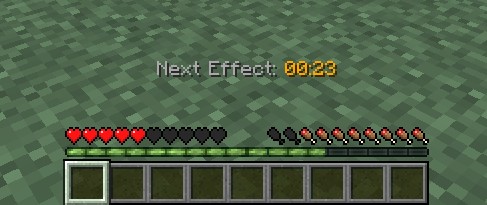 |
 |
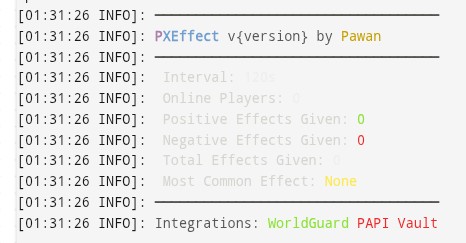 |
💡 Screenshots — install the plugin and share yours!
✨ What is PXEffect?
Imagine every player on your server is constantly one tick away from receiving a Speed boost — or a Wither curse. PXEffect makes chaos part of your server's DNA.
Every 2 minutes (fully configurable), each online player is handed a randomly selected potion effect. Higher XP levels? Stronger effects. The countdown ticks live in the action bar. The tension is real.
Whether you run a survival, minigame, RPG, or event server — PXEffect adds a layer of unpredictable energy that keeps players on their toes.
🚀 Core Features
🎲 Random Effect Engine
Randomly selects from all vanilla positive and negative potion effects every interval
- ✅ Full pool of positive effects — Speed, Strength, Regeneration, Night Vision, Absorption, Luck, and more
- ✅ Full pool of negative effects — Slowness, Weakness, Poison, Wither, Blindness, Levitation, and more
- ✅ Toggle positive and negative categories independently
- ✅ Customise which specific effects are in the pool via
config.yml - ✅ Configurable effect duration in ticks
⚡ XP Level Scaling
Effect strength automatically scales with the player's XP level
| 🎓 XP Level | 💪 Effect Strength |
|---|---|
| Level 0 – 9 | Level I |
| Level 10 – 19 | Level II |
| Level 20 – 29 | Level III |
| Level 30 – 39 | Level IV |
| Level 40+ | Level V |
Fully customisable tiers in
config.yml— set your own ranges and amplifiers.
⏱️ Live Action Bar Countdown
Players always know exactly when their next effect is coming
Next Effect: 01:59
Next Effect: 00:45
Next Effect: 00:03
- 🔄 Updates every second in real time
- 🎨 Fully customisable format with MiniMessage support
- 🌈 Hex colours, gradients, and legacy
&codes all supported - 🔘 Can be toggled off per-player or globally
📣 Effect Notifications
When an effect lands, players are informed clearly and stylishly:
- 💬 Chat message — shows effect name, level, and whether it's positive or negative
- 📋 Title + Subtitle — dramatic on-screen announcement (configurable fade times)
- 🔊 Custom sounds — different sounds for positive vs negative effects
- ✨ Particle burst — visual particle effect at the player's location
- 🎨 All messages fully customisable with MiniMessage
📊 Boss Bar Display (Optional)
An optional countdown boss bar at the top of the screen
- Choose from all Bukkit boss bar colours and styles
- Automatically fills and depletes as the timer counts down
- Fully MiniMessage-formatted title
- Enable/disable per-server in config
📈 Statistics System
Track everything that happens on your server
| Stat | Description |
|---|---|
| 🔢 Total Effects | Every effect ever applied |
| 💚 Positive Effects | Total positive effects given |
| ❤️ Negative Effects | Total negative effects given |
| 🏆 Most Common | The effect given most frequently |
- Persisted to
stats.ymlacross server restarts - Viewable via
/pxeffect info - Exposed via PlaceholderAPI
🛡️ World & Region Control
worlds:
  blacklist:
    - lobby
    - creative_world
  per-world:
    survival: true
    minigames: false

worldguard:
  region-blacklist:
    - spawn
    - safe_zone
    - shop_area
- 🌍 World blacklist — exclude specific worlds entirely
- 🗺️ Per-world toggle — enable or disable on a world-by-world basis
- 🔒 WorldGuard regions — players inside blacklisted regions are skipped
🔌 Integrations
| Integration | Status | What it does |
|---|---|---|
 PlaceholderAPI PlaceholderAPI |
✅ Supported | 7 custom %pxeffect_...% placeholders |
| 🛡️ WorldGuard | ✅ Supported | Region blacklist |
| 💰 Vault | ✅ Supported | Permission API bridge |
| 🍀 LuckPerms | ✅ Supported | Native Bukkit delegation |
| 📊 bStats | ✅ Built-in | Anonymous usage metrics |
📋 PlaceholderAPI Placeholders
| Placeholder | Returns |
|---|---|
%pxeffect_next_effect% |
Formatted countdown 01:45 |
%pxeffect_next_effect_sec% |
Raw seconds remaining |
%pxeffect_total_effects% |
Total effects applied |
%pxeffect_positive_effects% |
Positive effects count |
%pxeffect_negative_effects% |
Negative effects count |
%pxeffect_most_common% |
Most given effect name |
%pxeffect_interval% |
Configured interval (seconds) |
💻 Commands
| Command | Description | Permission |
|---|---|---|
/pxeffect reload |
Hot-reload the entire plugin | pxeffect.reload |
/pxeffect info |
View stats, interval, and integration status | pxeffect.use |
Alias: /pxe
🔑 Permissions
| Permission | Default | Description |
|---|---|---|
pxeffect.use |
✅ Everyone | Receive effects + use /pxeffect |
pxeffect.bypass |
❌ Nobody | Exempt from all effects |
pxeffect.reload |
🔧 OP | Reload plugin configuration |
pxeffect.admin |
🔧 OP | Full admin access |
⚙️ Configuration Highlights
general:
  interval: 120             # Seconds between effects
  positive-effects-enabled: true
  negative-effects-enabled: true
  debug: false

action-bar:
  enabled: true
  format: "<gray>Next Effect: <gold>{time}"

xp-scaling:
  enabled: true
  tiers:
    - { min: 0,  max: 9,  amplifier: 0 }
    - { min: 10, max: 19, amplifier: 1 }
    - { min: 20, max: 29, amplifier: 2 }
    - { min: 30, max: 39, amplifier: 3 }
    - { min: 40, max: 999999, amplifier: 4 }

sounds:
  positive:
    sound: ENTITY_PLAYER_LEVELUP
    volume: 1.0
    pitch: 1.2
  negative:
    sound: ENTITY_WITHER_HURT
    volume: 0.8
    pitch: 0.8
📄 Full config with every option documented ships inside the plugin on first run.
⚡ Performance
PXEffect is engineered for 500+ concurrent players:
- 🏎️ Single repeating task — one 1-second scheduler handles everything (cooldowns, action bar, boss bar, effect firing). Zero per-player tasks.
- 🧵 Thread-safe statistics —
AtomicLongcounters, no locks needed - 💾 Memory-efficient —
ConcurrentHashMapfor cooldown/bossbar state - ♻️ Hot-reload safe — scheduler shuts down cleanly before config reload, then restarts
- 📦 Shaded bStats only — no unnecessary bundled libraries
📦 Installation
1. Download PXEffect-1.0.0.jar
2. Drop it into your /plugins/ folder
3. Start or restart your server
4. Edit plugins/PXEffect/config.yml
5. Run /pxeffect reload
✅ Compatible with Spigot 1.20.4+, Paper, and Purpur ✅ Java 17 required ✅ No required dependencies — all integrations are optional
🗂️ Changelog
v1.0.0 — Initial Release
- 🎉 Full random effect engine with positive/negative pools
- ⚡ XP level scaling (5 configurable tiers)
- ⏱️ Live action bar countdown
- 📊 Boss bar display
- 📣 Title, subtitle, sound, and particle notifications
- 🌍 World blacklist and per-world toggle
- 🛡️ WorldGuard region blacklist
- 📋 PlaceholderAPI (7 placeholders)
- 💰 Vault integration
- 📈 Statistics system with persistence
- 💾 Cooldown persistence across restarts
- 🔄 Full hot-reload via
/pxeffect reload - 🐛 Debug mode
- 📡 bStats metrics
- 🔔 Update checker
🤝 Support & Community
Got a bug? Feature request? Just want to chat?
Discord: allay_gaming_x
Open an issue on GitHub or reach out on Discord — responses are fast!
👤 About the Author
Pawan — Minecraft plugin developer passionate about performance, polish, and player experience.
PXEffect is built with care — every config option, every message, every integration is intentional.
💜 Discord Live Status
PXEffect v1.0.0 · Made with ❤️ by Pawan · MIT License