
Compatibility
Minecraft: Java Edition
Platforms


Creators
Details
🏺 SoulKeeper Plugin - User Manual 📖 Description SoulKeeper automatically creates virtual tombs when you die, protecting your items with holograms and anti-hopper protection. Never lose your items again! ✨ Key Features
🏺 Automatic tombs on death 🛡️ Temporary protection against other players 🚫 Anti-hopper - Blocks automated extraction 👻 Informative holograms with remaining time 🎮 Intuitive GUI for collecting items 🔧 Configurable - Change block type, times, limits 🌍 Multi-language (Spanish/English)
🎯 How It Works 💀 On Death
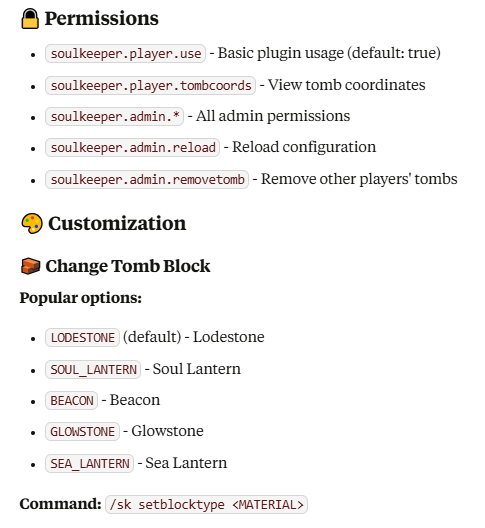
Your items are automatically saved in a virtual tomb A representative block appears (LODESTONE by default) A hologram is created with tomb information The tomb is protected for 5 minutes (configurable)
🖱️ Tomb Interaction
Right click → Opens GUI to take individual items Shift + Right click → Collects all items instantly Break block → Drops all items to the ground
🎮 Tomb GUI
📦 45 slots for your items ⏰ Time info remaining 🛡️ Protection status 📍 Location coordinates 🏃♂️ "Collect All" button for quick collection
⚙️ Configuration 🏺 Tombs yamltomb: block_type: "LODESTONE" # Block type max_tombs_per_player: 5 # Maximum per player lifespan_seconds: 1800 # 30 minutes lifespan protection: duration_seconds: 300 # 5 minutes protected block_automated_extraction_always: true # Anti-hopper 👻 Holograms yamlhologram: enabled: true lines: - "&6&l⚰ TOMB ⚰" - "&7Owner: &e%player%" - "&7Time remaining: &c%time_remaining%"
🏗️ Custom Resource Packs ✅ Compatible with custom textures/models
Use CustomModelData in your resource pack Plugin automatically detects base Material
🌍 Languages
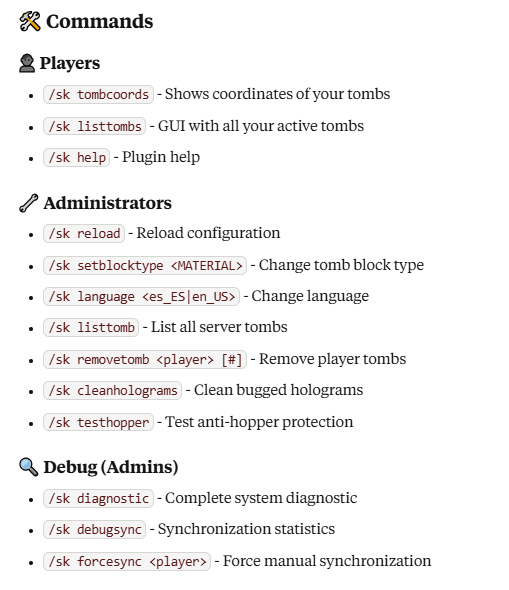
Spanish (es_ES) - Default language English (en_US) - Change with /sk language en_US
🚨 Anti-Hopper Protection
🚫 Blocks extraction by hoppers/hoppers 🛡️ Works on protected and unprotected tombs ⚙️ Configurable in block_automated_extraction_always
📊 Technical Information
Minecraft Version: 1.16.5+ API: Spigot/Paper Storage: Virtual with file persistence Performance: Optimized for large servers
🐛 Troubleshooting ❓ Tomb doesn't appear
Verify keepInventory is set to false Check player permissions Review that you haven't reached tomb limit
👻 Holograms not visible
Use /sk cleanholograms to clean bugged holograms Verify hologram.enabled is set to true
🔧 Items don't synchronize
Use /sk forcesync for manual synchronization Run /sk diagnostic to see system status
💡 Tips
🏃♂️ Shift+Click is the fastest way to collect everything 📍 Save important coordinates with /sk tombcoords 🕐 Collect quickly - Tombs have limited time 🛡️ First 5 minutes are completely protected
🔗 More information: Modrinth 👨💻 Developed by: DeLaRosaPlay 📝 Version: 1.0.0