
Compatibility
Minecraft: Java Edition
Platforms


Tags
Creators
Details




SpeedSMP Project
The official modrinth page for SpeedSMP plugin, featuring our custom plugin and required resource pack.
Requirements
To experience the server as intended, you must have the SpeedSMP Resource Pack installed. Note: This pack is required to view custom item textures and server-specific UI elements.
Where i can use it?


Plugin Features
- Leveling System: Everyone starts at Level 1. Gain levels by killing players; lose one level upon death.
- Speed Progression: Your movement speed scales automatically with every level gained.
- Abilities: Unlock three unique combat abilities once you reach Level 5.
- Speed Jar Crafting: Craft powerful items using:
- 4x Diamond Blocks (Corners)
- 4x Gold Blocks (Sides)
- 1x Netherite Ingot (Center)
- Reroll Style Crafting: Craft powerful items using:
- 4x Diamond Blocks (Corners)
- 4x Gold Blocks (Sides)
- 1x Netherite Ingot (Center)
How to use the Ultimate Ability
You can activate your ultimate ability by using this command:
/speedsmp activateultimate or by shift + f
Keybind Setup
To trigger this ability quickly during combat, you can bind the command to a key using mods like CommandKeys.
Recommended Mods:
- CommandKeys
- Any other mod that supports command keybindings.
Quick Setup Guide:
- Install your preferred keybind mod.
- Go to the mod's configuration menu.
- Create a new keybind.
- Set the command to:
/speedsmp activateultimate
Styles
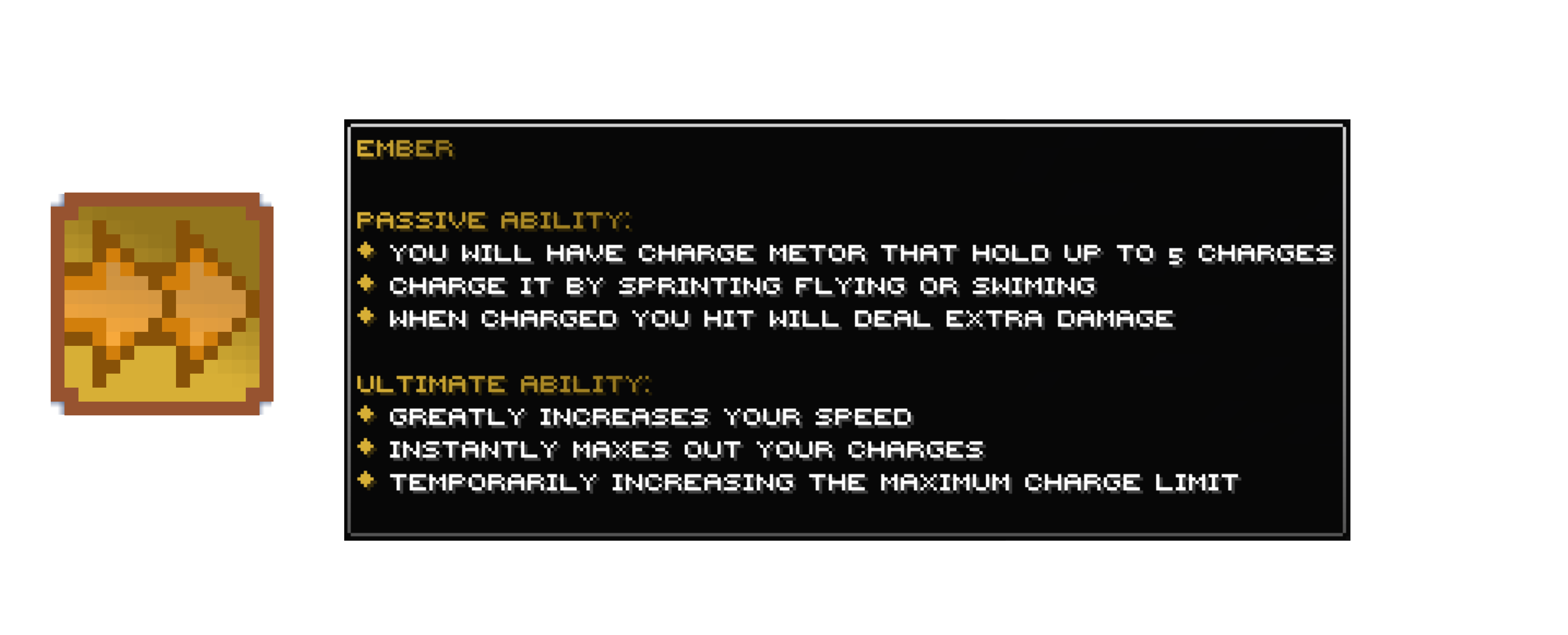
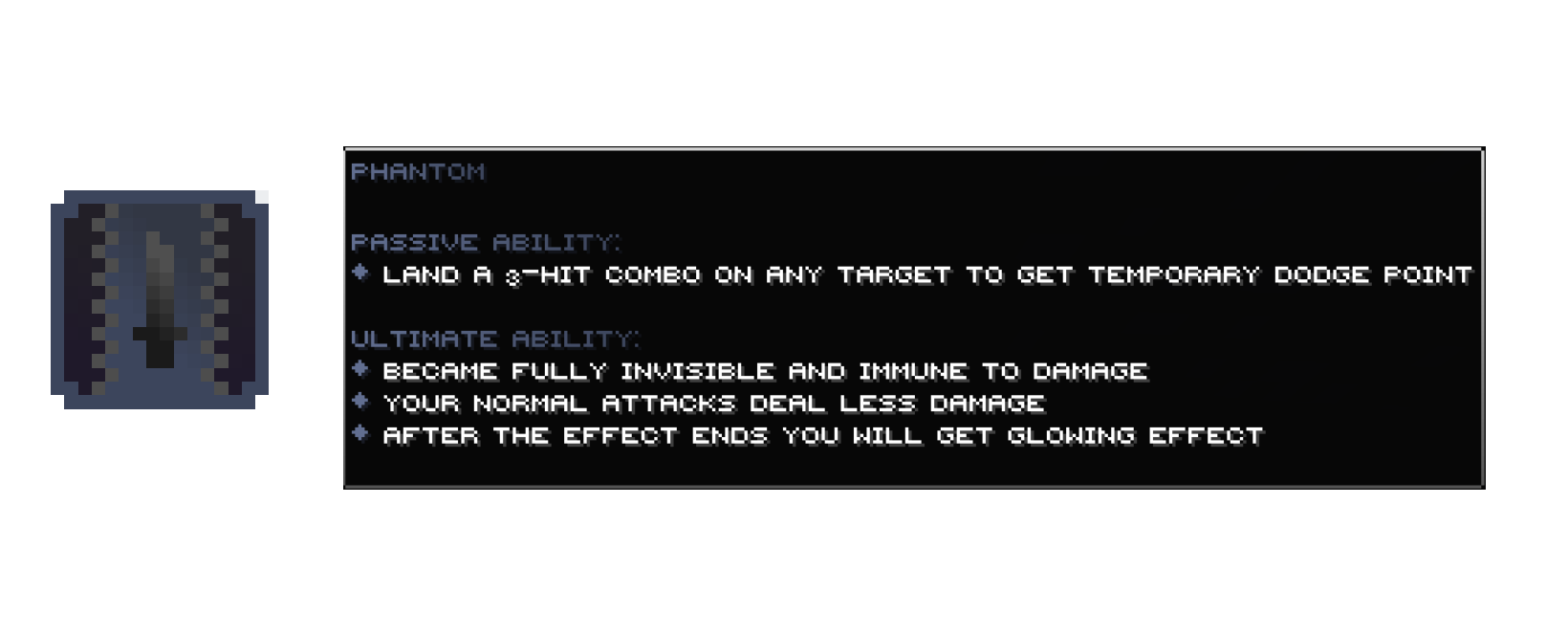
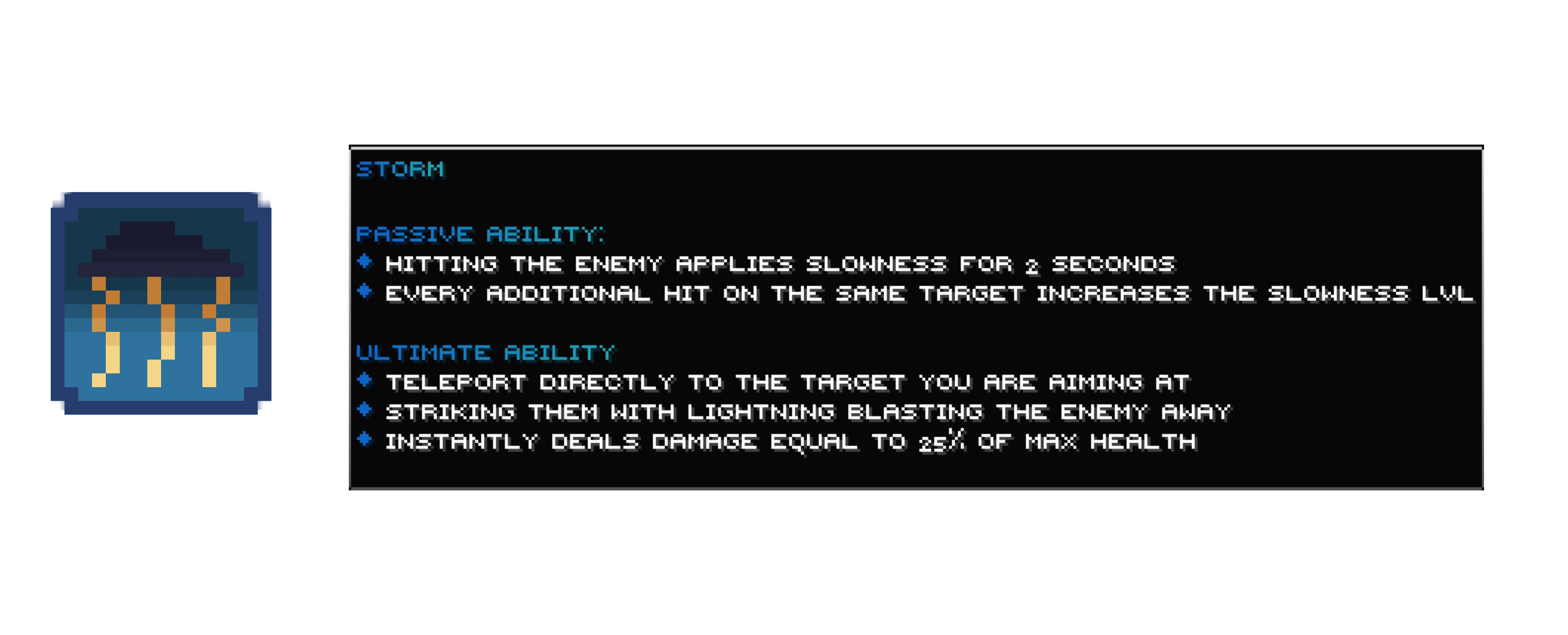
Commands & Permissions
Below is the list of available commands for SpeedSMP.
| Command | Description | Permission |
|---|---|---|
/speedsmp view [player] |
View your or another player's speed | speedSMP.view |
/speedsmp withdraw <amount> |
Withdraw speed levels into a Speed Jar | None |
/speedsmp recipe <type> |
View custom item recipes (GUI) | None |
/speedsmp info |
Open the menu (GUI) | None |
/speedsmp activateultimate |
Activate your ultimate combat ability | None |
/speedsmp setspeed <player> <amount> |
Set a specific speed level for a player | speedSMP.set |
/speedsmp setstyle <player> <style> |
Change a player's style | speedSMP.set |
/speedsmp give <player> <item> |
Give custom items (speed_jar, style_reroll) | speedSMP.give |
/speedsmp reload |
Reload configuration, messages, and sounds | speedSMP.reload |
/speedsmp debug <option> |
Debug plugin systems | speedSMP.debug |
Note: Permissions can be managed through any standard permissions plugin (like LuckPerms).
Highly Customizable
We designed this plugin to be fully configurable. You can modify game logic, messages, and sounds through our YAML files:
View Config.yml
# ─── Speed Levels ────────────────────────────────────────
# Controls the speed system boundaries and progression.
#
#   max-level:     Maximum speed level a player can reach
#   min-level:     Minimum speed level (below this, no speed jar is dropped on death)
#   default-level: Speed level assigned to new players on first join
#   speed-per-level: Walk speed multiplier added per level (0.1 = 10% per level)
#   action-bar-update: per how many ticks does the action bar update (min = 1, max = 20) --- REQUIRES RESTARTING
#
max-level: 5
min-level: 0
default-level: 1
speed-per-level: 0.1
action-bar-update: 2

# ─── Abilities ───────────────────────────────────────────
# Controls ability activation requirements and settings.
#
#   ultimate-level-requirement:  Minimum level needed to activate ultimate ability
#   passive-level-requirement:   Minimum level needed for passive ability to trigger
#                                (don't set higher than ultimate-level-requirement,
#                                 it will cause action bar glitches)
#   count-entities-hit:          If true, abilities can be triggered on non-player
#                                entities (mobs). If false, only player hits count.
#
ultimate-level-requirement: 5
passive-level-requirement: 3
count-entities-hit: true

# ─── Storm Ultimate Tuning ───────────────────────────────
# Fine-tune the Storm style's ultimate ability targeting.
#
#   storm-ultimate-angle-tolerance:          Max angle (degrees) between player's look
#                                           direction and the target for the initial strike
#   storm-ultimate-chained-angle-tolerance:  Max angle (degrees) for chained lightning
#                                           to jump to nearby targets
#
storm-ultimate-angle-tolerance: 30
storm-ultimate-chained-angle-tolerance: 15

# ─── Crafting Recipes ────────────────────────────────────
# Define the 3x3 crafting grid for each custom item.
# Each row is a list of 3 Bukkit Material names (e.g. GOLD_BLOCK, DIAMOND_BLOCK).
# Rows are: first-row (top), second-row (middle), third-row (bottom).
#
recipes:
  speed-jar:
    first-row:
      - "DIAMOND_BLOCK"
      - "GOLD_BLOCK"
      - "DIAMOND_BLOCK"
    second-row:
      - "GOLD_BLOCK"
      - "NETHERITE_INGOT"
      - "GOLD_BLOCK"
    third-row:
      - "DIAMOND_BLOCK"
      - "GOLD_BLOCK"
      - "DIAMOND_BLOCK"
  style-reroll:
    first-row:
      - "TINTED_GLASS"
      - "TINTED_GLASS"
      - "TINTED_GLASS"
    second-row:
      - "TINTED_GLASS"
      - "BEACON"
      - "TINTED_GLASS"
    third-row:
      - "DIAMOND_BLOCK"
      - "DIAMOND_BLOCK"
      - "DIAMOND_BLOCK"

# ─── Info Menu ───────────────────────────────────────────
# Configure the items shown in the /speedsmp info menu.
# Each item key (e.g. "storm") is just a label, you can name it anything.
# You can add or remove items freely.
#
# Options per item:
#   material:          Bukkit Material name (e.g. DIAMOND, NETHER_STAR)
#   slot:              Inventory slot (0-53)
#   name:              Display name (supports MiniMessage & legacy &-color codes)
#   lore:              List of lore lines (supports MiniMessage & legacy &-color codes)
#   custom-model-data: Custom model data integer (optional, default: 0)
#   glowing:           true/false - adds enchant glow (optional, default: false)
#   amount:            Stack amount (optional, default: 1)
#
info_menu:
  items:
    storm:
      material: "NETHER_STAR"
      slot: 22
      name: "<gradient:#2f729e:#24465c>ѕᴛᴏʀᴍ</gradient>"
      lore:
        - ""
        - "<gradient:#2f729e:#24465c>ᴘᴀѕѕɪᴠᴇ ᴀʙɪʟɪᴛʏ:</gradient>"
        - "<#1065C4>◆</#1065C4> <white>ʜɪᴛᴛɪɴɢ ᴛʜᴇ ᴇɴᴇᴍʏ ᴀᴘᴘʟɪᴇѕ ѕʟᴏᴡɴᴇѕѕ ꜰᴏʀ ₂ ѕᴇᴄᴏɴᴅѕ"
        - "<#1065C4>◆</#1065C4> <white>ᴇᴠᴇʀʏ ᴀᴅᴅɪᴛɪᴏɴᴀʟ ʜɪᴛ ᴏɴ ᴛʜᴇ ѕᴀᴍᴇ ᴛᴀʀɢᴇᴛ ɪɴᴄʀᴇᴀѕᴇѕ ᴛʜᴇ ѕʟᴏᴡɴᴇѕѕ ʟᴠʟ"
        - ""
        - "<gradient:#2f729e:#24465c>ᴜʟᴛɪᴍᴀᴛᴇ ᴀʙɪʟɪᴛʏ:</gradient>"
        - "<#1065C4>◆</#1065C4> <white>ᴛᴇʟᴇᴘᴏʀᴛ ᴅɪʀᴇᴄᴛʟʏ ᴛᴏ ᴛʜᴇ ᴛᴀʀɢᴇᴛ ʏᴏᴜ ᴀʀᴇ ᴀɪᴍɪɴɢ ᴀᴛ"
        - "<#1065C4>◆</#1065C4> <white>ѕᴛʀɪᴋɪɴɢ ᴛʜᴇᴍ ᴡɪᴛʜ ʟɪɢʜᴛɴɪɴɢ ʙʟᴀѕᴛɪɴɢ ᴛʜᴇ ᴇɴᴇᴍʏ ᴀᴡᴀʏ"
        - "<#1065C4>◆</#1065C4> <white>ɪɴѕᴛᴀɴᴛʟʏ ᴅᴇᴀʟѕ ᴅᴀᴍᴀɢᴇ ᴇǫᴜᴀʟ ᴛᴏ ₂₅% ᴏꜰ ᴍᴀх ʜᴇᴀʟᴛʜ"
        - ""
      custom-model-data: 5
      glowing: false
      amount: 1
    phantom:
      material: "NETHER_STAR"
      slot: 20
      name: "<gradient:#616e90:#3c455c>ᴘʜᴀɴᴛᴏᴍ</gradient>"
      lore:
        - ""
        - "<gradient:#616e90:#3c455c>ᴘᴀѕѕɪᴠᴇ ᴀʙɪʟɪᴛʏ:</gradient>"
        - "<#616E90>◆</#616E90> <white>ʟᴀɴᴅ ᴀ ₃-ʜɪᴛ ᴄᴏᴍʙᴏ ᴏɴ ᴀɴʏ ᴛᴀʀɢᴇᴛ ᴛᴏ ɢᴇᴛ ᴛᴇᴍᴘᴏʀᴀʀʏ ᴅᴏᴅɢᴇ ᴘᴏɪɴᴛ"
        - ""
        - "<gradient:#616e90:#3c455c>ᴜʟᴛɪᴍᴀᴛᴇ ᴀʙɪʟɪᴛʏ:</gradient>"
        - "<#616E90>◆</#616E90> <white>ʙᴇᴄᴀᴍᴇ ꜰᴜʟʟʏ ɪɴᴠɪѕɪʙʟᴇ ᴀɴᴅ ɪᴍᴍᴜɴᴇ ᴛᴏ ᴅᴀᴍᴀɢᴇ"
        - "<#616E90>◆</#616E90> <white>ʏᴏᴜʀ ɴᴏʀᴍᴀʟ ᴀᴛᴛᴀᴄᴋѕ ᴅᴇᴀʟ ʟᴇѕѕ ᴅᴀᴍᴀɢᴇ"
        - "<#616E90>◆</#616E90> <white>ᴀꜰᴛᴇʀ ᴛʜᴇ ᴇꜰꜰᴇᴄᴛ ᴇɴᴅѕ ʏᴏᴜ ᴡɪʟʟ ɢᴇᴛ ɢʟᴏᴡɪɴɢ ᴇꜰꜰᴇᴄᴛ"
        - ""
      custom-model-data: 4
      glowing: false
      amount: 1
    ember:
      material: "NETHER_STAR"
      slot: 24
      name: "<gradient:#d7af36:#93751d>ᴇᴍʙᴇʀ</gradient>"
      lore:
        - ""
        - "<gradient:#d7af36:#93751d>ᴘᴀѕѕɪᴠᴇ ᴀʙɪʟɪᴛʏ:</gradient>"
        - "<#D7AF36>◆</#D7AF36> <white>ʏᴏᴜ ᴡɪʟʟ ʜᴀᴠᴇ ᴄʜᴀʀɢᴇ ᴍᴇᴛᴏʀ ᴛʜᴀᴛ ʜᴏʟᴅ ᴜᴘ ᴛᴏ ₅ ᴄʜᴀʀɢᴇѕ"
        - "<#D7AF36>◆</#D7AF36> <white>ᴄʜᴀʀɢᴇ ɪᴛ ʙʏ ѕᴘʀɪɴᴛɪɴɢ ꜰʟʏɪɴɢ ᴏʀ ѕᴡɪᴍɪɴɢ"
        - "<#D7AF36>◆</#D7AF36> <white>ᴡʜᴇɴ ᴄʜᴀʀɢᴇᴅ ʏᴏᴜ ʜɪᴛ ᴡɪʟʟ ᴅᴇᴀʟ ᴇхᴛʀᴀ ᴅᴀᴍᴀɢᴇ"
        - ""
        - "<gradient:#d7af36:#93751d>ᴜʟᴛɪᴍᴀᴛᴇ ᴀʙɪʟɪᴛʏ:</gradient>"
        - "<#D7AF36>◆</#D7AF36> <white>ɢʀᴇᴀᴛʟʏ ɪɴᴄʀᴇᴀѕᴇѕ ʏᴏᴜʀ ѕᴘᴇᴇᴅ"
        - "<#D7AF36>◆</#D7AF36> <white>ɪɴѕᴛᴀɴᴛʟʏ ᴍᴀхᴇѕ ᴏᴜᴛ ʏᴏᴜʀ ᴄʜᴀʀɢᴇѕ"
        - "<#D7AF36>◆</#D7AF36> <white>ᴛᴇᴍᴘᴏʀᴀʀɪʟʏ ɪɴᴄʀᴇᴀѕɪɴɢ ᴛʜᴇ ᴍᴀхɪᴍᴜᴍ ᴄʜᴀʀɢᴇ ʟɪᴍɪᴛ"
        - ""
      custom-model-data: 3
      glowing: false
      amount: 1
View Sounds.yml
# SpeedSMP Sounds Configuration
# Use standard minecraft sound names (e.g., ENTITY.BLAZE.SHOOT)
# For custom resource pack sounds, use the namespace (e.g., custom:skills.ultimate_roar)
# isPrivate: true  -> only the executing player hears the sound
# isPrivate: false -> all nearby players hear the sound (default)
sounds:
  EMBER_ULTIMATE:
    id: "ITEM.TOTEM.USE"
    volume: 1.6
    pitch: 1.6
    isPrivate: false
  PHANTOM_ULTIMATE:
    id: "ENTITY.WARDEN.SONIC_CHARGE"
    volume: 1.0
    pitch: 1.7
    isPrivate: false
  STORM_ULTIMATE:
    id: "ITEM.TRIDENT.THUNDER"
    volume: 1.4
    pitch: 1.0
    isPrivate: false
  SUCCESS:
    id: "BLOCK.NOTE_BLOCK.PLING"
    volume: 0.4
    pitch: 1.2
    isPrivate: true
  ERROR:
    id: "ENTITY.VILLAGER.NO"
    volume: 0.4
    pitch: 2.0
    isPrivate: true
  JAR_USE:
    id: "ENTITY.PLAYER.LEVELUP"
    volume: 1.0
    pitch: 1.5
    isPrivate: false
  WITHDRAW:
    id: "BLOCK.ENCHANTMENT_TABLE.USE"
    volume: 1.0
    pitch: 1.4
    isPrivate: true
  OPEN:
    id: "BLOCK.BARREL.OPEN"
    volume: 1.0
    pitch: 1.4
    isPrivate: true
  PHANTOM_ULTIMATE_END:
    id: "ENTITY.ALLAY.AMBIENT_WITHOUT_ITEM"
    volume: 2
    pitch: 0.6
    isPrivate: false
  EMBER_ULTIMATE_END:
    id: "ENTITY.BLAZE.DEATH"
    volume: 1.4
    pitch: 1.2
    isPrivate: false
  HOTKEY_ENABLED:
    id: "BLOCK.LEVER.CLICK"
    volume: 1.3
    pitch: 1.4
    isPrivate: true
  HOTKEY_DISABLED:
    id: "BLOCK.LEVER.CLICK"
    volume: 1.3
    pitch: 0.7
    isPrivate: true
  STILL_COOLDOWN:
    id: "ENTITY.VILLAGER.NO"
    volume: 0.4
    pitch: 1.0
    isPrivate: true
View Messages.yml
# This uses MiniMessage notation
# You can use MiniMessage tags here (e.g., <red>, <bold>, <gradient:blue:aqua>)

messages:
  # Triggered when a player runs '/speedsmp view' to check their own stats.
  # {level}: The player's current speed level | {style}: The player's active action bar style.
  VIEW: "<#555555>◆ <white>Speed Level:</white> <gradient:#12D1E2:#AEC4CA>{level}</gradient> <dark_gray>•</dark_gray> <white>Style:</white> <gradient:#12D1E2:#AEC4CA>{style}</gradient>"

  # Triggered when an admin/player checks someone else's stats using '/speedsmp view <player>'.
  # {target}: The target player's name | {targetLevel}: Their speed level | {targetStyle}: Their active style.
  VIEW_OTHER: "<#555555>◆ <gradient:#12D1E2:#AEC4CA>{target}</gradient><white>'s Speed</white> <dark_gray>•</dark_gray> <white>Level:</white> <gradient:#12D1E2:#AEC4CA>{targetLevel}</gradient> <dark_gray>•</dark_gray> <white>Style:</white> <gradient:#12D1E2:#AEC4CA>{targetStyle}</gradient>"

  # Triggered when an admin successfully changes a player's speed via '/speedsmp setspeed <player> <amount>'.
  # {target}: The target player's name | {targetLevel}: The new speed level assigned to them.
  SET_SPEED: "<#555555>◆ <white>Updated</white> <gradient:#12D1E2:#AEC4CA>{target}</gradient><white>'s speed to</white> <gradient:#12D1E2:#AEC4CA>{targetLevel}</gradient><white>.</white>"

  # Triggered when an admin successfully changes a player's style via '/speedsmp setstyle <player> <style>'.
  # {target}: The target player's name | {targetStyle}: The newly assigned style.
  SET_STYLE: "<#555555>◆ <white>Updated</white> <gradient:#12D1E2:#AEC4CA>{target}</gradient><white>'s style to</white> <gradient:#12D1E2:#AEC4CA>{targetStyle}</gradient><white>.</white>"

  # Triggered when a player successfully converts their speed into a Speed Jar using '/speedsmp withdraw <amount>'.
  # {level}: The player's remaining speed level after the withdrawal.
  WITHDRAW: "<#555555>◆ <white>Speed withdrawn.</white> <white>Current Level:</white> <gradient:#12D1E2:#AEC4CA>{level}</gradient>"

  # Triggered for the killer when they defeat another player and gain speed.
  # {level}: The killer's new speed level.
  KILL: "<#555555>◆ <green>Speed gained.</green> <white>Current Level:</white> <gradient:#12D1E2:#AEC4CA>{level}</gradient>"

  # Triggered for the victim when they die and lose speed.
  # {level}: The player's new speed level after death.
  DIE: "<#555555>◆ <red>Speed lost.</red> <white>Current Level:</white> <gradient:#12D1E2:#AEC4CA>{level}</gradient>"

  # Triggered when a player consumes a Speed Jar.
  # {level}: The player's new total speed level.
  USE_SPEED_JAR: "<#555555>◆ <white>Speed Jar consumed.</white> <white>Current Level:</white> <gradient:#12D1E2:#AEC4CA>{level}</gradient>"

  # Triggered when a player consumes a Style Reroll.
  # {style}: The player's new style.
  USE_STYLE_REROLL: "<#555555>◆ <white>You have used a style reroll, your new style is</white> <gradient:#12D1E2:#AEC4CA>{style}</gradient><white>.</white>"

  # Triggered when a player joins the server for the first time.
  # {style}: The player's style.
  STARTER_STYLE: "<#555555>◆ <white>Your starter style is</white> <gradient:#12D1E2:#AEC4CA>{style}</gradient><white>.</white>"

  # Triggered when a player tries to exceed the maximum speed level.
  MAX_SPEED_REACHED: "<#555555>◆ <red>You have reached the maximum speed level.</red>"

  # for the ultimate abilitys
  ERROR_MESSAGE: "&c◆ Error &8» &f%message%"
  SUCCESS_MESSAGE: "&a◆ Success &8» &f%message%"
  MISSED_STORM_ULTIMATE: "<#555555>◆ <gradient:#1065C4:#25A0B1><bold>Your storm missed its target.</bold></gradient>"
  STORM_ULTIMATE: "<#555555>◆ <gradient:#1065C4:#25A0B1><bold>The storm answers your call.</bold></gradient>"
  PHANTOM_ULTIMATE: "<#555555>◆ <gradient:#616e90:#3c455c><bold>You step into the shadows.</bold></gradient>"
  EMBER_ULTIMATE: "<#555555>◆ <gradient:#d7af36:#93751d><bold>The flames awaken within you.</bold></gradient>"
  PHANTOM_ULTIMATE_END: "<#555555>◆ <gradient:#616e90:#3c455c><bold>Your location has been revealed.</bold></gradient>"
  EMBER_ULTIMATE_END: "<#555555>◆ <gradient:#d7af36:#93751d><bold>The flames have died out.</bold></gradient>"
  ULTIMATE_COOLDOWN_ENDED: "<#555555>◆ <white>Your ultimate is </white><gradient:#28A061:#84EC87>ready</gradient>"

  # Triggered when a player tries to use their ultimate while it's still on cooldown.
  # {time}: Seconds remaining until the ultimate is ready again.
  ULTIMATE_COOLDOWN: "<#555555><red><bold>◆ Ultimate is in cooldown :</bold> </red><gradient:#D14C4C:#E28A8A>{time}</gradient><red>s left</red>"

  # Triggered when a player runs '/speedsmp togglehotkey' and it becomes enabled.
  ULTIMATE_HOTKEY_ENABLED: "<#555555>◆ <white>Shift + F ultimate activation is now </white><gradient:#28A061:#84EC87>enabled</gradient><white>.</white>"

  # Triggered when a player runs '/speedsmp togglehotkey' and it becomes disabled.
  ULTIMATE_HOTKEY_DISABLED: "<#555555>◆ <white>Shift + F ultimate activation is now </white><gradient:#D14C4C:#E28A8A>disabled</gradient><white>. Use </white><gradient:#12D1E2:#AEC4CA>/speedsmp activateultimate</gradient><white> instead.</white>"
View Actionbar.yml
# ================================================================================================
#  SpeedSMP Action Bar Templates Configuration
#  You can use MiniMessage tags like <bold>, <italic>, <yellow>, <#HEX> ,<gradient:#HEX:#HEX>
#  Placeholders available per style:
#  - Phantom: %speed%, %dodge_time%, %passive_icon%, %cooldown_icons%, %ability_icon%
#  - Ember:   %speed%, %charge%, %passive_icon%, %cooldown_icons%, %ability_icon%
#  - Storm:   %speed%, %slowness%, %passive_icon%, %cooldown_icons%, %ability_icon%
# ================================================================================================

styles:
  #  NOTE: PLEASE DON'T CHANGE ANYTHING IN  icons and cooldown-animation IF YOU DON'T KNOW WHAT ARE YOU DOING !!!!
  phantom:
    icons:
      #the %passive_icon%
      passive_icon: "🛡"
      # dont miss with this if you don't know what are you doing
      active_ability: "\ue615"
      inactive_ability: "\ue618"
      inactive_cooldown: "\ue616"
      charged_cooldown: "\ue617"

    # the cooldown animation for the resource pack it start from down to up [ DON'T MISS WITH THIS IF YOU DON'T KNOW WHAT ARE YOU DOING ]
    cooldown-animation:
      - "\ue614"
      - "\ue600"
      - "\ue601"
      - "\ue602"
      - "\ue603"
      - "\ue604"
      - "\ue605"
      - "\ue606"
      - "\ue607"
      - "\ue608"
      - "\ue609"
      - "\ue610"
      - "\ue611"
      - "\ue612"
      - "\ue613"

    # the action bar that show when the player unlock the passive ability and the ability
    format: "<gradient:#616e90:#3c455c><bold>%speed% 🏃   |   %passive_num% %passive_icon%  |</bold></gradient> <white>%cooldown_icons% %ability_icon%</white>"
    # the action bar that show when the player didnt unlock the passive ability
    inactive-passive-format: "<gradient:#616e90:#3c455c><bold>%speed% 🏃</bold>/<gradient>"
    # the action bar that show when the player unlocked the passive ability and not the ability
    inactive-ability-format: "<gradient:#616e90:#3c455c><bold>%speed% 🏃   |   %passive_num% %passive_icon%</bold></gradient>"

  ember:
    icons:
      passive_icon: "☄"
      active_ability: "\ue715"
      inactive_ability: "\ue718"
      inactive_cooldown: "\ue716"
      charged_cooldown: "\ue717"

    cooldown-animation:
      - "\ue714"
      - "\ue700"
      - "\ue701"
      - "\ue702"
      - "\ue703"
      - "\ue704"
      - "\ue705"
      - "\ue706"
      - "\ue707"
      - "\ue708"
      - "\ue709"
      - "\ue710"
      - "\ue711"
      - "\ue712"
      - "\ue713"
    format: "<gradient:#d7af36:#93751d><bold>%speed% 🏃   |   %passive_num% %passive_icon%  |</bold></gradient> <white>%cooldown_icons% %ability_icon%</white>"
    inactive-passive-format: "<gradient:#d7af36:#93751d><bold>%speed% 🏃</bold></gradient>"
    inactive-ability-format: "<gradient:#d7af36:#93751d><bold>%speed% 🏃   |   %passive_num% %passive_icon%</bold></gradient>"

  storm:
    icons:
      passive_icon: "⚡"
      true_slowness_icon: "❄"
      false_slowness_icon: "❌"
      active_ability: "\ue815"
      inactive_ability: "\ue818"
      inactive_cooldown: "\ue816"
      charged_cooldown: "\ue817"

    cooldown-animation:
      - "\ue814"
      - "\ue800"
      - "\ue801"
      - "\ue802"
      - "\ue803"
      - "\ue804"
      - "\ue805"
      - "\ue806"
      - "\ue807"
      - "\ue808"
      - "\ue809"
      - "\ue810"
      - "\ue811"
      - "\ue812"
      - "\ue813"
    format: "<gradient:#2f729e:#24465c><bold>%speed% 🏃   |   %passive_num% %passive_icon%  |</bold></gradient> <white>%cooldown_icons% %ability_icon%</white>"
    inactive-passive-format: "<gradient:#2f729e:#24465c><bold>%speed% 🏃</bold></gradient>"
    inactive-ability-format: "<gradient:#2f729e:#24465c><bold>%speed% 🏃   |   %passive_num% %passive_icon%</bold></gradient>"
Need help?: If you have any questions, suggestions, or would like to contact the developer directly, add one of us on Discord:
- abdulla12e84
- mc7dz