
Compatibility
Minecraft: Java Edition
Platforms


Tags
Creators
Details
VoxCore — All-in-One Chat Management Plugin BuiltByBit Plugin link
VoxCore is a comprehensive chat management plugin for Paper 1.21.1 servers that replaces multiple plugins with a single, lightweight solution. Every message on your server — public chat, private messages, join/quit notifications, death messages, and staff communications — flows through one centralized pipeline, giving you complete control over how your server communicates.
🗨️ Multi-Channel Chat System
VoxCore introduces three fully independent chat channels out of the box. The Global channel broadcasts messages to every player on the server. The Local channel limits messages to players within a configurable block radius, perfect for roleplay or large servers. The Staff channel restricts communication exclusively to players with staff permissions, keeping internal conversations private. Players can switch between channels using /channel or by typing a trigger prefix (!, @, #) at the start of any message — no command required.
✉️ Private Messaging
A complete private messaging system is included with /msg, /tell, /whisper, and /reply. Players can toggle their message availability with /msgtoggle, and staff members can monitor all private conversations using /socialspy. Every private message is logged automatically.

🔤 Full RGB & Color Format Support
VoxCore supports every color format used across the Minecraft plugin ecosystem, ensuring full compatibility regardless of how your prefixes and suffixes are configured in LuckPerms or any other plugin:
Legacy codes: &a, &b, &c...
Hex inline: &#RRGGBB
Bukkit hex: &x&R&R&G&G&B&B
MiniMessage hex: <#RRGGBB>
MiniMessage gradients: gradient:#FF0000:#0000FF
Rainbow: <rainbow>
BBCode: [COLOR=#RRGGBB] And more alternative formats
🔗 LuckPerms & PlaceholderAPI Integration
VoxCore hooks directly into the LuckPerms API to fetch each player's prefix and suffix in real time, preserving all colors and gradients exactly as configured. It also integrates with PlaceholderAPI, meaning any %placeholder% from any installed expansion can be used inside chat formats, join messages, or any other format defined in the config.
🚫 Built-in Word Filter
An intelligent word and phrase filter is included as a standalone module located at plugins/ChatCore/modules/word-and-phrase-filter.yml. It supports three filtering modes per entry: exact:: to match only that specific word, nocensor:: to block the entire message without censoring, and similarity detection using the Jaro-Winkler algorithm to catch bypass attempts. Detected words are automatically censored with configurable characters (default *), with options for partial censoring, shortening long replacements, and a full whitelist for false-positive prevention. Staff members with the chatcore.filter.notify permission receive instant notifications when a blocked phrase is triggered.
📋 Daily Chat Logs
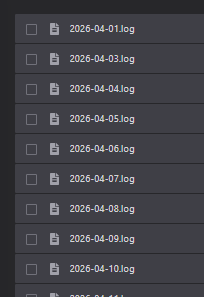
Every message processed by ChatCore is written to daily log files stored in plugins/ChatCore/logs/YYYY-MM-DD.log. Public chat, private messages, staff chat, and join/quit events are all logged separately and can be individually toggled in the config.
💬 Mention System
Players can mention others by typing @PlayerName in chat. The mentioned name is highlighted in a configurable color, the target player receives a sound notification and a chat alert, and the mention is rendered as a clickable component that auto-fills a /msg command. Players who have ignored the sender will not receive mention notifications.
🔇 Chat Mute
Staff members can instantly silence the entire global chat using /mutechat. While muted, only players with the chatcore.mutechat.bypass permission can send messages. A broadcast notification is sent to all online players when the chat is muted or unmuted.
🙈 Ignore System
Players can ignore others using /ignore <player>, preventing their chat messages, private messages, and mentions from appearing. The ignore list is fully persistent across server restarts and is stored in plugins/ChatCore/playerdata.yml.
💾 Full Data Persistence
Player preferences — including active channel, socialspy status, message toggle, and ignore lists — are saved automatically and restored on reconnect. No data is lost on server restart.
⚙️ Fully Configurable
Every message, format, and behavior is configurable without recompiling. Chat formats are defined in config.yml, all system messages are in messages.yml, and the word filter lives in its own module file. Changes take effect immediately with /chatcore reload.
🔒 Permissions Overview
Permission | Default | Description chatcore.chat.global | Everyone | Use global channel chatcore.chat.local | Everyone | Use local channel chatcore.chat.staff | OP | Use staff channel chatcore.msg.send | Everyone | Send private messages chatcore.msg.bypass | OP | Bypass msgtoggle chatcore.socialspy | OP | Use socialspy chatcore.mutechat | OP | Mute/unmute global chat chatcore.filter.bypass | OP | Bypass word filter chatcore.filter.notify | OP | Receive filter alerts chatcore.reload | OP | Reload configuration
📌 Requirements Paper 1.21.1 or higher Java 17 or higher LuckPerms (optional, recommended) PlaceholderAPI (optional, recommended)