
Compatibility
Minecraft: Java Edition
Platforms


Tags
Creators
Details

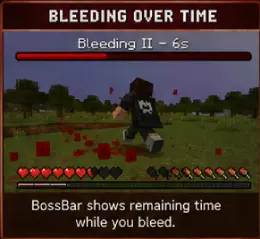
Lightweight Spigot/Paper/Folia plugin that adds a configurable bleeding system: when a player takes damage, they have a chance to start bleeding and take damage over time, with particles, sounds, and a BossBar showing the remaining timer.
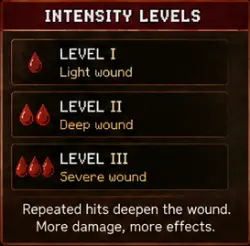
Bleeding can be treated with bandages, deepens into higher intensity levels when you keep getting hit, and leaves a blood trail behind a fleeing player.
Features
- Fully configurable chance, duration, interval, and damage per tick
- Bandages — right-click an item to treat your wound, with cast time, cooldown, and interruption on movement or damage
- Intensity levels — repeated hits deepen the wound instead of being ignored; damage and particles scale with the level
- Per-cause and per-weapon chances — swords make you bleed, falling does not
- Blood trail — a bleeding player leaves drops behind them as they move
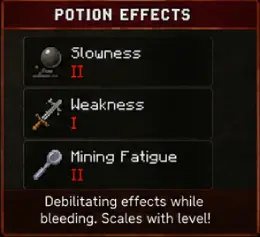
- Potion effects while bleeding — optional slowness, weakness, or anything else, scaling with intensity
- PlaceholderAPI support — bleed state for scoreboards, tab lists, and holograms
- Folia support — every task is region-aware, so it runs on modern threaded servers
- Customizable particles and sounds during bleeding
- BossBar with remaining timer (configurable color, style, and title)
- Customizable messages with
&color codes,&#RRGGBBhex colors, and placeholders - Per-world blacklist and optional WorldGuard integration:
bleed-allowedflag and/or region list in config mrtsimplebleed.bypasspermission to exempt staff/VIPs- Automatic config merge — updating the jar adds new options to your existing
config.ymlwhile keeping your values and your comments
Compatibility
- Minecraft: 1.21 → 26.2 (a single jar covers the whole range)
- Server: Spigot, Paper, Purpur, Folia
- Java: 17+
- Optional dependencies: WorldGuard 7.0.9+, PlaceholderAPI 2.11+
Installation
- Download
MRTSimpleBleed.jarfrom the latest release - Place it in your server's
plugins/folder - Start the server —
plugins/MRTSimpleBleed/config.ymlwill be generated - Edit the config as desired and run
/bleed reload
Updating from SimpleBleed 1.0.0
- Your configuration is migrated automatically on first start from
plugins/SimpleBleed/. The old folder is kept as a backup. - Permissions changed from
simplebleed.*tomrtsimplebleed.*. This is not automatic — update your LuckPerms (or equivalent) groups. The newmrtsimplebleed.adminnode grants everything at once. - Remove the old
SimpleBleed.jarfromplugins/before starting, or both plugins will fight over the/bleedcommand.
Commands
| Command | Description | Permission |
|---|---|---|
/bleed reset [player] |
Stop bleeding | mrtsimplebleed.reset.self / .others |
/bleed apply [player] |
Cause bleeding | mrtsimplebleed.apply |
/bleed info [player] |
Show bleeding status and level | mrtsimplebleed.info |
/bleed bandage [player] [amount] |
Give configured bandages | mrtsimplebleed.apply |
/bleed reload |
Reload the configuration | mrtsimplebleed.reload |
Aliases: /mrtbleed, /bleeding
Permissions
| Permission | Default | Description |
|---|---|---|
mrtsimplebleed.use |
true | Basic access to the /bleed command |
mrtsimplebleed.reset.self |
true | Remove bleeding from yourself |
mrtsimplebleed.reset.others |
op | Remove bleeding from others |
mrtsimplebleed.apply |
op | Apply bleeding, give bandages |
mrtsimplebleed.info |
true | View bleeding status |
mrtsimplebleed.reload |
op | Reload the config |
mrtsimplebleed.bandage |
true | Use bandages |
mrtsimplebleed.bypass |
false | Full immunity to bleeding |
mrtsimplebleed.admin |
op | Grants every permission above |
Configuration
bleed:
  chance: 0.25              # default probability 0.0-1.0
  duration-seconds: 8
  interval-ticks: 20
  damage-per-tick: 1.0
  particles:
    enabled: true
    type: BLOCK
    count: 15
  sound:
    enabled: true
    type: minecraft:entity.player.hurt
    volume: 0.6
    pitch: 1.0

# Repeated hits deepen the wound
stacking:
  enabled: true
  max-level: 3
  damage-multiplier: 0.5

# Treat your wound
bandage:
  enabled: true
  item: PAPER
  apply-time-seconds: 3.0
  cooldown-seconds: 10
  cancel-on-move: true
  cancel-on-damage: true

# Precedence: weapon -> cause -> bleed.chance
chances:
  causes:
    ENTITY_ATTACK: 0.35
    FALL: 0.0               # 0.0 disables this cause entirely
  weapons:
    DIAMOND_SWORD: 0.45

# Drops left behind a running player
trail:
  enabled: true
  min-distance: 0.8
  only-on-ground: true
  type: DUST
  color: '#8B0000'

# Debilitating effects while bleeding (off by default)
effects:
  enabled: false
  apply:
    SLOWNESS:
      amplifier: 0
      scale-with-level: true

bossbar:
  enabled: true
  color: RED
  style: SEGMENTED_10
  title: "&cBleeding %level% &7- &f%seconds%s"

worldguard:
  enabled: true
  disabled-regions:
    - spawn
    - safezone

messages:
  bleed-start: "&c&lYou are bleeding! &7Find a way to stop the hemorrhage..."
  bleed-end: "&aThe bleeding has stopped."
  # ...
Every option is documented inline in the generated config.yml.
PlaceholderAPI
| Placeholder | Returns |
|---|---|
%mrtsimplebleed_bleeding% |
true / false |
%mrtsimplebleed_bleeding_formatted% |
configured wording, e.g. Bleeding / Healthy |
%mrtsimplebleed_level% |
intensity as a number, 0 when not bleeding |
%mrtsimplebleed_level_roman% |
intensity in Roman numerals |
%mrtsimplebleed_seconds% |
whole seconds remaining |
%mrtsimplebleed_time% |
remaining time as M:SS |
%mrtsimplebleed_progress% |
remaining fraction, e.g. 0.75 |
%mrtsimplebleed_bandage_cooldown% |
seconds until another bandage may be used |
%mrtsimplebleed_total_bleeding% |
how many players are bleeding server-wide |
WorldGuard Integration
If WorldGuard is installed, you can disable bleeding in a region in two ways:
- Native flag:
/rg flag <region> bleed-allowed deny - Config list: add the region name under
worldguard.disabled-regions
Both apply — if either one blocks, bleeding will not start.
Folia
Every scheduled task is bound to the player's region, so the plugin runs unmodified on Folia as well as on Spigot and Paper. The platform is detected at startup and named in the enable message. No configuration needed.