
Compatibility
Minecraft: Java Edition
Platforms


Links
Tags
Creators
Details



UnseenFrames is a Minecraft Paper plugin for invisible item frames: hold shears, Shift + right-click a placed frame, and the frame disappears while the item inside stays on the wall. Item shops, storage labels and map walls without the frame border - no commands, no creative mode, no resource packs.
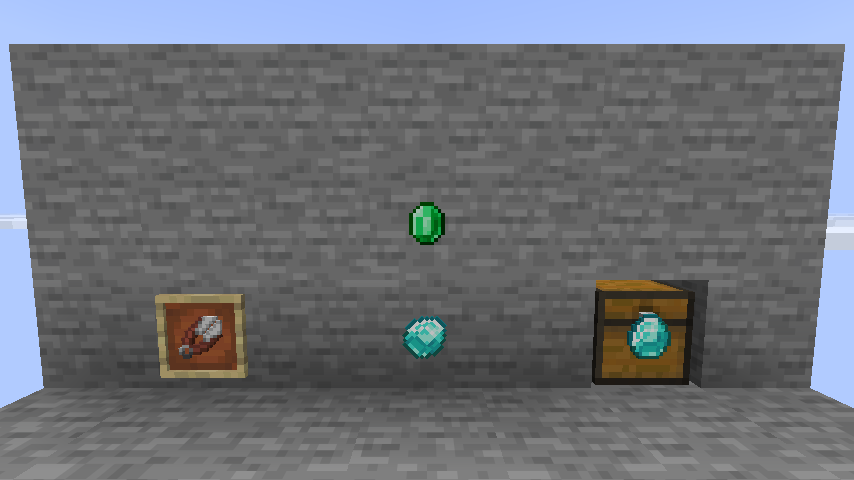
Left: an ordinary frame. Middle: hidden frames - only the diamond and the emerald are visible. Right: a hidden frame on a chest; a right-click opens the chest.
Using it
| Action | How |
|---|---|
| Hide a frame | Hold shears and Shift + right-click the frame. The shears lose 1 durability |
| Show it again | The same gesture on the hidden frame |
| Rotate the item | Shift + right-click with anything but the shears - a plain click never turns a hidden frame by accident |
| Open the container behind | Plain right-click on a hidden frame hanging on a chest, barrel, furnace, shulker box... |
| Find hidden frames | /uf scan highlights every hidden frame around you with particles |
Works with regular and glow item frames.
Nothing gets lost
- An empty hidden frame stays visible, so it can be found and broken. It hides itself again the moment an item is put inside.
- A broken hidden frame drops an ordinary item frame: the flag lives on the entity, never on the item.
- Frames made invisible by another plugin or by
/datacommands are adopted on chunk load, on the first click and on/uf reload, so switching from another solution needs no migration. - Opening a container through a frame fires a
PlayerInteractEventfirst, so WorldGuard, GriefPrevention, Lands and lock plugins keep deciding who gets in. - Without the
unseenframes.usepermission a click with shears behaves exactly like vanilla.
Commands
Alias: /uf
| Command | Description | Permission (default) |
|---|---|---|
/unseenframes reload |
Re-read config.yml and resync loaded frames |
unseenframes.admin (op) |
/unseenframes scan [radius] |
Highlight hidden frames with particles for a few seconds | unseenframes.admin (op) |
/unseenframes toggle |
Toggle the frame you are looking at, no shears or sneaking needed | unseenframes.admin (op) |
Permissions
| Node | Default | Grants |
|---|---|---|
unseenframes.use |
everyone | Hiding and revealing frames with shears |
unseenframes.admin |
op | The /unseenframes command |
Configuration
Everything lives in config.yml: the tool (any item, not only shears), whether Shift is required,
the durability cost, the toggle sound, the rotation lock, container pass-through and its protection check,
adoption, the scan radius and every player message in
MiniMessage format.
# Item used to toggle a frame's visibility.
tool: minecraft:shears

# An empty hidden frame becomes visible again so it can be found and broken.
# false = a hidden frame is always invisible, even when empty.
reveal-when-empty: true

# Plain right-click on a hidden frame on a chest, barrel, furnace, ... opens that container.
container-passthrough:
  enabled: true
  # Ask region protection and lock plugins first.
  check-protection: true
Installation
- Requires Paper 26.2 or 26.3 (Folia works too) and Java 25+. No other plugins needed.
- Drop
UnseenFrames-x.y.z.jarintoplugins/and restart.
Metrics
Anonymous usage statistics are collected via bStats.
Server owners can opt out for every plugin at once in plugins/bStats/config.yml.