
Compatibility
Minecraft: Java Edition


Links
Tags
Creators
Details
Licensed MIT
Published 3 years ago
Updated last month
🏺 Artefacts CIT


CIT resource pack with 2D and 3D models — no Optifine required.
Artefacts CIT adds custom-modeled equipment and decorative items to vanilla Minecraft using item model predicates (custom model data), so you get true CIT-style item reskins without needing Optifine or any client mod.
✨ Features
- Custom models, including:
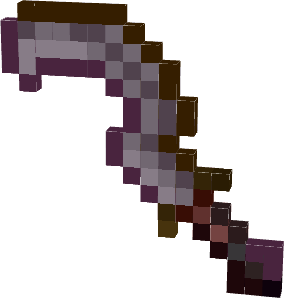
- Khepesh Royal — a custom-modeled weapon
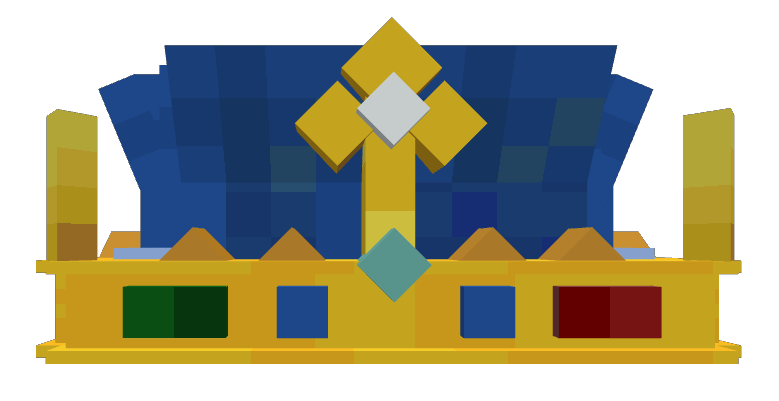
- Arpegene Crown — a decorative headpiece
- Mitre Papale — a papal-style headpiece
- …and more equipment/decorative pieces
- 2D and 3D models, built for a clean, vanilla-friendly look.
- No Optifine dependency: works out of the box with vanilla Java Edition, using standard custom model data rather than Optifine's CIT system.
Models
- Khepesh Royal
- Arpegene Crown
- Mitre Papale

🌟 Plus Edition
A Plus version is also available, which folds in additional models ported from other well-known CIT packs:
Reworked to function without Optifine, for an even larger item selection.
🆕 What's new (26.3 update)
- Support for Minecraft 26.3 (resource pack format 97).
- New pack icons for Artefacts and Artefacts Plus.
- Fixed the PlayStation console models (missing textures) and the PlayStation Headphones model in the Plus edition.
- Fixed untextured faces showing the missing texture on the Couronne du Prince Clerc, the Sainte Mitre and several maeflowers models (towels, curtains, fridges…).
- Plus edition: fixed the bucket sinks (
Bucket_sink_1–3) that no longer loaded, and removed unused horn models. - Lighter PlayStation TV loading screen texture (1024×512).
🕹️ How to use
- Download and install the resource pack into
.minecraft/resourcepacks, then enable it in Options → Resource Packs.
📦 Compatibility
| Minecraft versions | 1.19.4 · 1.20–1.20.2 · 1.21.x · 26.1.x · 26.2 · 26.3 |
| Type | Resource Pack (client-side) |
| Resolution | 16x |
| License | MIT |
| Source | GitHub |
📥 Installation
- Place the resource pack in
.minecraft/resourcepacks/and enable it in-game.
On 5.1 version only
Models using stonecutter via Artefacts datapack companion.
Link to Artefacts CIT datapack