Compatibility
Minecraft: Java Edition
Platforms
Supported environments


Tags
Creators
Details

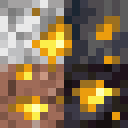
Seamless Ores adds ore variants for the stones ore generates in, such as granite, andesite, tuff and dripstone, and the stones other mods add. Each variant uses its stone as the background, so the ore matches the wall it sits in.
The amount of ore in the Overworld stays almost exactly the same, because the veins are the same and in the same places; only their look changes. The few settings that do change the amount are listed below, and each has its own switch.
Resource pack
Seamless Glowing Ores is the companion resource pack. Ores glow in the dark, with an optional connected outline that joins ore of the same type across different stones, with animated and subtle versions. It needs only Fusion.
Stones
Ore gets a variant in granite, diorite, andesite, tuff and dripstone, and gold and quartz in basalt and blackstone in the Nether. The Sulfur Caves' cinnabar holds ores too, on Minecraft 26.2 and 26.3, and on 1.21.1 and 1.20.1 with Vanilla Backport. The deep blackstone that Terralith lays in its caves gets matching ore on every version.
Stones from other mods are covered as well, each with the vanilla and modded ores that really form inside it:
Blockus, Born in Chaos, Create, Create: TFMG, Forbidden and Arcanus, Let's Do Meadow, Mythic Upgrades, Promenade, Spawn, Twigs and Wilder Wild.
Calcite and smooth basalt get ore only where Create's stone layers place them.
Ores from other mods
The ores of these mods get variants in the stones they generate in:
Cobblemon, Create, Create: New Age, Create: TFMG, Dense Mekanism, Energized Power, Exp Ores, Extreme Reactors, Ice and Fire (Community Edition), Immersive Engineering, Malum, Mekanism, Modern Industrialization, Mystical Agriculture, Mythic Metals, Mythic Upgrades, Occultism, Oreganized, Powah, Silent Gear, Silent's Gems, Tech Reborn and Things.
Not every mod has a build for every Minecraft version and loader, so the blocks you get depend on what you have installed. A modded block exists only when the mods it belongs to are installed, so there is nothing to configure. The variants carry the same tags, drops, experience, hardness and mining level as the ore they replace, so JEI, REI, Jade, ore doubling and processing chains treat them as ordinary ore.
Amount of ore
A block that becomes granite iron ore was already going to be iron ore, and a vein running from stone into granite changes look block by block. These settings are the exceptions:
- Copper. Vanilla's large copper veins and dripstone caves look like solid copper once the stone around the ore matches, so ordinary copper defaults to 75 percent and dripstone caves to 50 percent. Set both to 100 for vanilla amounts.
- Lush Caves. Ore left bare in their clay and moss becomes clay or moss. This removes a little ore, only there.
- Sulfur Caves (26.2 and 26.3, and 1.21.1 and 1.20.1 with Vanilla Backport). No ore sits in or against their sulfur and cinnabar. This removes ore, only there.
- Cinnabar ores (the same versions). Gold, iron, redstone and the modded ores that occur beside cinnabar form inside it, in the same veins and at the same rates as the ore they stand in for. This adds ore, only in cinnabar, with a slider for how much.
- Geology, off by default. When on, ore stops forming in the vanilla stones it could never form in, such as coal in granite. This removes ore. Ores in other mods' stones always follow a fixed version of this rule, and Cobblemon's evolution stones keep only the stones that fit their lore (with Geology on, in the vanilla stones as well, on 1.21.1 and 1.20.1).
The Nether
Vanilla gold and quartz only generate in netherrack, so their basalt and blackstone versions are new ore rather than a restyle. They are on by default, and the same goes for the Nether ores of the supported mods. Nether ore rarity (one in two by default) and Nether vein size (80 percent by default) control how much of it forms, and turning basalt and blackstone off brings Nether generation back to vanilla. Bastions are protected, so their walls never turn into ore.
Compatibility
Worldgen overhauls and ore distribution datapacks keep their own settings, including Terralith, because existing ore features are extended rather than replaced.
Settings
The settings screen opens from Mod Menu on Fabric, or from the mods list on NeoForge and Forge. Every stone can be switched off and each supported mod has its own section; sections for mods you do not have are hidden. Settings never change which blocks exist, only what generates, so a client and a server with different settings always agree. Changes apply to newly generated chunks.
Supported versions
| Minecraft | Fabric | NeoForge | Forge |
|---|---|---|---|
| 26.1 to 26.3 | Yes | Yes | n/a |
| 1.21.11 | Yes | Yes | Yes |
| 1.21.4 to 1.21.10 | Yes | Yes | n/a |
| 1.21 to 1.21.1 | Yes | Yes | Yes |
| 1.20 to 1.20.1 | Yes | 1.20.1 | Yes |
There is one file per loader, and it picks the right build for the version it is installed on. On NeoForge 1.20.1 the NeoForge file runs the Forge build, which NeoForge supports at that version. Tested in game: Fabric on 1.20.1, 1.21.1, 1.21.10, 1.21.11, 26.1.2, 26.2 and 26.3, NeoForge on 1.21.1, 1.21.4, 1.21.11, 26.1.2, 26.2 and 26.3, and Forge on 1.20.1, 1.21.1 and 1.21.11.
Dependencies
| Mod | Fabric | NeoForge | Forge |
|---|---|---|---|
| Fabric API | Required | n/a | n/a |
| Cloth Config | Required | Required | Required on 1.20.x to 1.21.1 |
| Cloth Config API Forge | n/a | n/a | Required on 1.21.11 |
| Mod Menu | Optional | n/a | n/a |
On Forge 1.21.11, Cloth Config has no Forge build, so it comes from Cloth Config API Forge, a separate project. Because one Forge file covers versions that need different ones, both are listed as optional on the Forge file; install the one for your version. Every stone and ore mod above is optional.
Common questions
I have Seamless Ores: Matrix installed. What should I do? Matrix is now part of Seamless Ores and is no longer available on its own. Update Seamless Ores to 5.0.0 or newer first, then delete the Matrix file from your mods folder. Your worlds are safe: while both are installed Seamless Ores steps aside, and once Matrix is gone the Matrix ores already in your worlds become Seamless Ores' own blocks.
Does it work in an existing world? Yes, in chunks you have not visited yet. Explored areas keep what they have.
Does it work on a server? Yes, install it on both sides.
Credits
The vanilla ore overlays are derived from Minecraft's own textures and remain Mojang's property. Each supported mod's overlay is derived from that mod's own ore texture and is used under its licence: Cobblemon by The Cobblemon Team (MPL-2.0, and the overlays derived from it are MPL-2.0 too), Create (CC0 and MIT), Create: New Age by Antarctic Gardens (BSD-3-Clause), Create: TFMG by DrMangoTea, Pepa and Luna (MIT), Dense Mekanism (MIT), Energized Power by JDDev0 (MIT), Exp Ores by TriQue (MIT), Extreme Reactors by ZeroNoRyouki (MIT), Ice and Fire Community Edition by IAFEnvoy, after Alexthe666's original (LGPL-3.0), Mekanism by Aidan C. Brady (MIT), Modern Industrialization by Azerococo and Technici4n (MIT), Mystical Agriculture by BlakeBr0 (MIT), Mythic Metals by Noaaan (MIT), Mythic Upgrades by TriQue (MIT), Occultism by Kli Kli (MIT), Powah by owmii, Technici4n and shartte (LGPL-3.0), Silent Gear and Silent's Gems by SilentChaos512 (MIT), Tech Reborn by Team Reborn, modmuss50 and drcrazy (MIT), and Things by glisco (MIT).
The Immersive Engineering overlays are derived from its ore textures and are used with the permission of BluSunrize. The Oreganized overlays are derived from its ore textures and are used with the permission of Binome. The Malum overlays are derived from its ore textures and are used with the permission of Sammy Semicolon.
An original mod, written from scratch. Not a fork or a port.