
Compatibility
Minecraft: Java Edition
Platforms


Tags
Creators
Details


UltimateShop
Build your own shop rules with flexible products, prices, conditions, actions, and dynamic menus.
UltimateShop is a highly configurable shop and trading framework for Spigot and Paper. Configure what appears in a shop, who can trade, what players pay and receive, how prices and stock change, and when offers refresh. Each part can follow its own rules and work together with the others.
Use conditions, placeholders, formulas, actions, and reset schedules across supported settings to connect your shop to player progress, server events, custom items, and existing economy plugins. A daily random shop, seasonal market, or reward menu is one example of these features working together. You can combine the same features differently, or layer several behaviors into one shop.
Features
Features marked Premium require UltimateShop Premium. Some integrations also require the corresponding third-party plugin.
Build Shops Around Your Own Rules
The shop's selection, transactions, availability, and refresh behavior are configured separately. Combine the supported rules at the menu, product, price, and reward levels to create your own trading experience.
- Decide what appears: Use configured products and display rules to shape the selection. Premium adds dynamic layouts, conditional product selection, and random placeholders: switch products according to conditions, choose weighted offers from a pool, or roll selections separately for each player.
- Decide what changes hands: Combine items, currencies, costs, rewards, and commands in a transaction. Conditions can change which entries apply, allowing the same offer to include different payments or rewards for eligible players.
- Decide who can trade and when: Check permissions, worlds, biomes, or placeholder values, then apply personal and global limits or cooldowns. Values exposed by other plugins can connect trading to levels, quests, seasons, dates, or event states.
- Decide how the shop evolves: Use formulas and transaction data to change prices, quantities, and available stock. Schedule usage resets independently. Premium random placeholders can also refresh product selections and values on a schedule, with product usage resets linked to the same cycle.
- Decide what happens around a trade: Configure menu and transaction actions, success or failure feedback, display information, and navigation. Connect purchases to services or rewards delivered by your other plugins.
For example: With Premium, random placeholders can select 5 daily offers from a larger pool, while conditional product selection can change what appears according to a season value supplied by another plugin. Those offers can also have rank-based rewards, alternative payments, limited stock, and prices that respond to trading activity. Each of these rules can be used independently or combined with the others.
The same building blocks can produce rotating merchants, seasonal offers, progression-based exchanges, player-supplied markets, daily rewards, one-time claims, or command-based services. These examples illustrate possible configurations; your shop's behavior comes from the rules you choose and how you combine them.
Flexible Products & Payment Methods
- Configure what players pay and what they receive independently. Both sides can include items, money, points, EXP, or levels, with separate buying and selling settings.
- Combine multiple costs or rewards in one transaction. For example, charge 500 points and 64 diamonds for a custom sword, then run a command to grant an additional reward.
- Use ALL mode to require or deliver every applicable entry, or ANY mode to let the system select a valid option. Offer money or points as alternative payment methods without creating separate products.
- Apply different prices or rewards at specific transaction counts, and add requirements to individual entries. Create introductory offers, milestone rewards, or progressively more expensive purchases.
- Build command shops and free reward entries, and reuse named price definitions to simplify common pricing settings.
- Premium: Connect other numeric resources through placeholders and give/take actions, even when no direct economy hook is available.
Dynamic Markets & Item-Based Sell Prices
- Calculate prices and product amounts with math expressions, PlaceholderAPI values, and player or server transaction counts. Make popular products more expensive or lower their sell price as more players supply them.
- Choose simple fixed-price calculations or calculate successive trades individually, so a bulk purchase can follow your changing price rules.
- Set minimum and maximum amounts to keep calculated prices within your intended range.
- Price Modifier (experimental): Adjust sell rewards using the actual item being sold, with price preview and confirmation through an Item Sell Menu. Reduce the value of damaged equipment, read numbers from Lore or NBT, or apply MythicChanger matching rules. Some modifier types require additional plugins.
- Premium: Show whether a dynamic price is above, below, or equal to its base price, and use additional lifetime-count and transaction-time data in your formulas.
Personal Limits, Global Stock & Cooldowns
- Set personal and server-wide buying and selling limits independently. Control how much each player can trade and how much the entire server can purchase or supply.
- Configure personal and global cooldowns for both buying and selling, alongside your transaction limits.
- Keep limits permanent, reset them after an interval, or refresh them on a schedule. Build daily allowances, weekly offers, or recurring stock refills.
- Use formulas and placeholders for limits and stock. Combine buy and sell data to create a market where player sales replenish available stock.
- Premium: Share usage data across products, including transaction counts, limits, and reset times. Shared product data is currently an Alpha feature.
- Premium: Use custom reset timestamps and random-placeholder reset schedules for more specialized offers and shop rotations.
Custom Items & Economy Integrations
- Retrieve supported plugin items directly through configuration. Item hooks include ItemsAdder, Oraxen, Nexo, CraftEngine, MMOItems, MythicMobs, EcoItems, EcoArmor, eco, NeigeItems, and ExecutableItems. ItemBridge can provide access to additional item plugins.
- Recognize supported custom items by their plugin identity, allowing them to remain sellable after name, Lore, or enchantment changes, provided their identifying data is preserved.
- Use ItemFormat to build configured items, customize supported item properties, and modify templates retrieved from item plugins. Save held items for later use in shops and menus.
- Choose strict vanilla item comparison or configurable ItemFormat matching. With MythicChanger installed, define more specific matching rules for the items you accept.
- Use Vault, PlayerPoints, CoinsEngine, ExcellentEconomy, UltraEconomy, EcoBits, PEconomy, RedisEconomy, RoyaleEconomy, and VotingPlugin, plus vanilla EXP and levels.
- Premium: Access additional ItemFormat options, including AdvancedEnchantments integration and modern item component settings on supported server versions.
Custom Menus & Convenient Trading
- Design shop menus, navigation menus, and quantity-selection menus with your own layouts, display items, names, Lore, buttons, conditions, and actions. Configure interaction-based or periodic button updates for dynamic information.
- Let players select quantities with Buy More, sell matching inventory items through product Sell All, or use quick-buy, quick-sell, sell-hand, and sell-all-hand commands where permitted.
- Set each product's default buy and sell quantities for direct trading. Make one click buy a stack or sell a configured batch.
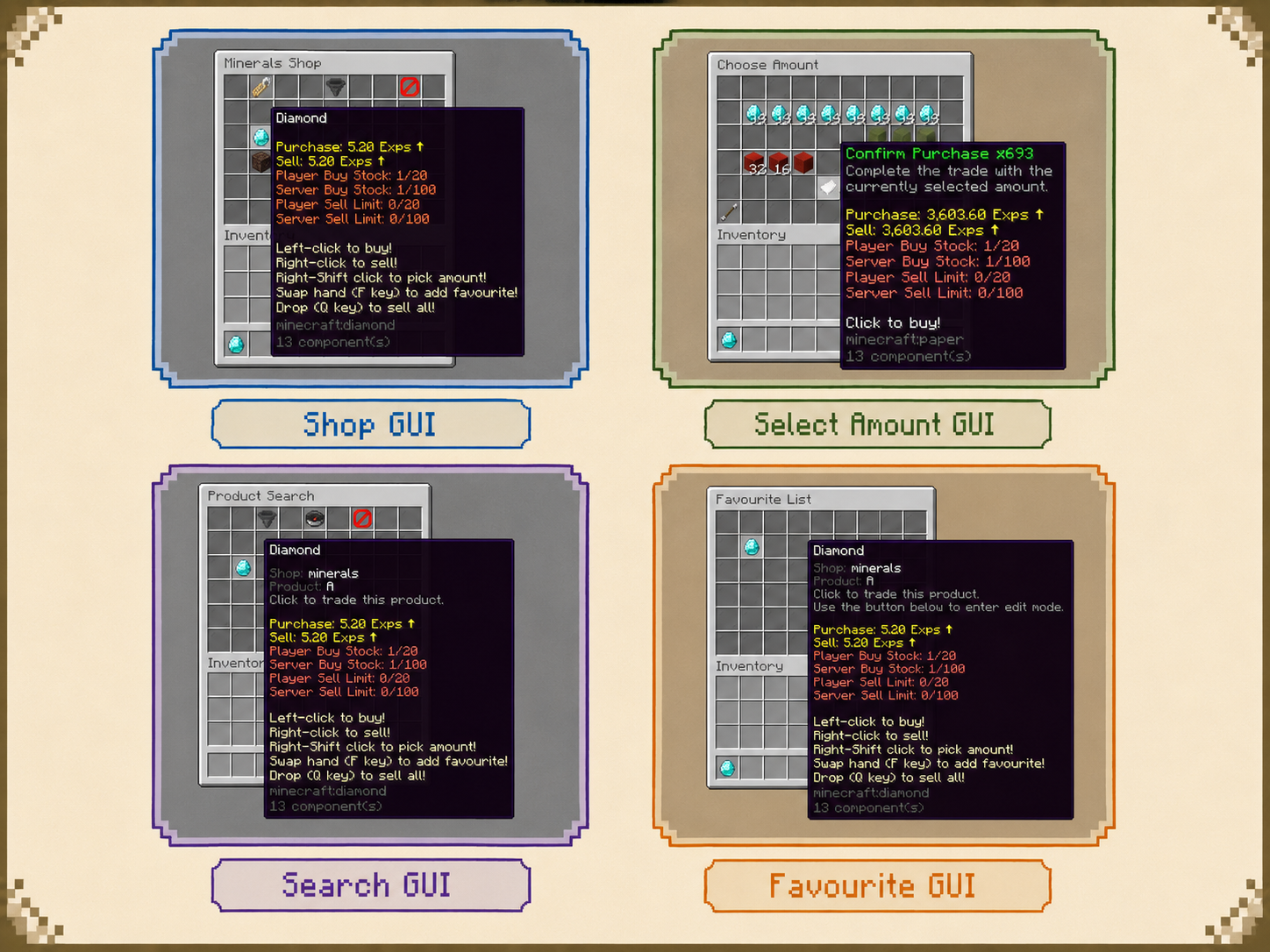
- Provide two item-deposit selling workflows: Sell All GUI sells deposited items when the menu closes; Item Sell Menus let players preview the adjusted price and confirm the sale with a button.
- Enable smart item giving to respect stack sizes, reuse inventory space, and check capacity before giving purchased items.
- Premium: Add text or item-based product search, editable favourites, conditional button selection, dynamic layouts, custom menu commands, and GUI title updates. Title updates require PacketEvents.
- Premium: Define custom product click actions and display the same product in multiple slots or menus. Offer separate quantity shortcuts while keeping the underlying product data together.
Java, Bedrock & Graphical Dialog Menus
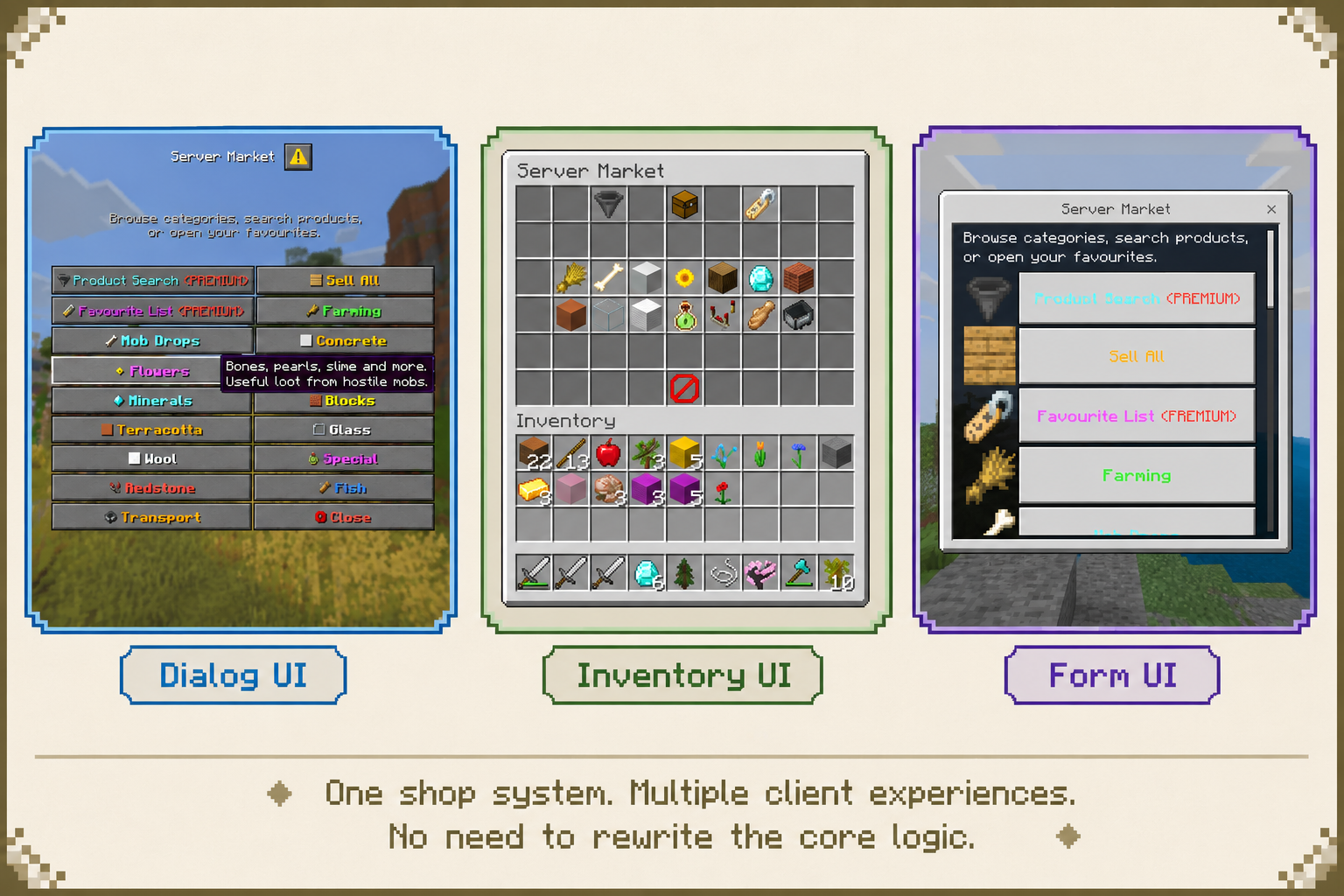
- Classic inventory menus: Give Java players familiar chest-style shops with configurable item layouts and trading controls.
- Premium — Bedrock Form UI: Generate Bedrock forms from your existing menus through Geyser and Floodgate. Show item icons and price information, with separate Bedrock click behavior for a more suitable interaction flow.
- Premium — Native Dialog UI: Use Minecraft Dialog menus on Paper 1.21.9+ with a compatible Java client. Standard action-button and item-action-list layouts do not require a resource pack.
- Premium — Ore Graphical Menus: Create Dialog shops with custom backgrounds, buttons, product cards, item icons, and navigation. Customize textures and layout templates, then generate the required resource pack with /shop dialogpack. Requires Paper 1.21.9+, a compatible Java client, and the generated resource pack loaded by the client.
- Reuse shop definitions across supported menu presentations, and tailor product descriptions to the interface in which they appear.
Container Selling & Conditional Sell Bonuses
- Premium — Sell Stick: Let players sell eligible contents by clicking a container. Configure usage counts and selling multipliers for different stick types.
- Premium — Sell Chest (experimental): Automatically sell eligible chest contents while the owner is online and the chunk is loaded. Configure usage limits, multipliers, and hologram information. Sell Chest does not support Folia.
- Premium — Shulker Box Selling (Alpha): Enable selling of eligible contents inside shulker boxes through supported selling workflows.
- Premium — Sell Multiplier: Apply conditional bonuses or taxes. Use the highest matching multiplier or multiply matching entries together for VIP bonuses, event boosts, and other sell adjustments.
- Container-selling protection integrations include WorldGuard, Residence, GriefPrevention, Lands, HuskTowns, HuskClaims, PlotSquared, Towny, BentoBox, Dominion, and SuperiorSkyblock2. Sell Chest holograms support DecentHolograms, CMI, and FancyHolograms.
Actions & Conditions for Your Server's Rules
- Control access and trading with permission, world, biome, menu, and placeholder checks. Restrict a shop to a world, require a rank, or connect an offer to progress tracked by another plugin.
- Run actions when menus open or close, buttons are clicked, transactions succeed, or trading fails. Send messages, execute commands, play sounds, teleport players, and open other menus.
- Control which transaction counts trigger an action and whether it runs once for a bulk transaction. Customize feedback for insufficient funds, full inventories, unmet conditions, or reached limits.
- Premium: Combine conditional, delayed, and chance-based actions; compose alternative or inverted conditions; and trigger actions from condition results. Filter actions for Java or Bedrock players when their interactions need to differ.
Dynamic Information & Player Language
- Display prices, quantities, limits, transaction counts, and reset information in product descriptions and messages. Integrate PlaceholderAPI and built-in math, cron, and language placeholders where supported.
- Customize text with legacy colors, hex colors, gradients, and MiniMessage formatting, and control how numbers and prices are presented.
- Premium: Use random and conditional placeholders for rotating offers and contextual text. Store custom values separately for each player or globally; custom placeholder storage is currently a Beta feature.
- Premium: Show reset countdowns and comparison results, display localized vanilla item names, and select language text according to each player's client locale.
- Premium: Deliver language feedback through chat, titles, action bars, boss bars, and sounds. Supported modern Paper versions also offer item sprite display options for Java players.
Management, Storage & Network Features
- Manage saved items, open menus for players, perform quick trades, and adjust product usage data through commands and permissions.
- Store data in YAML or enable SQL storage. Supported SQL dialects include MySQL, H2, PostgreSQL, and SQLite, with automatic saving and asynchronous database operations.
- Premium: Edit shops, products, and menus through the in-game editor.
- Premium: Record transactions in a file or database, including player, product, amount, price, and multiplier information. Logs are buffered and written in batches.
- Premium: Synchronize global product usage updates through BungeeCord plugin messaging with database storage enabled. Check the setup guide when configuring a proxy network.