
Compatibility
Minecraft: Java Edition
Platforms


Tags
Creators
Details
Solstice v3.1
Thanks for 20,000 downloads in total!

Solstice is a semi-realistic shader pack for Minecraft with five performance profiles. It is built for Iris and developed on an RX 6600 at 1440p.
Features
- Shadows are soft, stay sharp where an object touches the ground, and hold still while you walk. Leaves move in the wind, stained glass casts coloured light, and water casts caustics.
- Clouds are either blocky or volumetric, and they cast shadows on the ground. Every Minecraft day has its own cloud cover, haze and high cirrus.
- Trees, cave mouths and windows cast beams of light through the haze.
- Ambient occlusion darkens corners and creases and leaves flat ground alone.
- Water has ripples, reflections and foaming waterfalls. From below, the surface shows the sky through a round window and mirrors the lake floor around it.
- Rain forms puddles, light sources glow, Nether portals light the blocks around them, snow sparkles and flames flicker.
- The sky, the sunlight and the haze come from one atmosphere model, so they agree with each other from noon to twilight and all the way to the horizon.
- The night sky has stars, meteors, the Milky Way and an occasional aurora.
- Vanilla metal and polished blocks get subtle highlights. A LabPBR resource pack adds normal, specular and emissive maps.
- Distant Horizons terrain and water are lit in the Overworld, the Nether and the End.
- Auto exposure brightens caves and interiors the way your eyes adjust to the dark.
- Block light can take the colour of its source, so soul fire glows cyan and redstone glows red.
- Depth of field and motion blur are available as options.
- Bloom, anti-aliasing, sharpening and colour grading finish the image.
Install
- Install Iris on Fabric. It comes with Fabulously Optimized.
- Put Solstice in the
shaderpacksfolder. - Select it under Video Settings, then Shader Packs.
- Start with the Medium profile.
OptiFine support is experimental. See OptiFine.
Profiles
- Potato has no shadows, uses blocky clouds, and turns every expensive effect off.
- Low adds basic shadows and keeps most expensive effects off.
- Medium is the default. It has volumetric clouds and light, ambient occlusion, materials, bloom, puddles and water reflections.
- High has sharper shadows, finer ambient occlusion and finer light beams.
- Ultra uses the highest shadow, cloud and light quality. It suits screenshots and fast graphics cards.
Select your profile again after you update the pack, because Iris keeps the settings the previous version saved. Lighting Style and the colour settings do not belong to a profile, so they stay as you set them.
Settings worth trying
- Lighting Style changes how dark nights and interiors are. Survival is the darkest and Builder brightens interiors.
- Auto Exposure is on by default and sits on the Color & Tone screen. It leaves open sky, nights, the Nether and the End alone.
- Depth of Field and Motion Blur are on the Camera screen and are off by default. Depth of Field focuses on whatever is under the crosshair, looks through glass and water, and keeps your hand sharp. Motion Blur follows the camera, so a moving mob is not blurred.
- Colored Block Light is off in every profile. Turn it on under Lighting.
- Water Reflections adds detailed reflections of terrain. With it off, water still reflects nearby terrain more coarsely. Reflections can only show what is on screen.
- Shadow Projection has two modes. Sharp gives the finest shadows near you, and Stable keeps every shadow still while you walk.
- Minecraft's own Brightness slider lifts caves and nights when you set it above the middle.
- Clouds, Color Grade, Fog Density, Water Murkiness, Daily Weather Variety, Contrast, Vibrance and Color Temperature are also worth a look.
Distant Horizons
Solstice applies its own fog and side lighting to distant terrain, so change these settings in Distant Horizons:
- LOD Fog: Off
- LOD Side Shading: Off
- Cave Culling: On, with a height around 60
- Overdraw Prevention: 100%
- Max Horizontal Resolution: Block
- Quality: High for normal play
Distant terrain is kept out of the shadow map, because Iris may draw the whole distant range into it. The Distant Terrain Shadows option gives distant terrain shadows from what is visible on screen instead. It is on in High and Ultra.
Voxy
Voxy support is new and has not been tested in the game yet. Solstice lights Voxy terrain the same way as Distant Horizons terrain and uses Voxy's own block textures. Distant water gets a sky reflection and the pack's water colour.
Voxy 0.2.19 probably cannot draw its terrain under any shader pack on Iris 1.11.4 or newer, because the two disagree about the direction of depth. This comes from reading the Iris and Voxy source code and has not been confirmed in the game. Voxy 0.2.20 fixes it and needs Iris 1.12.
When Voxy and Distant Horizons are both enabled, Voxy draws the distant terrain and Distant Horizons draws nothing. The exception is Voxy 0.2.19 on Iris 1.11.4 or newer, where Distant Horizons keeps drawing.
If Voxy terrain looks unlit, search latest.log for "Failed to compile shader patch" and "The following uniforms could not be found", and include those lines when you report it.
LabPBR
The built-in materials keep the vanilla look and add restrained highlights. To use the maps from a resource pack:
- Install a LabPBR 1.3 resource pack.
- Enable Surface Materials and set Material Source to LabPBR Resource Pack.
- Start with Material Reflections on Sky Only.
Brick, cobblestone, polished stone, quartz, iron, gold and copper show the difference best in angled sunlight. Parallax Mapping is off in every profile. Turn it on under Materials once a LabPBR pack is selected.
Performance
If the pack runs slowly, lower these settings in this order:
- Shadow Resolution
- Shadow Distance
- Shadow Filter Quality
- Cloud Quality
- Volumetric Light Quality, or turn Volumetric Light off
- Water Reflections, Ambient Occlusion Quality or Material Reflections
- Colored Light Range, or turn Colored Block Light off
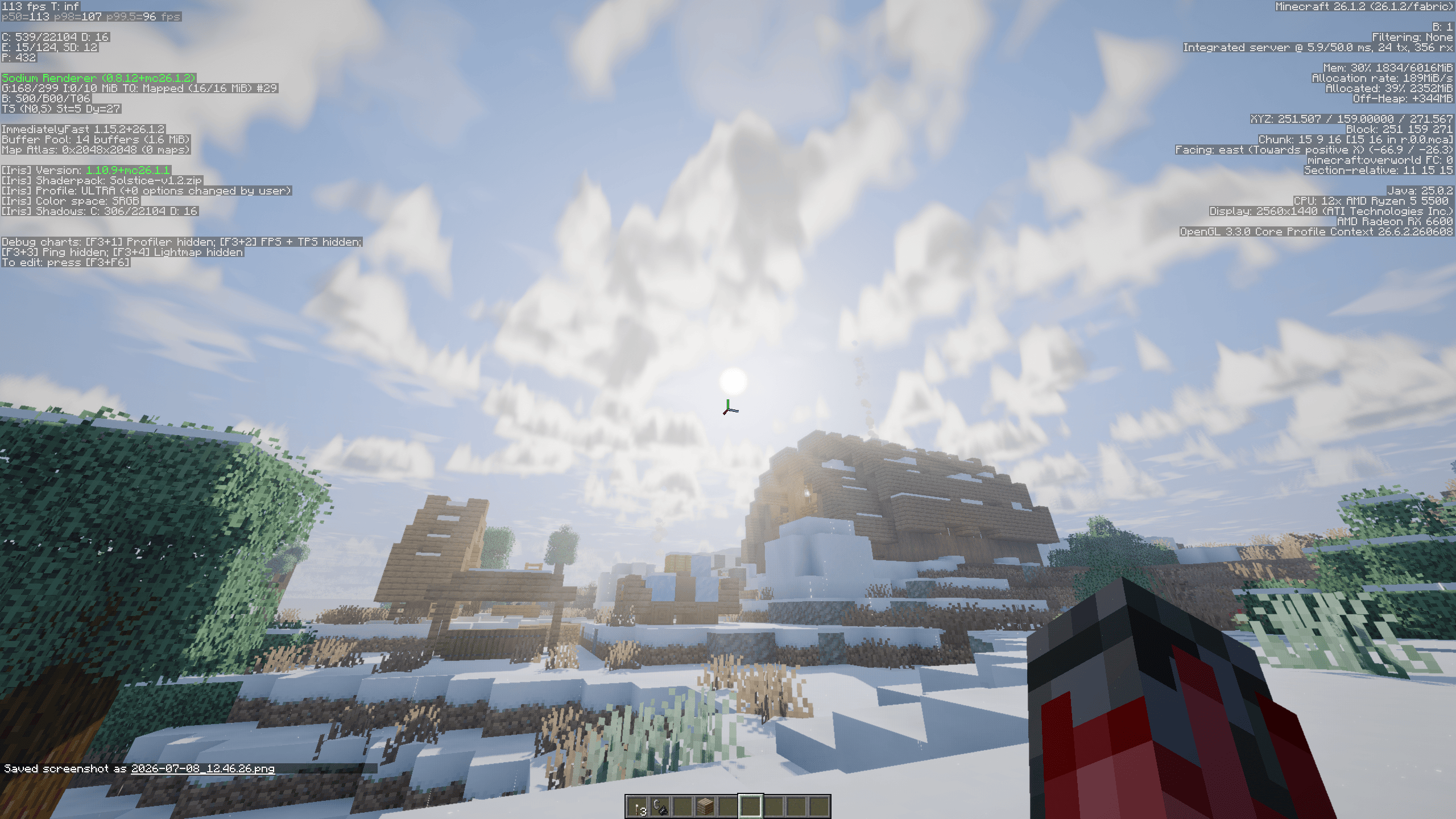
Ultra on Minecraft 26.1. Results depend on your graphics card, resolution, world, mods and render distance.
OptiFine
Solstice is built for Iris. OptiFine support is experimental and has not been tested in the game yet. Expect these differences:
- Distant Horizons is not supported.
- Block light is not coloured and uses the warm torch colour.
- Shadows are slightly less precise far from the world origin.
- Held item materials, lightning flashes on the landscape and auroras use default values.
If you report an OptiFine problem, include the full log and your Minecraft and OptiFine versions.
Troubleshooting
- If the edge between normal and distant terrain is bright or dark, turn off LOD Fog and LOD Side Shading in Distant Horizons.
- If distant terrain shows through the ground, enable Cave Culling and set Overdraw Prevention to 100%.
- If materials look unchanged, use a LabPBR 1.3 pack and select it as the Material Source.
- If the pack fails to compile, send the full Iris error with your Minecraft, Iris, Distant Horizons, graphics card and driver versions.
Source and history
The source is at github.com/d0mkaaa/solstice, and the full history is in CHANGELOG.md.