
Compatibility
Minecraft: Java Edition
Platforms


Tags
Creators
Details
RandomRoll
A lightweight datapack that adds dice-rolling functionality to Minecraft — perfect for tabletop-style RPG mechanics, DnD-inspired servers, or any world where you need a random roll on demand.
Features
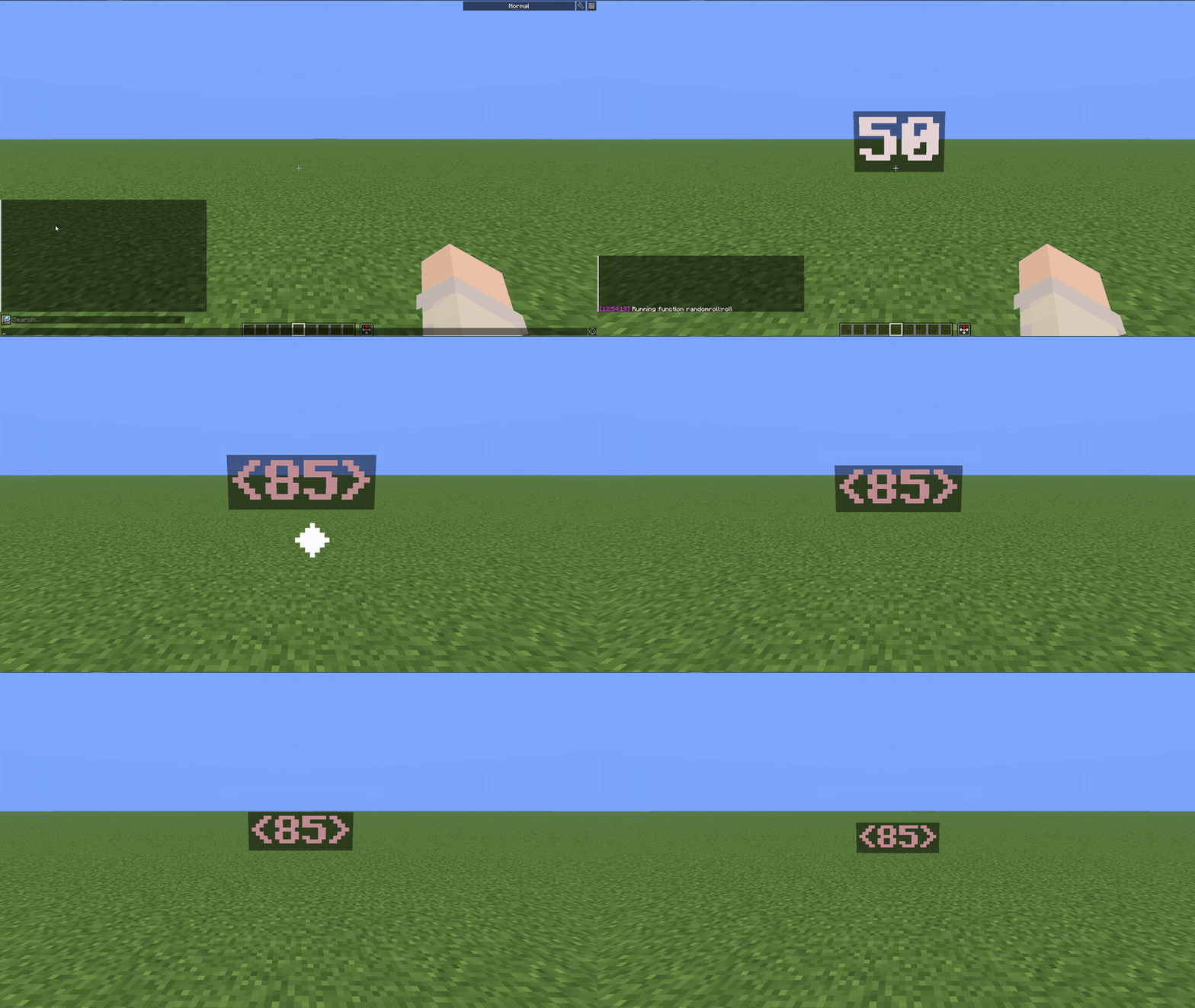
RandomRoll lets you trigger dice rolls either by running a function directly or by placing a specially-tagged item into an item frame — great for building physical "dice" props in your world.
Versions
v1.0.0+
- Run
/function randomroll:rollto roll a d100. - Alternatively, give yourself an item with custom data, e.g.:
(the value of/give @s minecraft:apple[minecraft:custom_data={dice:1}]dicedoesn't matter here) and place it in an item frame to trigger a d100 roll.
v2.0.0+
- Added the
dicemacro, letting you set a custom die size:
rolls a d20./function randomroll:roll {dice:20} - Item frame items now respect the die size too:
placed in a frame rolls a d50./give @s minecraft:apple[minecraft:custom_data={dice:50}]
v3.0.0+
- Added the
modifiermacro, which adds its meaning (3.1.0+) or the value of a scoreboard objective to the roll result. The scoreboard modifier is pulled from the nearest player without theadmintag:
rolls a d12 and adds 2./function randomroll:roll {dice:12,modifier:2}
rolls a d10 and adds the/function randomroll:roll {dice:10,modifier:v1}v1scoreboard value of the nearest non-admin player. - Works the same way with item frames:
placed in a frame rolls a d15 with the/give @s minecraft:apple[minecraft:custom_data={dice:15,modifier:v1}]v1modifier applied.
 |
How to Use
- Download the version that fits your needs (or the latest for all features).
- Place the datapack in your world's
datapacksfolder. - Run
/reloador restart the world. - Use
/function randomroll:roll(with optional macros) or set up item-frame dice as described above.
RU:
Легкий датапак, который добавляет в Minecraft функцию броска игральных костей — идеально подходит для настольных ролевых игр, серверов в стиле DnD или любого мира, где вам нужен случайный бросок по запросу.
RandomRoll позволяет запускать броски игральных костей либо напрямую, вызывая функцию, либо помещая предмет со специальным custom_data в рамку для предметов — это отличное решение для создания физических «игральных костей» в вашем мире.
v1.0.0+
- Запустите
/function randomroll:roll, чтобы бросить d100. - Или создайте предмет с custom_data, например:
(значение/give @s minecraft:apple[minecraft:custom_data={dice:1}]diceздесь не имеет значения) и поместите его в рамку для предметов, чтобы запустить бросок d100.
v2.0.0+
- Добавлен макрос
dice, позволяющий задать размер игральных костей.
бросает d20./function randomroll:roll {dice:20} - Предметы в рамке теперь тоже учитывают размер кубика:
поместив предмет в рамку, вы бросаете d50./give @s minecraft:apple[minecraft:custom_data={dice:50}]
v3.0.0+
- Добавлен макрос
modifier, который прибавляет к результату броска своё значение (3.1.0+) или значение scoreboard цели. Модификатор берется у ближайшего игрока без тегаadmin:
бросает d12 и прибавляет 2`./function randomroll:roll {dice:12,modifier:2}
бросает d10 и прибавляет значение/function randomroll:roll {dice:10,modifier:v1}v1с scoreboard ближайшего игрока без тегаadmin. - Работает так же с предметами в рамке:
поместив предмет в рамку, вы бросаете d15 с применением модификатора/give @s minecraft:apple[minecraft:custom_data={dice:15,modifier:v1}]v1.
|
Как использовать
- Скачайте версию, которая соответствует вашим потребностям (или последнюю версию со всеми функциями).
- Поместите датапак в папку
datapacksвашего мира. - Выполните команду
/reloadили перезапустите мир. - Используйте
/function randomroll:roll(с дополнительными макросами) или настройте кубики в рамке для предметов, как описано выше.