Compatibility
Minecraft: Java Edition
Platforms
Supported environments


Tags
Creators
Details
sheeta's Amethyst Tools

Requirements
Fabric: Fabric API
Forge: Sinytra Connector + Forgified Fabric API
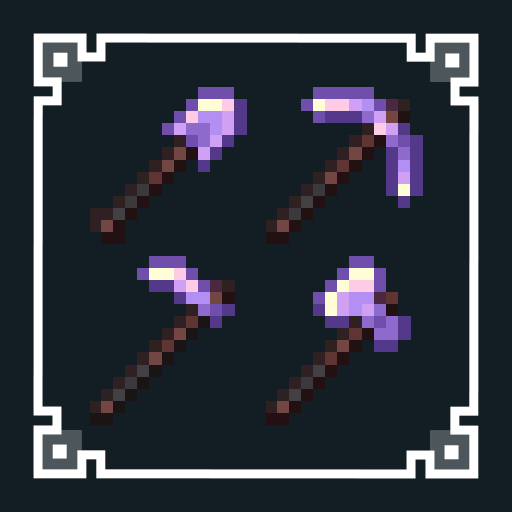
This mod adds 4 Amethyst Tools that can be evolved from Netherite tools. They keep the same base stats as regular Netherite, but each one gets a unique ability. Essentially, they serve as complete versions of mods for wide mining, harvesting, and tree cutting:
- Amethyst Shovel: Mines in a 3x3 area.
- Amethyst Pickaxe: Mines in a 3x3 area, but only affects blocks up to 3 times the hardness of the block you hit.
- Amethyst Hoe: Mines in a 3x3 area. Right-click to do 3x3 tilling, 3x3 harvesting, and automatic replanting.
- Amethyst Axe: Breaks an entire tree in one hit (logs and leaves included). It processes the tree in phases of up to 25 logs at a time. It's only breaking the tree you're targeting, even in thick forests, so it barely touches nearby builds. Its accuracy is superior to other tree cutting mods.
You can disable them by holding Shift while using the tool.
Amethyst Charge
Each tool has its own Amethyst Charge up to 3000, separate from normal durability. It costs 1 charge every time you use ability (per phase for the Axe). When used up, the tool loses its ability and works like a regular Netherite tool. The current charge can be checked in the tooltip.
You can recharge them by:
- Combining with Amethyst Clusters on an anvil (25% charge per cluster)
- Combining two Amethyst Tools (their charges add together)
- Using the Mending enchantment (XP will be used for Amethyst Charge when durability is full)
How to craft them
To turn a Netherite tool into an Amethyst Tool, you have to do a ritual inside an Amethyst Geode.
You will need: a Silk Touch pickaxe, a Beacon, Tinted Glass, and the Netherite tool you want to upgrade.
- Go into an Amethyst Geode and mine some of Amethyst Buds (small, medium, large) and Amethyst Clusters using Silk Touch.
- Place the Beacon on an Amethyst Block inside the geode and place an Amethyst Cluster on top of it.
- A beam will shoot up and highlight a specific spot in the geode. Place Tinted Glass there and right-click it with your Netherite tool to set the tool in place.
- Now use the different Amethyst Buds and Clusters to reflect and guide the beam until it reaches the Tinted Glass with the exact number of reflections needed.
Each growth stage has a different function:
- Medium Amethyst Bud: Reflects the beam to the left
- Large Amethyst Bud: Reflects the beam to the right
- Amethyst Cluster: Reverses the beam
- Small Amethyst Bud: When placed on an Amethyst Block, extends the beam’s reach by allowing it to pass through to the other side (doesn't count as a reflection)
The exact number of reflections and max distance depends on your world seed and the Beacon's position. beam's color gets whiter as you get closer to the right setup. If the reflections are wrong, it turns purple. If the beam isn't long enough, use Small Buds to extend it or try a shorter path.
When the beam connects and stays pure white for 10 seconds, you'll hear a sound and the evolution starts. After it's done, the Tinted Glass and used clusters break, and your Amethyst Tool drops out.
Each Beacon position can only be used once. If you move the Beacon, a new spot will be highlighted.