Compatibility
Minecraft: Java Edition
Platforms
Supported environments


Links
Tags
Creators
Details
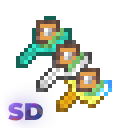
🫳 Super Duper Grabber allows players to pick up and place chests using special grabber tools.
It supports both vanilla chests and custom chests from the Iron Chests: Restocked, with configurable slowness effects to balance gameplay. The mod integrates with Cloth Config API for customizable settings and Mod Menu for a user-friendly configuration interface.
You'll say it's useless, I'll say partially yes 🙃, but actually at the beginning of the development phase I thought of presenting this as a vanilla tool that doesn't break the atmosphere of the game.
The idea itself I borrowed from the mod Chest Transporter (versions up to 1.12.2), consider it a transfer to new versions
✨ Features
- Grabber Tools: Craft special tools (Wooden, Iron, Diamond, and Double Grabbers) to pick up and place chests without breaking them.
- Chest Support:
- Vanilla chests (
minecraft:chest,minecraft:trapped_chest). - Barrels (
minecraft:barrel). - Chests from mod Iron Chests: Restocked.
- Vanilla chests (
- Slowness Effect: Configurable slowness effect when carrying chests, with different settings for each grabber type.
- Configuration:
- Customize slowness effect intensity and maximum amplifier via Cloth Config API.
- Settings saved in
config/sdgrabber.json.
- ModMenu Integration: Access configuration through a GUI with ModMenu (optional).
- Multilingual Support: Descriptions and settings available in English (
en_us) and Russian (ru_ru), with support for additional languages via community contributions.
⚙️ Usage
Single Grabbers (Wooden, Iron, Diamond):
- Shift + Right-Click on a chest to pick it up.
- Shift + Right-Click on a block to place the grabbed chest.
Double Grabbers:
The mechanics of picking up and placing chests are slightly altered here, as this grabber can grab multiple chests at once.
- Shift + Right-Click on a chest to pick it up (can hold multiple chests).
- Shift + Right-Click on a double chest's second half while holding a chest to pick it up, or place all held chests if grabber inventory is full.
- Right-Click without Shift on a chest or adjacent block to place a held chest, connecting it to form a double chest if possible.
- Shift + Right-Click on a block next to a chest to place a held chest without connecting it (like placing a chest with Shift).
- Right-Click without Shift on the top of a chest to place a held chest without connecting.
📚 Crafting / Parameters
Wooden Grabber
- Damage per chest: 10
- Slowness amplifier per chest: 3
- Max slowness amplifier: 3
- Max chests can be grabbed: 1
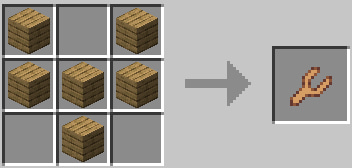
Iron Grabber
- Damage per chest: 5
- Slowness amplifier per chest: 2
- Max slowness amplifier: 3
- Max chests can be grabbed: 1
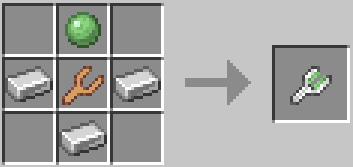
Diamond Grabber
- Damage per chest: 5
- Slowness amplifier per chest: 1
- Max slowness amplifier: 2
- Max chests can be grabbed: 1
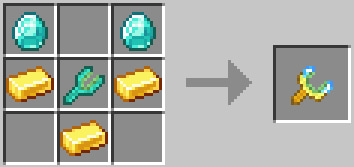
Double Grabber
- Damage per chest: 1
- Slowness amplifier per chest: 1
- Max slowness amplifier: 1
- Max chests can be grabbed: 2