
Compatibility
Minecraft: Java Edition
Platforms
Supported environments


Links
Tags
Creators
Details
探囊取物 / Su's Instant Swap
一键交换手中物品,不再需要打开物品栏拖放,省时省力。
One key, instant item swap. No more opening inventory and dragging items with the mouse.
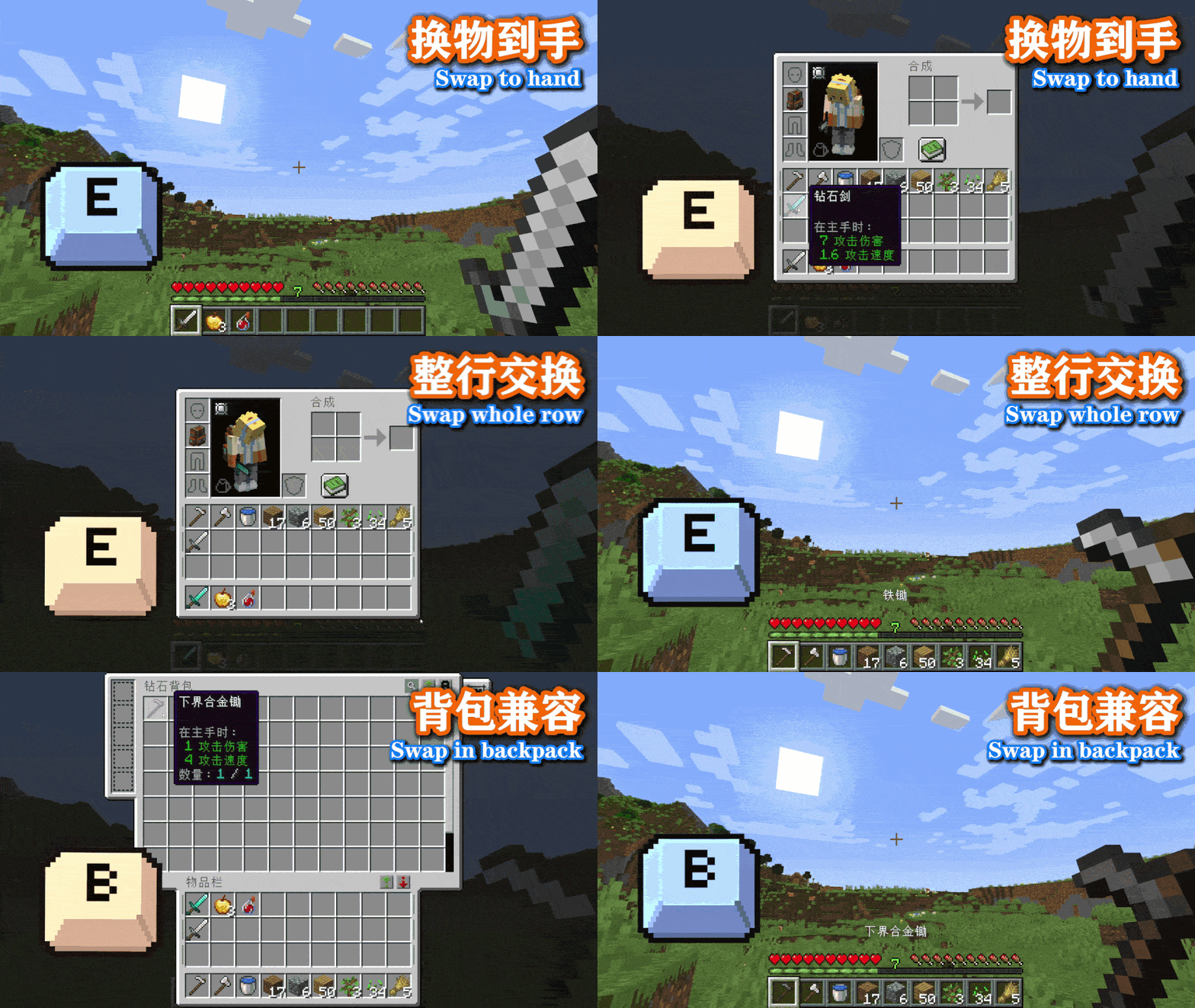
使用方式 / How to use
你可以使用两种方式快速把物品栏中的物品交换到手上,或者直接把一整行物品换到快捷栏中
You can use one of two methods to quickly swap an item from your hotbar/inventory into your hand, or directly swap an entire row of items into your hotbar.
一键交换模式:
Instant swap mode:
-
按住
E键(跟随原版的开关物品栏按键)
Hold theEkey (the vanilla inventory key) -
物品栏界面出现(如此时松开按键,界面将关闭)
The inventory panel appears (if you release the key now, the panel closes) -
鼠标悬停在目标物品,或者目标行边上的绿色标记上
Hover your mouse over the desired item, or the green marker next to the target row -
松开
E键执行交换,物品栏自动关闭
Release theEkey to perform the swap, the panel closes automatically
界面内交换模式:
In‑GUI swap mode:
-
在物品栏或其他存储界面中(理论上兼容其他模组)
In the inventory or other storage GUI (theoretically compatible with other mods) -
鼠标悬停在目标物品,或者目标行边上的绿色标记上
Hover your mouse over the desired item, or the green marker next to the target row -
短按
左Alt键(可自定义)执行交换,物品栏自动关闭
Tap theLeft Altkey (customizable) to perform the swap, the panel closes automatically
背包模组支持 / Backpack Mod Support
此外,从3.0.0版本起,添加了对部分热门背包模组的支持,例如使用精妙背包模组时,长按B键(默认的打开背包按键)也可以在背包UI内进行交换。下面是当前已支持的背包模组:
Additionally, since version 3.0.0, support for some popular backpack mods has been added. For example, when using Sophisticated Backpacks, long-pressing the B key (the default backpack open key) also allows swapping inside the backpack UI. Below is the list of currently supported backpack mods:
- Sophisticated Backpacks
- Traveler's Backpack
- Backpacked
- Inmis
- Simply Backpacks
- Packed Up
- L2 Backpack
- Beans Backpacks
- Resource Backpacks
键位设置 / Keybinding
即时交换键自动绑定为开关物品栏键。
The instant swap key is automatically bound to the vanilla inventory key.
界面内交换键默认为左Alt键,可自行修改。
The in‑GUI swap key defaults to Left Alt and can be changed separately.
配置文件 / Configuration
你可以在游戏内模组配置中修改如下内容(Fabric 版需要 Mod Menu,否则需要自行到 config 文件夹中修改):
You can change the following options in the in‑game mod configuration (Fabric version requires Mod Menu; otherwise edit the config file directly in the config folder):
-
模组开关 – 如果关闭,则模组完全关闭。默认开启。
Mod toggle – If disabled, the whole mod is turned off. Default: ON. -
长按判定阈值 – 用于区分长按和短按,可设定为 50-1000 毫秒。默认 200 毫秒。
Long press threshold – Used to distinguish between long and short presses, adjustable from 50 to 1000 ms. Default: 200 ms. -
交换音效 – 用于开关交换物品的音效。默认开启。
Swap sound – Enable/disable the sound when swapping items. Default: ON. -
鼠标重定位 – 在打开物品栏界面时,鼠标会自动移动到 UI 右下角避免遮挡。我非常希望大家尝试一下这个功能,所以默认开启,如果你不适应的话可以手动关闭。
Mouse reposition – When opening the inventory panel, the mouse automatically moves to the bottom‑right corner to avoid blocking the view. I highly recommend trying this feature, so it is enabled by default; you can turn it off if you are not comfortable with it. -
快捷栏优先 – 开启后,如果你的快捷栏中还有空位,被换下来的物品会优先放入快捷栏,对于建筑等需要反复使用不同方块的场景有些帮助。我很希望大家尝试这个功能,但是可能会造成一些反直觉的误解,所以默认关闭。
Hotbar priority – When enabled, if you have empty slots in your hotbar, the swapped‑out item will be placed into the hotbar first. This can be helpful for building or other scenarios where you frequently switch between different blocks. I highly encourage trying it out, but it may cause some counter‑intuitive confusion, so it is disabled by default. -
界面内交换 – 如果关闭,则无法在物品栏界面内按键交换物品。默认关闭(防止误触)。
Swap inside GUI – If disabled, you cannot swap by pressing the key while the inventory panel is open. Default: OFF (prevents accidental swaps). -
空位交换 – 开启后,允许和空位进行交换。默认关闭。
Swap with empty slots – When enabled, allows swapping with empty slots. Default: OFF. -
整行交换 – 关闭后将禁用整行交换的UI和功能。默认开启。
Row swap – If disabled, the row swap UI and functionality are turned off. Default: ON. -
交换失败通知 – 开启时,会在交换失败时显示提示文字。默认开启。
Swap failure notification – When enabled, shows a message when a swap fails. Default: ON. -
调试日志 – 开启后将在游戏日志文件中生成调试信息,如果使用模组时遇到问题,可以打开这个选项,并将游戏的
latest.log提供给模组作者。默认关闭。
Debug logging – When enabled, generates debug information in the game log file. If you encounter issues with the mod, turn this on and provide thelatest.logfile to the mod author. Default: OFF.
其他说明 / Additional Info
-
非常推荐和 InvMove 一起使用,打开物品栏将不会影响你的行走,体验更丝滑。
Highly recommended to use together with InvMove – opening the inventory will not affect your movement, for a smoother experience. -
模组为纯客户端,可在未安装该模组的服务器上使用,但请务必与服主确认,自行承担反作弊风险。
Pure client‑side mod – works on servers without the mod, but always check with your server admin. Use at your own risk regarding anti‑cheat. -
模组完全由 AI 开发,如果遇到 BUG,请到 GitHub 提交问题。
Developed entirely by AI. Please report bugs on GitHub. -
开源协议:LGPL 3.0
License: LGPL 3.0