
Compatibility
Minecraft: Java Edition
Platforms
Supported environments


Links
Tags
Creators
Details
Badge It !
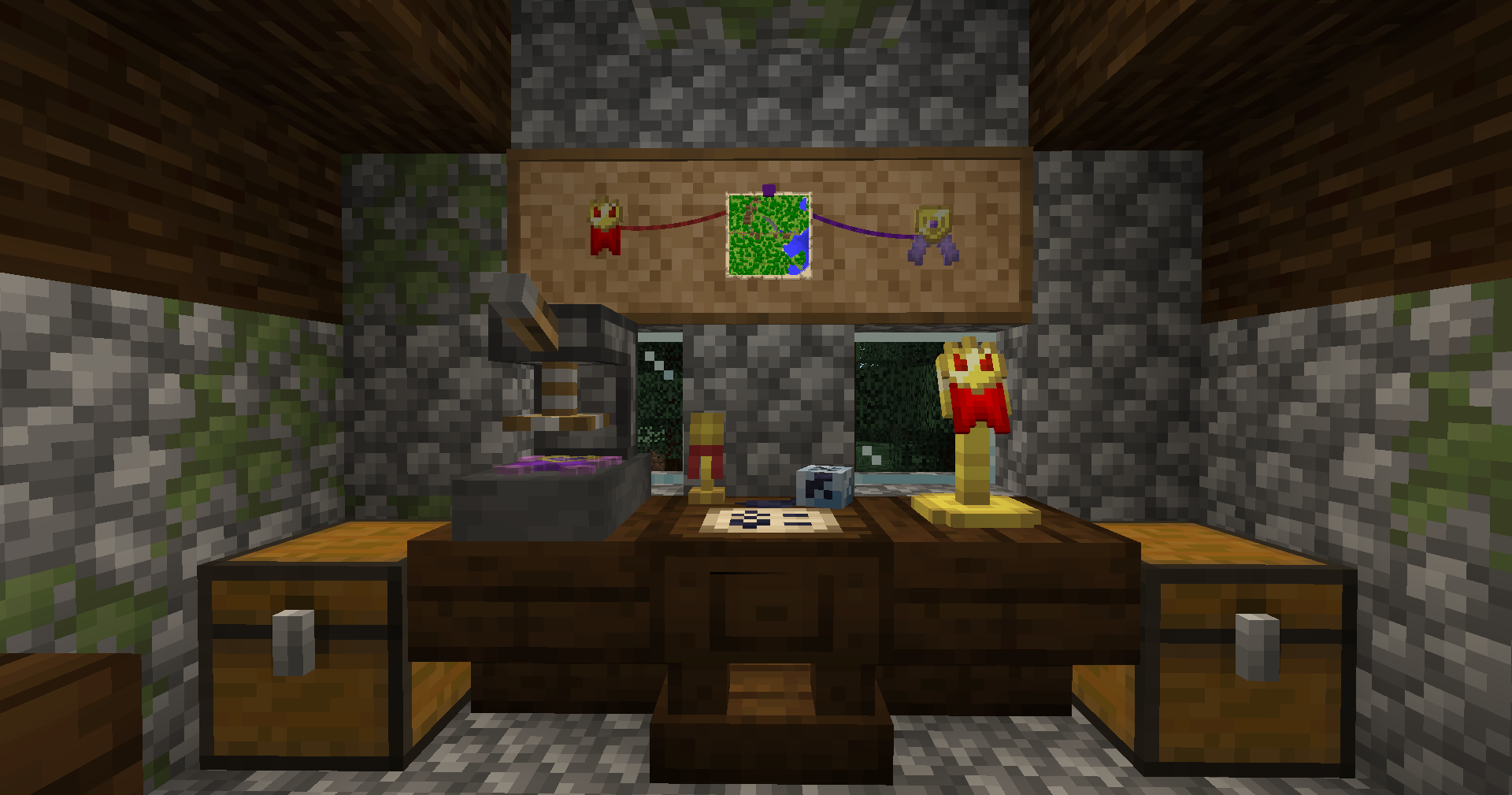
Badge It ! is a vanilla-friendly minecraft mod that allows player to craft custom badges to use as wearable, decoration, or barter currency !
What is a badge ?
Badge are mainly-decorative item that are a combination of different badge parts put together. You can rename them at an anvil, display them in item frame, fill your chest full of them if you're this kind of person, or simply just show them to your friends.
Each badge has unique internal ID that allows server owners to check the dtails of every created badge on their server. Each badge also have a Creator (= the player who crafted it) and a Designer (= the player that made the design of the badge) to make sure nobody can make counterfeits of your badges !
How to make badges ?
Because having to craft every part individually and the combine them would be a chore (and an honest waste of crafting recipes), badges have an unique two-step crafting method, that is heavily inspired by minecraft vanilla banners.
First step : The Design Table
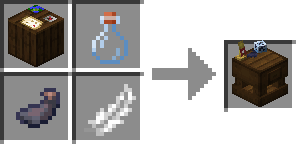
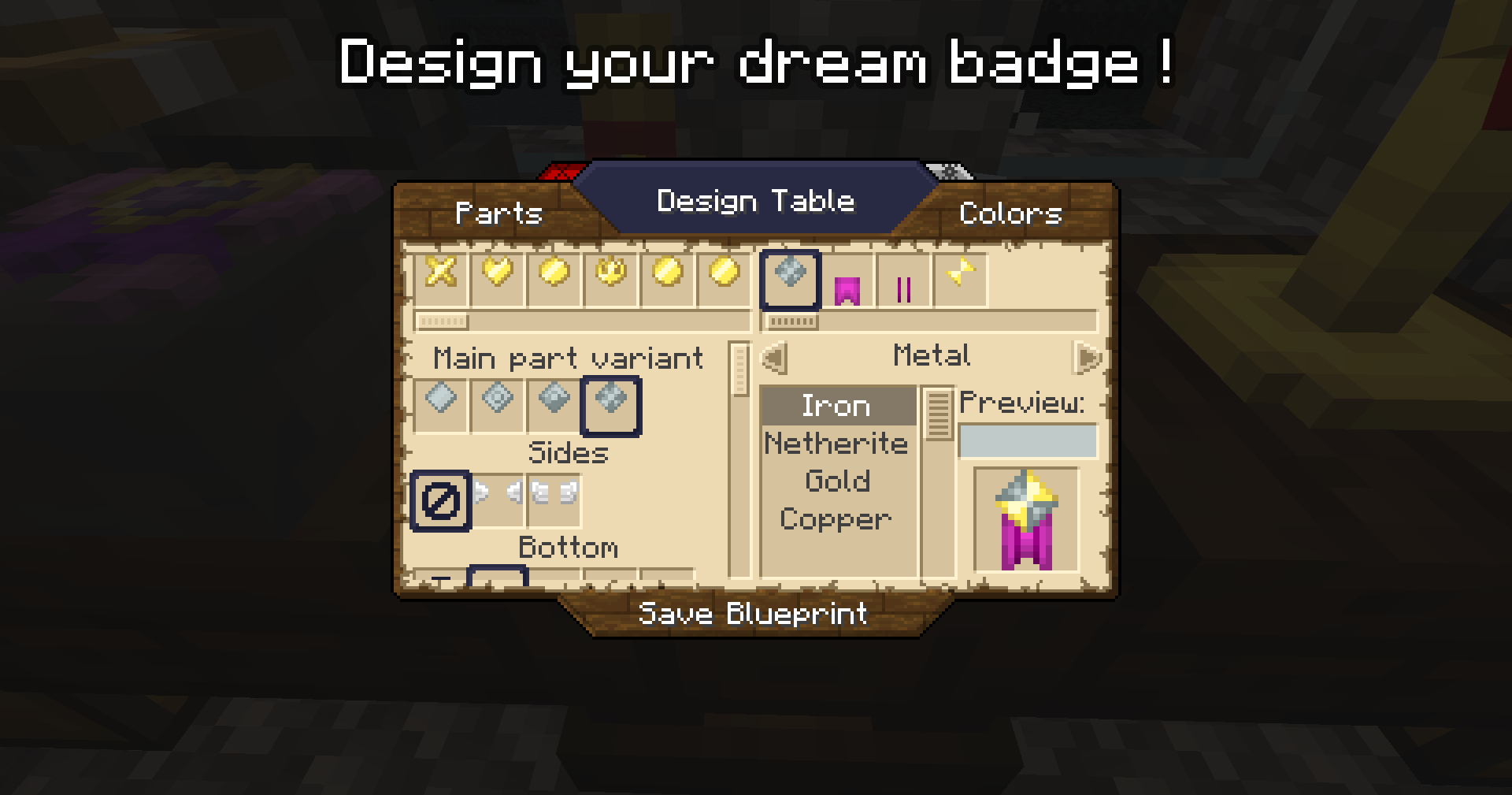
By right-clicking a Design Table with a piece of paper, an users can design their own badge ! Pick out the parts options on the left side of the screen, and tweak their colors on the right side. Once your design is finished, click and hold the "save blueprint" button, and your paper will turn into a badge blueprint !
Second step : Badge Forge
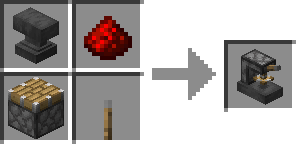
Inputing the blueprint into the badge forge will display the list of required ingredients to craft one unit of the badge. Simply fill the slots with the required quantity and you'll be able to craft the badge ! The Forge has an inventory, meaning you can leave the blueprint and some of the materials there while you look around your stash of unorganized chests to find the required materials; but note that you cannot take the blueprint out while materials are present inside the forge. On top of that, if you use a hooper on top of the forge, you can feed ingredients to the forge. please note however that the forge will try its best to fill the required quantity to build one badge at a time, in a round-robin mode, instead of dumping a stack of a single material into the forge.
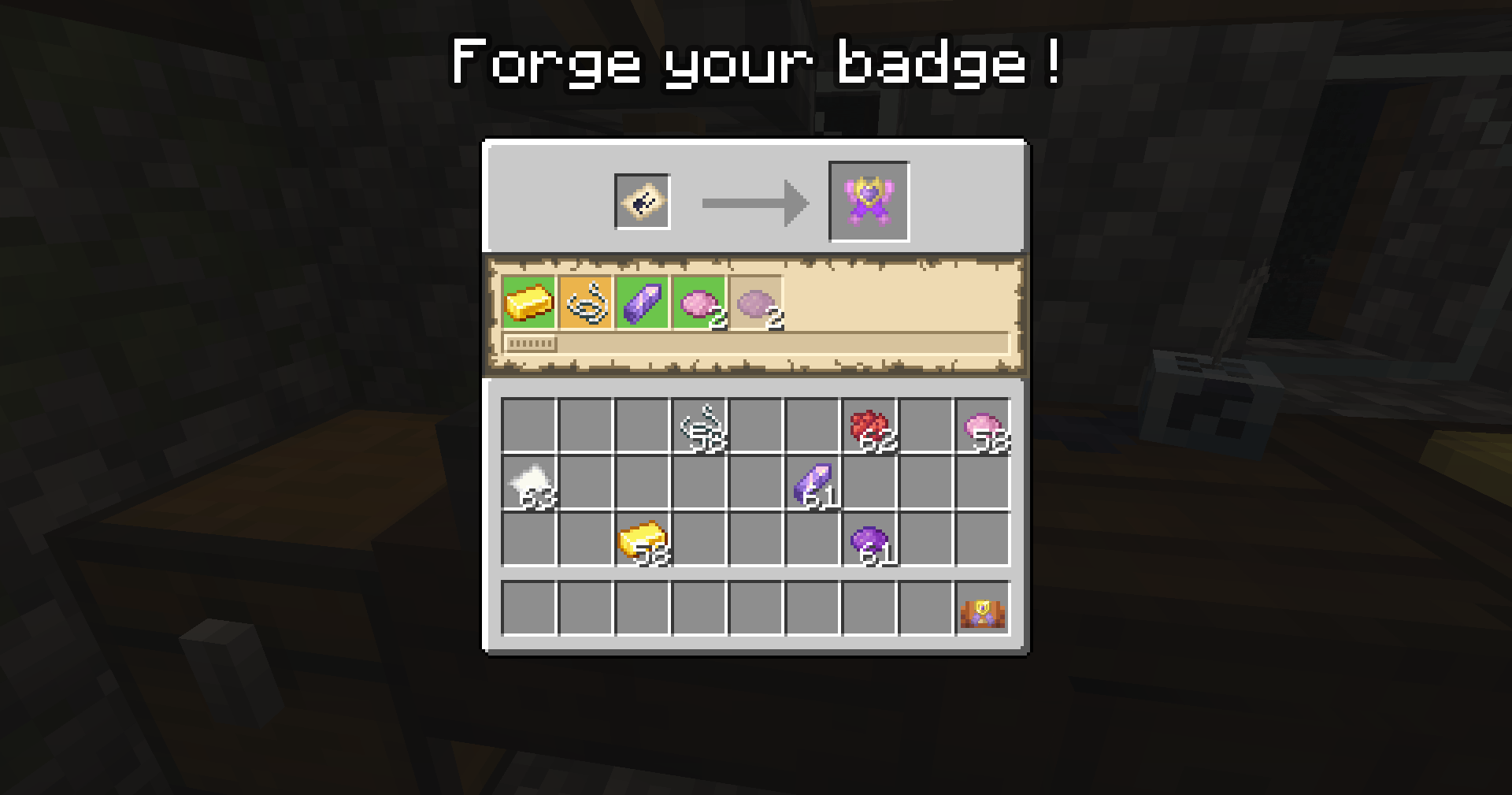
Small note on blueprints : Blueprints have their designer name on them, and only the original creator can edit their blueprint ! However, anyone can create badges in the forge using any blyeprint ; but the badge will still display the designer name alongside the creator's. Designer can edit their blueprints by right-clicking the Design Table whild holding said blueprint anytimle they want as long as no badge has already been created with that design yet.
Where do you use Badges ?
Badges can be used in a lot of different ways ! On top of the vanilla uses (item frames) and basic multiplayer uses (trading, selling), the mod add a few ways to uses your badges !
Accesories Slot
The main use for a badge is... to wear it! IF you have the accesories mod installed, a new dedicated "badge" slot will be added, where you can put you badge on your chest. Proudly show your favorite badge to everyone !
The Cork Issue
As per wikipedia* says : "Cork is a natural material used by humans for over 5,000 years. It is a material whose applications have been known since antiquity, especially in floating devices and as stoppers for beverages, but is maily known today for being the material you put bagde and pins into"
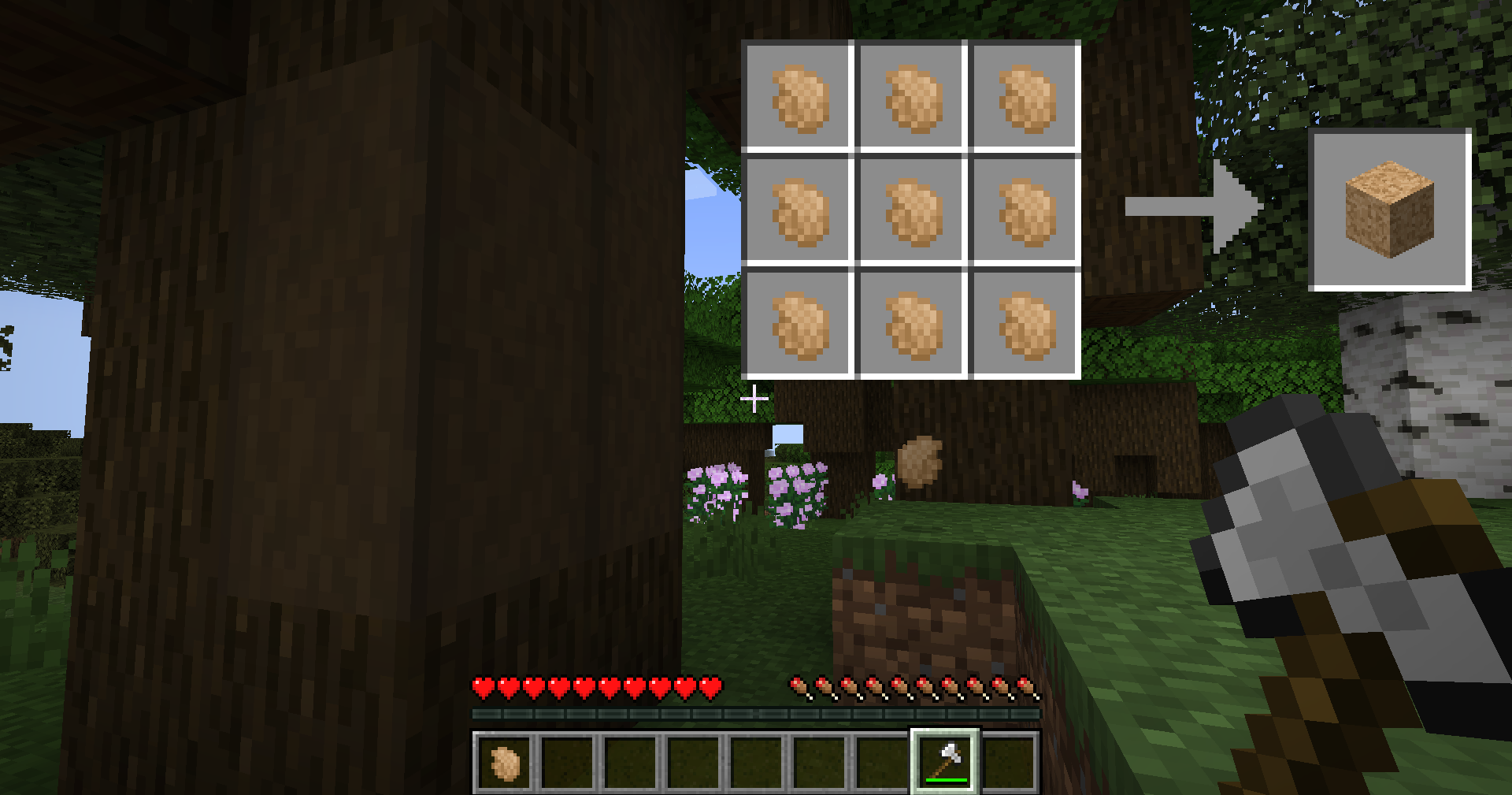
In order to craft most if not all of the following badge-related blocks and items, you need cork. Cork fragments can be harvested by stripping Dark Oak; stripping a whole three should give you around 9 fragments. With said 9 fragments, you can craft a cork block. Cork block are by themselves pretty useless, but can become quite usefull when used to craft others things.
Badge Bag
I've personally already tried to wear multiple badges on my chest. It was heavy and almost tore down my shirt. Therefore, I had to invent something : a bag where I can put a lot of badges inside !
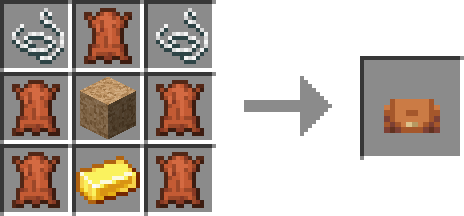
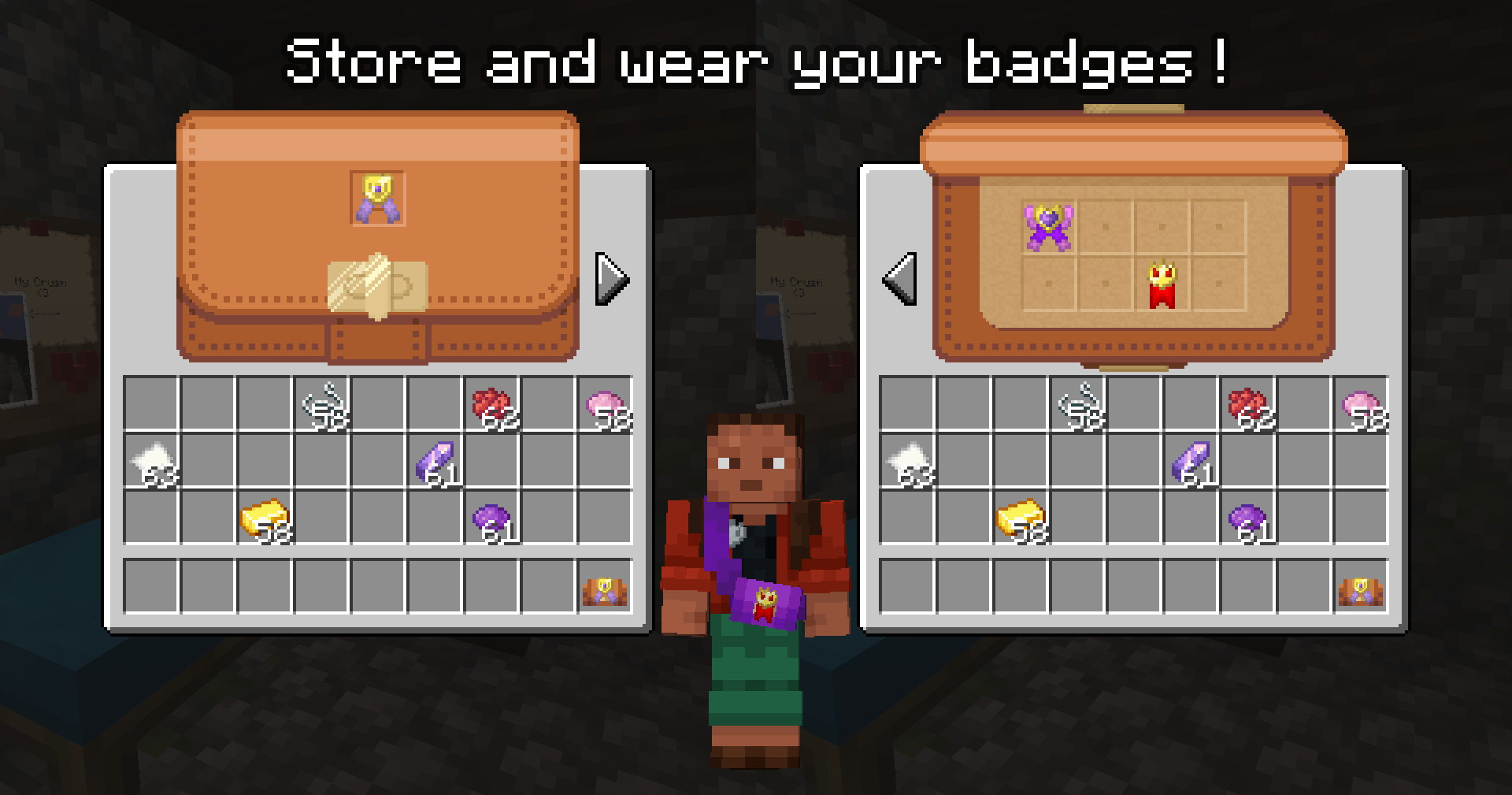
By using 5 leather, one gold ingot, two string and one cork block, you can make a badge bag ! By default, you can only put 8+1 badges in it : 8 bagdes on a page, and one extra slot to display the badge on top of the bag ! On top of that, you can customize your bag further : put the bag along any of the vanilla dye to get a dyed bag; and by putting your bag next to a cork block, you can add a new 8-space page to your bag ! You can also wash away dye from a pin bag by right-clicking it with a filled cauldron.
If Accesories is installed, you can also wear the bag in the necklace slot* to display it on yourself ! It will display correctly under any skin AND when wearing an armor too, but modded armor with custom models might interfere with it.
Badge Stand
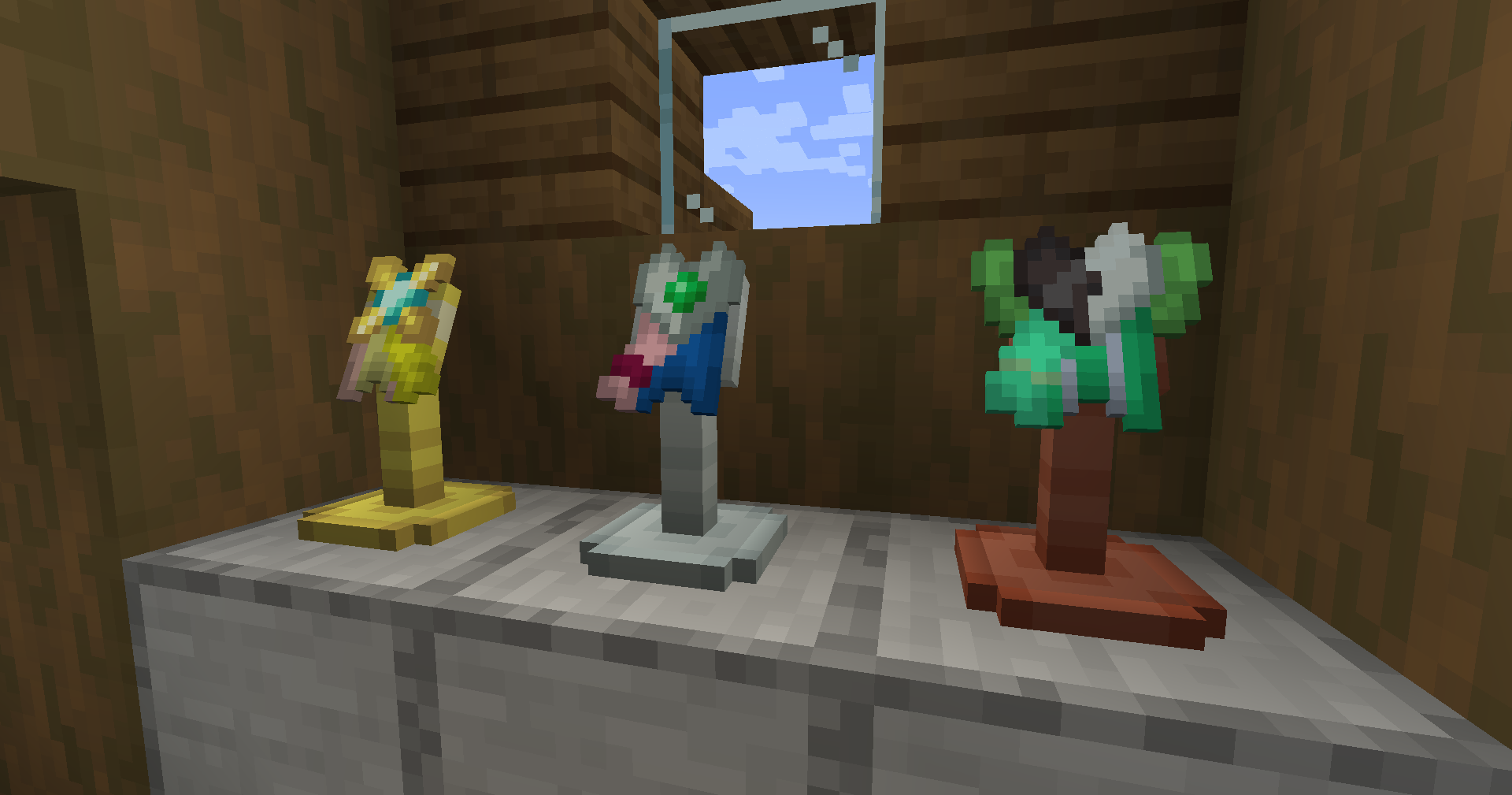
Perhaps you want to display your favorite badge next to your bed, or perhaps you want to open a badge shop and have a very cool looking display. Both have the same answer : badge stands !
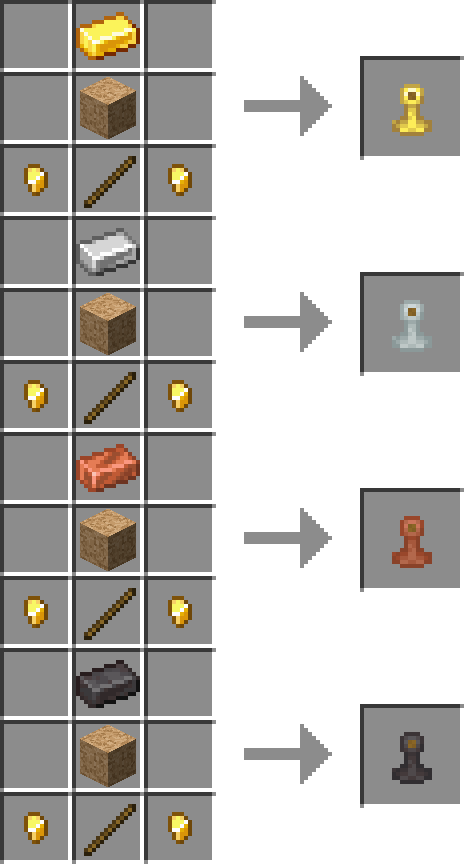
This time around, no need for some sort of ancient arrow, you can get your own stand using a cork block, an ingot of one of four metal option, a stick and two gold nugget. Each variant has its own behaviour :
- Gold Ingot : Badge can be slotted it by right-clicking, but cannot be removed by right clicking (breaking the block is mandatory).
- Iron Ingot : Badge can be slotted it by right-clicking, and can be re-obtained again hby right-clicking it again.
- Copper Ingot : badge can be slotted in and out, and a full strenght redstone current is outputted on the block under the stand every time a badge in slotted in/out, and whenever a badge is currently slotted, it will output a predetermined random current comprised between 1 and 14, whose value is determined via the badge's design ID (so two identical badges will always have the same value, but two different badge have a 1/14 chance of having the same value too, ideal for some puzzles !)
- Netherite Ingot : Badge can be slotted in but not out. If a player right-click the stand, and the player owns the same badge (inventory/accesory slot/bag currently in the inventory), a redstone current is outputed on the block where the stand is placed. Great for secret passages !
Corkboard
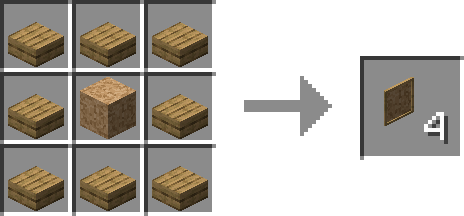
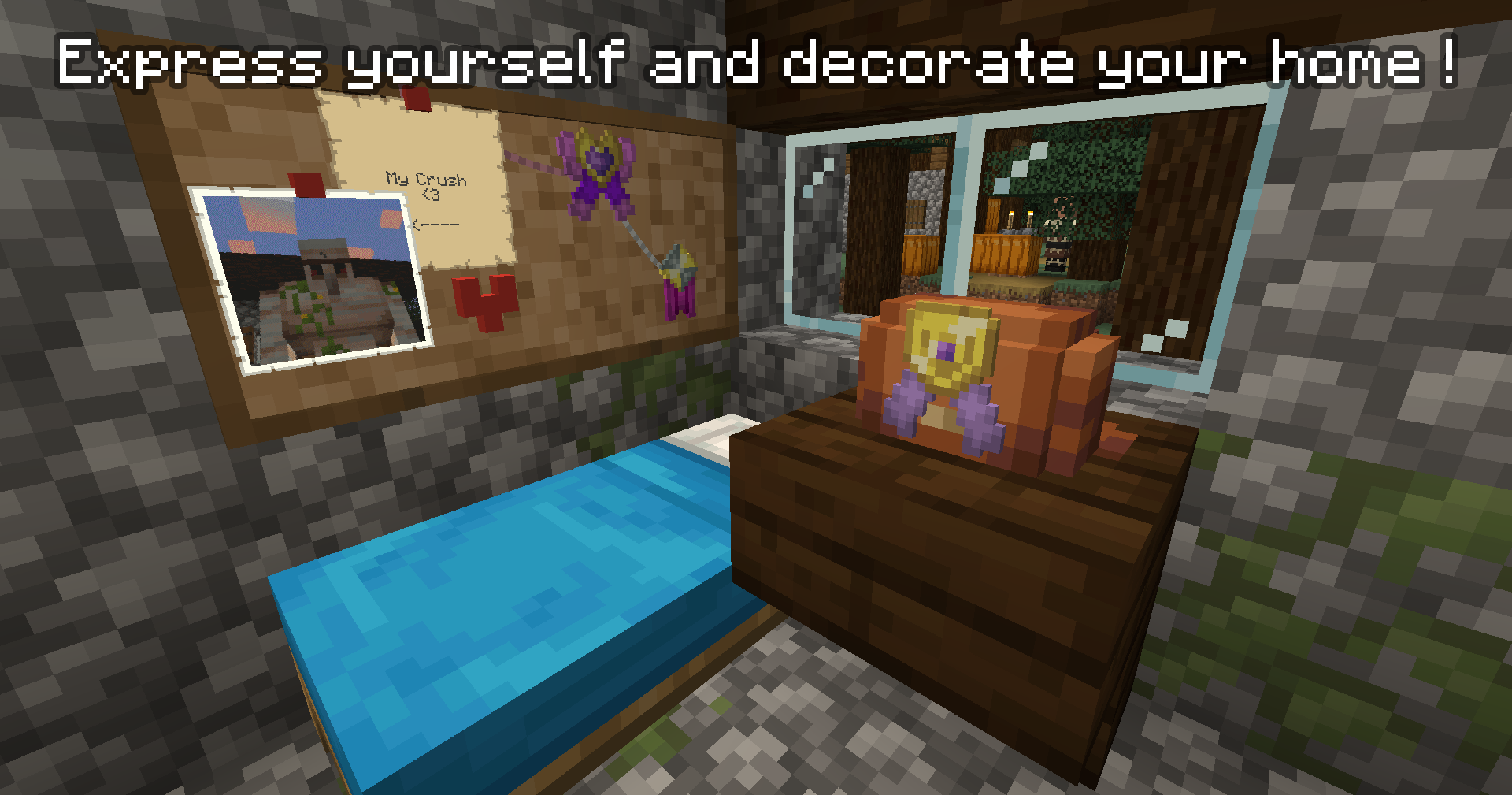
What's the best way to display your pin than a corkboard ? Using a block of cork and 8 slabs of a specific wood type (no mix and match !), you can craft a corkboards ! Place it on any wall, and place several of them next to each other to create an even bigger corkboard, that can scale up to infinity ! To place something on the corkboard, right-click the board with your badge; and right-click it with an empty hand to get it back.
You can also use a piece of string to "link" two items : holding a piece of string, right click any element placed on the board (the string will be show between the board and your hand, like a lead), and right click another element to definitively place it down; you can now make your corkboard looks like thoses detective movies where they piece together the truth ! The string will drop if any of the two element get removed, but you can also cut the string with shears (but you won't get it back that way...). string can be dyed by right-clicking them with any dye.
On top of that, right-clicking any element of the board (badge, string) with a glowing ink sack, you can make that element emissive (similar to how glow frames works).
But only being able to place badges on a corkboard kind of sounds lame, right ? What would be a corkboard with only pinned badges ?
Introducing : Drawing Pins !
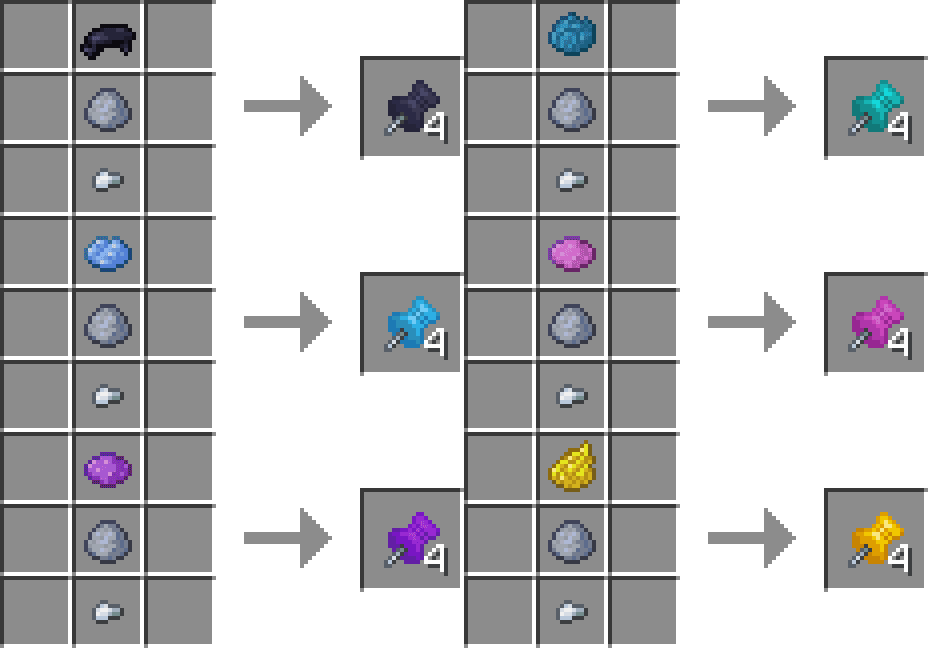
Drawing pin can be placed on corkboards the same way you place badges, with a simple right click; but they allow a few more tricks :
- Right-clicking the pin with a map will place the map on the board; right click it to remove it from the pin.
- Right-clicking the pin with a piece of paper will display said paper. Right-click the paper will open a GUI that let you write on this piece of paper ! Removing the paper makes you loose the text on it (similar to how signs behave). Shift-right-click it to removes it from the pin.
Drawing Pins and what's attached to them behave like other corkboard elements : you can tie a string to the pin, and you can also use glow ink to make either the pin or the pinned item emissive. Right-clicking the pin removes it and everything attached to it (string, map, paper, etc).
For the technical folks out there : corkboards are block with blockentities, not actual entities; so they looks more like a chest or an enchanting table rather than an item frame; meaning they should have less lag than
Badge Checker
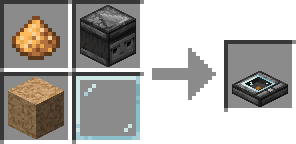
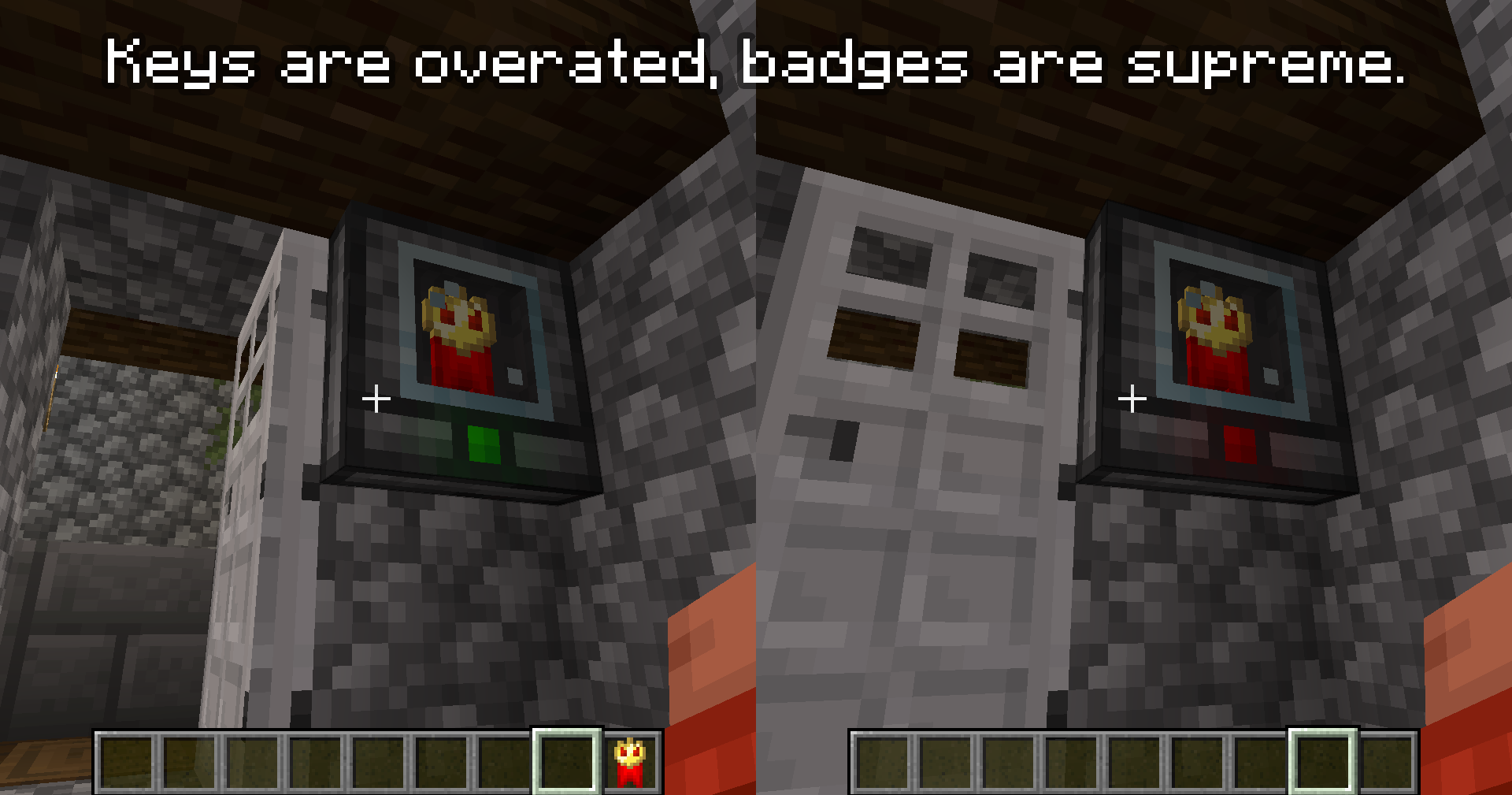
Badge Checker acts like an hybrid between a button and an Magnetic card reader: place it on any surface (wall, floor, ceiling), and it's now yours: only you and creative mode player can remove it. Shift-right-click it with any badge, and that badge will be slotted inside the block. From now on, any time a player right-click the block, a check will be made: if the player own a copy of the same badge (in its hand, inventory, accesories slot, or inside a bag he's wearing), the light turns green, and the checker emits redstone. If you don't have it however, something terrible happen... The light turns red and nothing happen. Shocking.
Use the badge checker to restring to entry to you super duper secret book club, or simply lock your door.
Why Badges ?
It's a mix of two things :
- First of all, I needed a break on my Cobblemon sidemod, and discord user @blueman444444 suggested a way for player to create custom gym badges for cobblemon. This idea stuck with me, and without relizing it, I had realized a hundread swappables parts and drafted GUIs designs. I asked their permission to create a mod based on their idea, and this is what it is.
- I'm unfortunatly a huge collector of enamel pins, and fan of licences such as The World Ends With You, and I always wished some mod would includes collectibles like that for their modpack. So far, I feel like the only kind of mod that fits this niche are the countless Pokemon TCG mods... which unfortunately always has to have scalper-related gimmick in them. With that in mind, I decided that instead of making yet another cobblemon addon, I went the vanilla-friendly route, so it can be used in a lot cottage-core, vanilla-like adventures and modpacks, rather than being limited to cobblemon packs.
When Badges ?
Now !
Other Informations
Mod compatibility
Badge-IT contains native compatibility with several mods :
- Biomes O'Plenty, Oh The Biomes We've Gone, Cobblemon & Cobblesafari : corkboard can be made using any type of wood from thoses mod, natively and without any extra work !
- Every Compat (Wood Good) : using this mod, you cna make corkboard using any kind of wood planks slab from any mod ! This also deactivate the hand-made comapt from the mod to replaced them with the Every Compat authored variants, meaning migration will cause issues.
- Exposure : pictures taken (not picture stacks) can be placed on corkbaords using drawing pins, similar to maps and paper.
- Accessories : a specific accesories slot let you equip badges directly on yourself, and badge bag can reuse the existing "necklace" slot (it"s a cross body bag after all)
Datapack Compatibility
In the download tab, you can find a "sample_pack.zip" file. This is a sample datapack that contain a readme file explaining everything you need to do, including examples for all of the mod's datapacked features. Feel free to contact me on discord if you need any help making your own !
*the actual quote from wikipedia might have been altered.